






















TL;DR:
- eSIM technology allows travelers to download digital data plans before their trips, significantly reducing roaming costs. It offers greater flexibility by supporting multiple profiles, easy online activation, and eliminating physical SIM swaps; savings can reach up to 95% compared to carrier roaming fees. Compatibility depends on device support and unlock status, so travelers should verify their phones and choose plans tailored to their specific data and coverage needs.
You open your phone after landing in a new country, and within minutes your carrier sends a text: “Welcome! Data roaming is now active at $15 per day.” That single message can add hundreds of dollars to a two-week trip. eSIM technology changes that equation entirely. Instead of paying carrier roaming rates or hunting for a local SIM card at the airport, you download a digital plan before you even board the plane. This guide covers how to verify your device, choose the right plan, activate it correctly, and avoid the mistakes that cost travelers time and money.
Table of Contents
- Why eSIM is a game changer for travelers
- Check if your phone supports eSIM and what you need
- How to choose the best eSIM for your travel needs
- Installing, activating, and troubleshooting your eSIM
- Pro tips to maximize your eSIM value while abroad
- A fresh perspective: Why perfectly matching your travel habits with eSIM options beats chasing “unlimited” deals
- Ready to travel smarter? Get started with global eSIM options
- Frequently asked questions
Key Takeaways
| Point | Details |
|---|---|
| Huge roaming savings | Travel eSIMs typically reduce roaming charges by 70–95% with cost-effective prepaid plans. |
| Device compatibility matters | Not all phones support eSIM—check your model and ensure your device is unlocked before buying. |
| Data usage is key | Estimate your data needs and avoid overpaying for unlimited plans if you won’t use them. |
| Plan features vary | Always review if the eSIM plan supports hotspot, calls, and multi-country travel before purchase. |
| Install before departure | Activate your eSIM while you still have reliable Wi-Fi at home to avoid travel stress. |
Why eSIM is a game changer for travelers
Traditional roaming fees have always been one of the most frustrating parts of international travel. Most major carriers charge between $10 and $15 per day for international data access, and those charges stack up fast. A two-week trip through Europe on a standard roaming plan can easily cost $200 or more just for data, before you factor in calls or texts. Many travelers have returned home to bill shock that ruined the memory of an otherwise great trip.
eSIM works differently. Instead of a physical card that you insert into your phone, an eSIM is a digital profile downloaded directly onto your device. You purchase a plan online, receive a QR code or activation code, and install the profile in minutes. No store visits, no SIM ejector tools, no waiting in airport lines. The eSIM transformation in the travel industry has been significant, with more travelers switching every year as device support expands.
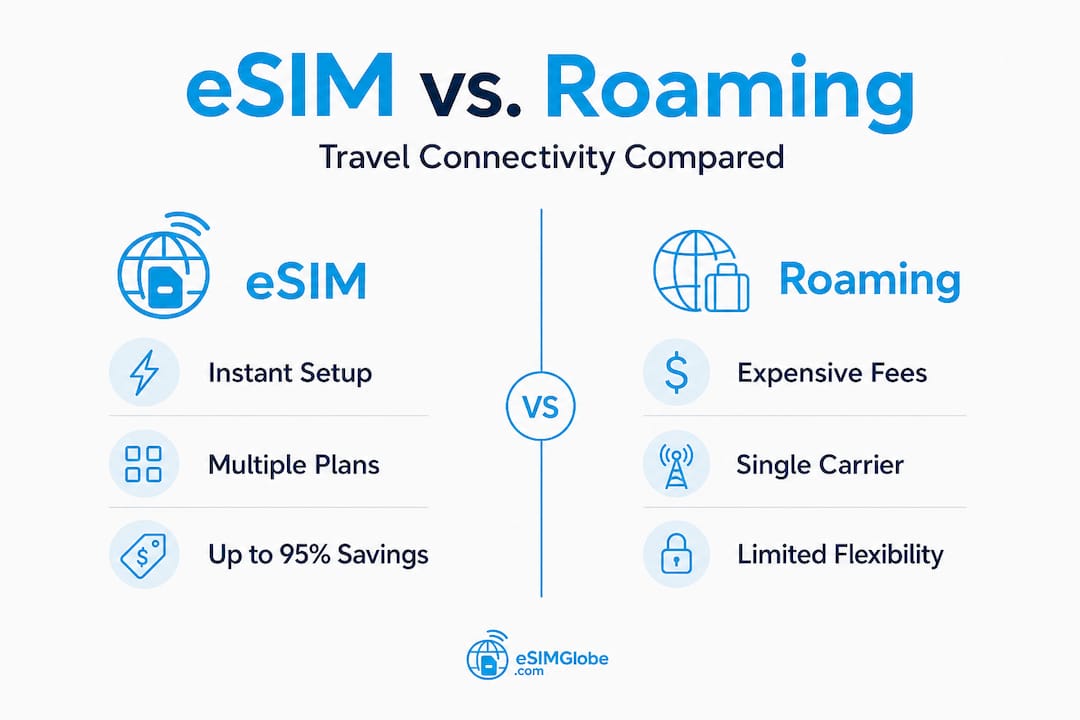
The cost difference is substantial. eSIMs can save travelers between 70% and 95% compared to standard roaming fees. To put that in concrete terms: a 7-day trip through Europe might cost $84 with standard carrier roaming, or just $22 with a regional eSIM plan. That is not a marginal difference. It is the kind of saving that pays for an extra night at a hotel or several good meals.
Beyond cost, eSIM offers flexibility that physical SIM cards cannot match. You can hold multiple eSIM profiles on one device and switch between them depending on your location. Traveling from Germany to Japan to Mexico in a single month? You can pre-load plans for each destination and activate them as needed. The eSIM vs SIM guide breaks down exactly how these two options compare across cost, convenience, and coverage scenarios.
Here is a quick comparison of typical costs across connection options:
| Connection type | 7-day Europe cost | Setup required | Flexibility |
|---|---|---|---|
| Carrier roaming | $84+ | None | Low |
| Local SIM card | $15 to $30 | In-store visit | Medium |
| Travel eSIM | $12 to $22 | Online, minutes | High |
Key advantages of eSIM for international travelers:
- No physical SIM swap required
- Plans available for single countries, regions, or global coverage
- Purchase and activate from anywhere with internet access
- Keep your home number active on the same device
- Environmentally friendlier with no plastic card waste
Check if your phone supports eSIM and what you need
To make eSIM work, your device needs to meet a few key requirements. Not every phone supports eSIM, and even among compatible devices, some are locked to a single carrier, which blocks eSIM activation for other providers.
Most iPhones since XS and Android phones from the past three years support eSIM. On the iPhone side, that includes the XS, XR, and all models released after them. Samsung Galaxy S21 and later models support eSIM, as do Google Pixel 3 and newer devices. Many mid-range Android phones from 2023 onward also include eSIM support, though it varies by manufacturer and region.
The fastest way to check eSIM compatibility on any phone is to dial *#06#. If your device supports eSIM, you will see an EID (Embedded Identity Document) number in the results. That number is your device’s unique eSIM identifier. No EID means no eSIM support. On an iPhone, you can also go to Settings, then General, then About, and scroll down to find the EID field.
eSIMs require an unlocked phone, and activation can be different from physical SIMs. A locked phone is tied to one carrier and will reject eSIM profiles from other providers. If you bought your phone outright or have completed your carrier contract, it is likely already unlocked. If you are unsure, contact your carrier directly and request an unlock before your trip.
Here is a summary of compatible devices by category:
| Device category | Compatible models | Check method |
|---|---|---|
| iPhone | XS and later | Settings > General > About > EID |
| Samsung Galaxy | S21 and later | Dial *#06# |
| Google Pixel | Pixel 3 and later | Dial *#06# |
| Other Android | Varies by model | Dial *#06# |
Before purchasing an eSIM plan, gather the following:
- Confirmed EID number from your device
- Stable internet connection for QR code scanning or manual entry
- Valid payment method (credit card or digital wallet)
- Email address to receive activation codes
- Your destination country or region confirmed
Pro Tip: Check eSIM compatibility and unlock status at least one week before your trip. Carrier unlock requests can take several business days to process, and you do not want to be troubleshooting this at the departure gate.
The essential eSIM facts page covers additional device-specific details worth reviewing before you commit to a purchase, especially if you are using a less common Android device.
How to choose the best eSIM for your travel needs
Once you are set on eligibility, it is time to navigate the eSIM marketplace and match your needs to the right plan. The options can feel overwhelming, but a structured approach makes the decision straightforward.
The best eSIM plan depends on where you are going, your data needs (fixed GB or unlimited with fair usage), and whether you need hotspot/tethering or calls/SMS. Those three factors alone will narrow your choices significantly.
Follow these steps to find the right plan:
- Identify your destination. Single-country plans are usually cheaper for one-destination trips. Multi-country or regional plans work better for travelers crossing borders frequently.
- Estimate your daily data use. Light users (maps, messaging, occasional browsing) typically use 500MB to 1GB per day. Heavy users (video calls, streaming, remote work) may need 3GB to 5GB daily.
- Decide if you need voice calls or SMS. Most travel eSIMs are data-only. If you need to make local calls or receive texts, confirm the plan includes those features.
- Compare prices across providers. For the same destination and data amount, prices can vary by 40% or more between providers. Always compare at least three options.
- Read the fine print on unlimited plans. Many unlimited plans throttle speeds after 1GB to 3GB of daily use. What looks like unlimited may perform like a capped plan after a few hours of video streaming.
The best international eSIM types article organizes plans by traveler profile, which is a useful starting point if you are not sure which category fits your trip.
“Unlimited” on a travel eSIM does not always mean what you expect. Read the fair-use policy carefully. Speed throttling after a daily threshold is standard practice among most providers, and it can reduce your connection from fast 4G LTE to barely functional 2G speeds.
Additional features worth checking before you buy:
- Hotspot and tethering support. Not all plans allow you to share your connection with a laptop or tablet. Digital nomads working remotely need to confirm this feature is included.
- Activation window. Some plans start counting days from the moment you activate, others from first use. A plan that activates immediately can waste days if you install it too early.
- Top-up options. If you run out of data mid-trip, can you add more without buying a completely new plan?
- Customer support availability. 24/7 support matters when you are in a different time zone and your connection drops unexpectedly.
The eSIM travel tips guide provides additional guidance on reading plan details and avoiding the most common purchase mistakes.
Pro Tip: For trips longer than 10 days, calculate the total cost of a fixed-data plan versus an unlimited plan with throttling. In many cases, a 15GB or 20GB fixed plan costs less and delivers consistent speeds throughout your trip.
Installing, activating, and troubleshooting your eSIM
With the perfect plan selected, it is time to activate and manage your eSIM on your device. The process is straightforward when you follow the steps in order, but skipping steps is where most problems begin.
eSIM activation can require scanning a QR code or entering a code manually, and deactivation/reactivation is often more involved than with a traditional SIM. Most providers deliver your activation QR code by email within minutes of purchase.
Standard eSIM installation steps:
- Complete your purchase and wait for the confirmation email with your QR code or activation code.
- Open your device settings. On iPhone: Settings > Cellular > Add eSIM. On Android: Settings > Connections > SIM Manager > Add eSIM.
- Scan the QR code using your device camera when prompted, or enter the activation code manually if a QR code is not available.
- Label your eSIM clearly (for example, “Europe Trip 2026”) so you can identify it easily in your settings.
- Set the new eSIM as your primary data line in your cellular settings. Keep your home SIM active for calls and texts if needed.
- Test connectivity by loading a webpage or using a speed test app before you need the connection urgently.
Common issues and how to resolve them:
- Activation delay. Some profiles take up to 30 minutes to activate after scanning. Wait and restart your device before assuming something is wrong.
- QR code scan failure. Ensure good lighting and hold the camera steady. If scanning fails repeatedly, request the manual activation code from your provider.
- No signal after activation. Go to Settings > Cellular > select your eSIM > Network Selection, and switch from automatic to manual. Choose the available network in your destination country.
- Profile mismatch error. This usually means your device is still locked to your home carrier. Contact your carrier to confirm the unlock was processed.
Do not delete your eSIM profile unless you are completely certain you no longer need it. Many providers issue single-use QR codes, meaning once deleted, the profile cannot be reinstalled without purchasing a new plan.
The eSIM travel practices page covers additional installation scenarios and device-specific instructions. For definitions of technical terms like APN, ICCID, or SM-DP+ that appear during setup, the eSIM terms explained guide is a useful reference.
Pro Tip: Install and activate your eSIM while you still have a reliable Wi-Fi connection at home. Trying to activate a new eSIM at an airport or hotel with weak Wi-Fi adds unnecessary stress and potential errors.
Pro tips to maximize your eSIM value while abroad
Staying connected is not just about installing an eSIM. Travel-smart habits keep your costs low and your service reliable throughout the trip.
Matching your actual data pattern and verifying roaming/extras is essential for maximizing eSIM savings. Most travelers overestimate how much data they need, but digital nomads often underestimate it. Knowing your actual usage before you travel makes a real difference.
Practical steps to get the most from your eSIM:
- Monitor daily data consumption. Both iPhone and Android have built-in data usage trackers. Check them each evening and adjust your behavior if you are approaching plan limits or throttling thresholds.
- Download offline content before departure. Google Maps offline areas, Spotify playlists, and Netflix downloads all reduce your data needs significantly while traveling.
- Screenshot your QR code and activation details. Store them in your photos app and a cloud backup. If you lose your email access, you still have the information needed to reinstall.
- Use Wi-Fi whenever it is available and secure. Cafes, hotels, and coworking spaces with reliable Wi-Fi are opportunities to save your eSIM data for when you actually need it on the go.
- Check multi-country coverage before crossing borders. Some regional plans cover 30 or more countries but exclude specific destinations. Verify your next country is on the coverage list before you arrive.
- Turn off background app refresh for data-heavy apps like social media and cloud storage. These apps consume data silently and can drain your allowance faster than active browsing.
The eSIM market trends page shows how provider competition is driving better coverage and lower prices, which means checking for updated plans before each trip is worth a few minutes of your time. The global eSIM guide provides a destination-by-destination breakdown of coverage quality and recommended plan types for 2026.
Pro Tip: If you travel across multiple regions in a single trip, a global plan may cost more per GB than regional plans but saves you the time and risk of managing multiple activations. Calculate both options before committing.
One often-overlooked strategy: keep a small amount of data in reserve for the final day of your trip. Airport navigation, ride-sharing apps, and last-minute booking changes all require connectivity at exactly the moment your plan might expire.
A fresh perspective: Why perfectly matching your travel habits with eSIM options beats chasing “unlimited” deals
Most eSIM guides focus on finding the cheapest unlimited plan. That framing leads a lot of travelers toward plans that look great on paper and underperform in practice.
Unlimited plans often have fair-use limits, with speeds slowing after heavy use. The threshold is usually 1GB to 3GB per day. For a traveler doing light browsing, that is fine. For a digital nomad running video calls and uploading files, hitting that limit by noon is a real problem. The connection does not stop, but it slows to the point where basic tasks become frustrating.
The better question is not “which plan has the most data?” but “which plan matches how I actually use my phone?” A traveler who uses 800MB per day on a 10-day trip needs 8GB total. A fixed 10GB plan at a lower price point will outperform an unlimited plan with throttling at every level: price, speed consistency, and reliability.
Digital nomads face a different calculation. Remote work requires stable upload speeds, not just download speeds. Many eSIM plans advertise download speeds but do not specify upload performance. Hotspot/tethering capability is also non-negotiable for anyone connecting a laptop. These are the details that matter more than headline data limits.
Coverage quality is another area where marketing language diverges from reality. A plan that claims coverage in 50 countries may rely on 2G networks in several of them. For a traveler who only visits major cities in Western Europe, that is irrelevant. For someone heading to Southeast Asia or Central America, network generation matters significantly for usable speeds.
The eSIM basics guide provides a grounded starting point for understanding what the technology actually delivers versus what providers market. Reading it alongside any plan comparison helps cut through the noise.
The travelers who get the best results from eSIM are not the ones who find the cheapest unlimited deal. They are the ones who spend 15 minutes honestly assessing their usage, confirm the specific features they need (hotspot, voice, SMS), verify coverage in their exact destinations, and then match those requirements to available plans. That process consistently produces better outcomes than chasing marketing buzzwords.
Ready to travel smarter? Get started with global eSIM options
You now have a complete picture of how eSIM works, what your device needs, how to choose a plan, and how to install it correctly.
EsimGlobe offers a full range of global eSIM plans across hundreds of destinations, with straightforward online activation and support for multiple currencies and languages. Whether you are planning a single-country trip or a multi-region journey across several continents, the platform makes it simple to find, purchase, and activate the right plan before you travel. Review the eSIM travel practices guide for additional setup tips and destination-specific recommendations. Your next trip can be more connected and more affordable with the right eSIM in place before you leave.
Frequently asked questions
How do I know if my phone can use eSIM?
Most iPhones since XS and recent Android phones support eSIM. Dial *#06# on your device and look for an EID number in the results to confirm compatibility.
Are eSIMs really cheaper than roaming?
Yes. Prepaid travel eSIMs save between 70% and 95% compared to standard carrier roaming fees on most international trips.
Can I use eSIM for calling and texting, or just data?
Most travel eSIMs are data-only plans. Some providers offer plans that include calling and SMS, but you need to check plan features before purchasing to confirm what is included.
Is it easy to switch my eSIM between devices?
Switching eSIMs across devices requires deactivation on the old device and reactivation on the new one, which is generally more involved than simply moving a physical SIM card between phones.