






















TL;DR:
- Travel eSIMs are digital SIM cards that support multiple profiles and offer faster setup than physical SIMs.
- Compatibility requires checking device EID, unlocking status, and supporting carrier specifications.
- Proper installation and plan choice can save travelers money and simplify multi-country connectivity.
International travelers know the feeling. You land, turn off airplane mode, and watch your phone rack up roaming charges before you’ve even cleared customs. Traditional SIM swaps are no better: finding a local carrier, standing in line, dealing with a language barrier. eSIM data costs run $4-8/GB in Europe versus $50-100/GB on standard roaming plans. That gap is hard to ignore. This guide covers everything you need, from confirming device compatibility and installing your first eSIM profile to choosing the right plan and fixing common issues, so you can travel with reliable, affordable data from day one.
Table of Contents
- What is a travel eSIM and why use one?
- Checking your device compatibility for eSIMs
- How to set up and activate your travel eSIM
- Choosing the best eSIM plan for your trip
- Solving common travel eSIM problems and limitations
- A seasoned traveler’s take: When an eSIM isn’t always best
- Ready for effortless travel? Start with a top-rated eSIM
- Frequently asked questions
Key Takeaways
| Point | Details |
|---|---|
| eSIMs save money | Travel eSIMs cost much less than traditional roaming fees, especially for data-heavy trips. |
| Setup is simple | Most eSIMs can be purchased, installed, and activated in just a few steps with compatible devices. |
| Choose plans wisely | Single-country, regional, or global eSIM plans fit different types of travel and budgets. |
| Know device support | Check your device before purchase, as not all phones or versions are eSIM-ready. |
| Understand limitations | Most eSIMs are data-only and some rural areas may have limited coverage despite provider claims. |
What is a travel eSIM and why use one?
An eSIM (embedded SIM) is a digital SIM card built directly into your device. There is no physical chip to remove or swap. Instead, you download a carrier profile over the internet and your phone connects to that network automatically. You can store multiple profiles on one device and switch between them through your settings menu.
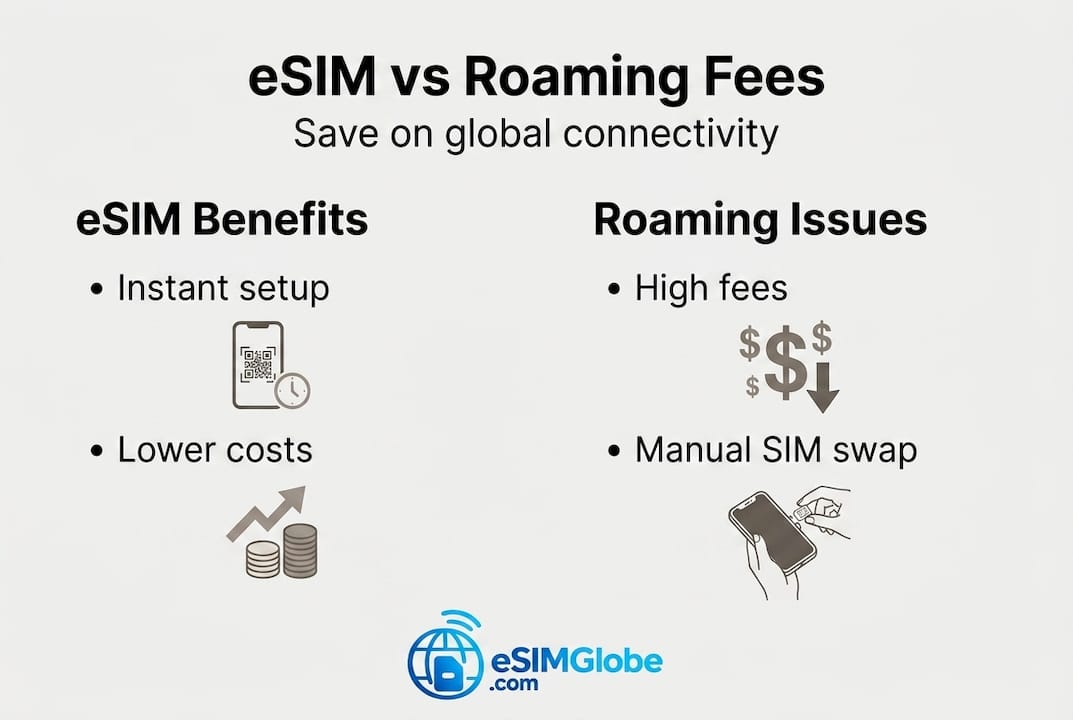
The difference from a physical SIM is straightforward. Physical SIMs require you to handle a small card, risk losing it, and visit a store or wait for delivery. eSIMs offer faster setup with no card swap, support multiple profiles at once, and are purpose-built for travelers who move between countries regularly.
| Feature | Travel eSIM | Physical SIM |
|---|---|---|
| Setup speed | Instant, online | Hours to days |
| Device swap | Not required | Required |
| Multi-profile | Yes | No |
| Purchase location | Anywhere with WiFi | In-country store or online shipping |
| Risk of loss | None | Card can be lost or damaged |
Devices that support eSIM include iPhones from the XS onward, Samsung Galaxy S20 and later, Google Pixel 3 and later, and most recent iPad and Apple Watch models. Many Windows laptops also support eSIM for cellular data.
The cost savings are real. Roaming fees vs eSIM rates show a consistent pattern: travelers who pre-purchase eSIM plans pay a fraction of what carriers charge for international roaming. For a two-week Europe trip, that can translate to $130-180 saved. You can read a deeper breakdown in this eSIM vs local SIM guide or explore specific savings in the save money with eSIMs resource.
Checking your device compatibility for eSIMs
Before purchasing any plan, confirm your device actually supports eSIM. The quickest method is to dial *#06# on your phone. If an EID (Embedded Identity Document) number appears alongside your IMEI, your device has an eSIM chip. No EID means no eSIM support.

You can also check through your settings. On iPhone, go to Settings > General > About and scroll down to look for “EID.” On Android, go to Settings > About Phone > SIM Status or similar, depending on your manufacturer.
Popular eSIM-ready devices (2026):
| Brand | Example models | Year introduced |
|---|---|---|
| Apple | iPhone XS, XR, 11, 12, 13, 14, 15, 16 series | 2018 onward |
| Samsung | Galaxy S20, S21, S22, S23, S24, Z Fold/Flip | 2020 onward |
| Pixel 3, 4, 5, 6, 7, 8, 9 series | 2018 onward | |
| Motorola | Razr 2019+, Edge+ models | 2019 onward |
Your device also needs to be carrier-unlocked to use a third-party eSIM. Contact your home carrier to confirm unlock status before your trip. Device compatibility checks are a required first step: dial *#06# for your EID, then verify unlock status.
One important caveat: some phone variants sold in China or Hong Kong, even flagship models, ship without eSIM hardware due to local regulations. Always check the specific model number, not just the brand name.
For a broader list of compatible hardware, the guide on top eSIM devices for travelers covers current models with detailed notes.
Pro Tip: Always install your eSIM profile while connected to home WiFi before you depart. Airport WiFi is unreliable, and you do not want to troubleshoot a profile installation at the gate.
How to set up and activate your travel eSIM
Once you confirm compatibility, the process is straightforward. Here is what you need before you start:
- Stable WiFi connection
- Unlocked device with eSIM support
- Valid payment method
- Your destination country or region confirmed
- Screenshots or printed backup of QR code (optional but smart)
Step-by-step setup:
- Choose your plan. Select country, regional, or global coverage based on your itinerary.
- Complete purchase. You receive a QR code or activation code by email, usually within minutes.
- Install the profile. Go to your phone’s cellular settings, select “Add eSIM,” and scan the QR code. Follow on-screen prompts.
- Label the plan. Name it by destination so you can find it easily in settings.
- Do not activate yet. Keep your home SIM as the primary data line until you arrive.
- On arrival, toggle data roaming ON for your eSIM line and set it as the active data SIM.
Installing before travel is the recommended approach: buy the plan online, install the profile on home WiFi, then activate upon arrival by switching your data line.
Important: Activating your eSIM early at home can start the plan’s validity countdown before you even reach your destination. Most plans count days from activation, not from first data use. Always read the plan terms.
Pro Tip: Screenshot your QR code and installation instructions and save them offline. If you delete the email or lose internet before installation, you will not be able to reinstall without contacting support.
Keep your home SIM active in dual SIM mode. Data-only eSIM plans do not include a local phone number, which means calls, SMS, and two-factor authentication (2FA) codes still route through your home number. Dual SIM mode handles both simultaneously.
For a detailed visual walkthrough, the guide on how to activate your eSIM step-by-step and the global eSIM activation process cover each platform in detail.
Choosing the best eSIM plan for your trip
Not all eSIM plans are equal. The three main plan types each serve a different travel style:
- Single-country plans: Cheapest cost per GB. Best for one-destination trips. Not portable.
- Regional plans: Cover multiple countries under one plan (e.g., 30+ European countries). Slightly higher per-GB cost but much more convenient for multi-stop itineraries.
- Global plans: Cover 100+ countries with one purchase. Maximum flexibility, highest price per GB. Most are data-only with no local number.
Key factors to evaluate before buying:
- Total data included and whether it throttles after a threshold
- Plan duration (7-day, 30-day, 90-day options are common)
- Network partners in your destination country (check if it’s 4G LTE or 5G)
- Rollover policy (unused data usually does not carry over)
- Customer support availability and response time
Top providers tested in 2026 include Airalo (200+ countries, consistently reliable), Saily (budget-friendly, backed by NordVPN), Holafly (unlimited data plans), and Nomad (strong value in Asia-Pacific). Speeds range from 30 to 180 Mbps depending on location and local network conditions.
Cost benchmarks for 2026 show that a 5GB/30-day Europe plan runs roughly $12-15. Southeast Asia is similar. A comparable U.S. plan costs $10-15. Compare that to standard roaming and the savings for even a short trip are significant.
Pro Tip: Estimate your realistic daily data use before buying. Streaming video eats 700MB to 1GB per hour. Navigation, messaging, and email use far less. Match your plan size to actual habits, not worst-case scenarios.
For destination-specific options, browse the best SIM cards abroad guide, the eSIM worldwide guide, or review understanding eSIM terms if plan language feels unclear.
Solving common travel eSIM problems and limitations
Even well-prepared travelers run into issues. Here is a quick numbered guide for the most common problems:
- No data connection on arrival: Toggle airplane mode off and on. Then go to cellular settings and confirm your eSIM line is set as the active data line with data roaming enabled.
- Activation failure: Restart your device. Re-check that your carrier unlock is confirmed. Try a different WiFi network if the QR scan fails.
- Slow speeds or no signal in rural areas: Coverage gaps exist even on plans that claim broad coverage. Manually select a different local network in your settings.
- APN errors: Some devices need manual APN (Access Point Name) configuration. Contact your eSIM provider’s support for the correct settings.
Troubleshooting steps follow a consistent pattern: toggle airplane mode, restart the device, enable data roaming, try manual network selection, check APN settings, then contact support.
Security note: Using public WiFi, even alongside your eSIM data connection, carries risk. A VPN adds a layer of protection when connecting on hotel or airport networks. Keep your home SIM active for 2FA codes to protect financial and email accounts.
For activation-specific issues, the hassle-free eSIM activation guide covers carrier-specific fixes.
A seasoned traveler’s take: When an eSIM isn’t always best
eSIMs are the right call for most international travelers. But “most” is not “all,” and the travel industry does not always surface the exceptions.
If your home carrier includes international roaming at no extra cost, for example through a premium plan with data in 100+ countries, a separate eSIM purchase may add no real value for a short trip. Carrier roaming perks can match or beat eSIM pricing for trips under a week, especially if speeds and data caps are acceptable.
For stays longer than 60 days, a physical local SIM often wins. Local operators in many countries offer prepaid plans with voice, SMS, and data at rates that undercut any global eSIM provider, and local SIMs sometimes come with better network priority than visiting eSIM traffic.
Always check your existing plan before purchasing. Then compare actual local SIM prices at your destination. The eSIM vs local SIM breakdown is a useful reference for making that call trip by trip.
Pro Tip: Reevaluate your connectivity setup for every trip. A regional eSIM that worked perfectly in Europe may not be the best value for a 3-month stay in Southeast Asia.
Ready for effortless travel? Start with a top-rated eSIM
You now have a complete picture: what eSIMs are, how to verify compatibility, how to install and activate a profile, how to select the right plan, and how to fix issues when they arise.
EsimGlobe offers instant digital delivery and simple activation for travelers heading anywhere from a single country to multiple continents. Shop U.S. travel eSIMs if your trip includes the United States, or explore global eSIM plans to find coverage for your exact destinations. Plans are available in USD, EUR, and GBP. No physical card. No store visit. Purchase, install, travel.
Frequently asked questions
Which phones work with travel eSIMs?
Most iPhones from the XS onward, Samsung Galaxy S20+, Google Pixel 3+, and recent unlocked Android flagships support eSIM. Devices sold in China or Hong Kong may be excluded even on flagship models.
Should I get a single-country, regional, or global eSIM plan?
Single-country plans offer the lowest cost per GB for one destination. Regional plans cover multiple countries affordably. Global plans provide maximum flexibility across 100+ countries but at a higher price per GB.
Can I use my travel eSIM for local calls and SMS?
Most travel eSIMs are data-only. Data-only plans require your home SIM to remain active for calls, SMS, and two-factor authentication codes.
What do I do if my eSIM won’t connect or activate?
Restart your device, toggle airplane mode, enable data roaming in cellular settings, and check your APN configuration. Contact your provider’s support team if the issue continues.