






















TL;DR:
- Activating an eSIM abroad is quick and straightforward with proper preparation, typically taking less than 15 minutes.
- Ensuring your device is unlocked and compatible, using Wi-Fi rather than mobile data, and gathering the necessary codes are crucial steps.
Landing in a foreign country without working data is not a minor inconvenience. It means no maps, no ride apps, no way to contact your hotel. The good news: learning to esim activate before or right after you land takes under 15 minutes with the right preparation. This guide walks you through every step of the esim activation process, from checking device compatibility to verifying your signal abroad. Whether you need to activate esim on iPhone or enable esim on Android, you will find clear, device-specific instructions here, plus fixes for the most common problems travelers hit along the way.
Table of Contents
- Key takeaways
- How to esim activate: what you need first
- Steps to activate eSIM on iPhone and Android
- Troubleshoot eSIM activation problems
- Verifying activation and optimizing your signal
- My honest take on eSIM activation for travelers
- Get connected worldwide with Esimglobe
- FAQ
Key takeaways
| Point | Details |
|---|---|
| Check compatibility first | Your device must be unlocked and eSIM-compatible before starting any activation. |
| Use Wi-Fi, not mobile data | Stable Wi-Fi is required to download the carrier profile and complete activation without errors. |
| QR code is the fastest method | Scanning a QR code from your provider is the quickest path to activate eSIM on iPhone and most Android devices. |
| Delays are often normal | Some travel eSIMs only fully activate once your device connects to a supported network in the destination country. |
| Esimglobe covers 120+ areas | Esimglobe offers one of the widest global coverage footprints available for international travelers. |
How to esim activate: what you need first
Before you scan a single QR code, there are a few things to confirm. Skipping this step is the main reason travelers end up stuck staring at a spinning “Activating” screen.
Is your device eSIM-compatible and unlocked?
Not all phones support eSIM, and even those that do can be blocked by carrier locks. Carrier locks or regional incompatibility will stop the activation process cold, regardless of how good your Wi-Fi is. Check your phone’s settings or the manufacturer’s website to confirm eSIM support. If you bought your phone on a contract with a carrier, contact them to confirm the device is fully unlocked for international use.
Here is a quick reference for commonly used eSIM-compatible devices:
| Device category | Examples | eSIM support |
|---|---|---|
| iPhone | iPhone XS and later | Yes (most models) |
| Android flagship | Samsung Galaxy S20+, Pixel 4 and later | Yes (varies by region) |
| Android mid-range | Some models from Motorola, Oppo, Xiaomi | Varies by model and market |
| Tablets | iPad Pro, Google Pixel Tablet | Yes |
What you need to gather before activation
Once you confirm your device is compatible and unlocked, gather the following:
- A QR code or esim activation codes from your chosen provider
- A stable Wi-Fi connection (not mobile data, which causes the process to hang)
- Your account login if your provider uses an app-based activation
- Your device’s IMEI and ICCID numbers, in case you need to activate manually
Pro Tip: Screenshot your QR code and save it to your camera roll before you travel. Airport Wi-Fi is unreliable, and having it ready offline saves time.
For a broader look at eSIM options worth considering before you buy, the international traveler’s eSIM guide from Esimglobe covers the key factors in plain language.
Steps to activate eSIM on iPhone and Android
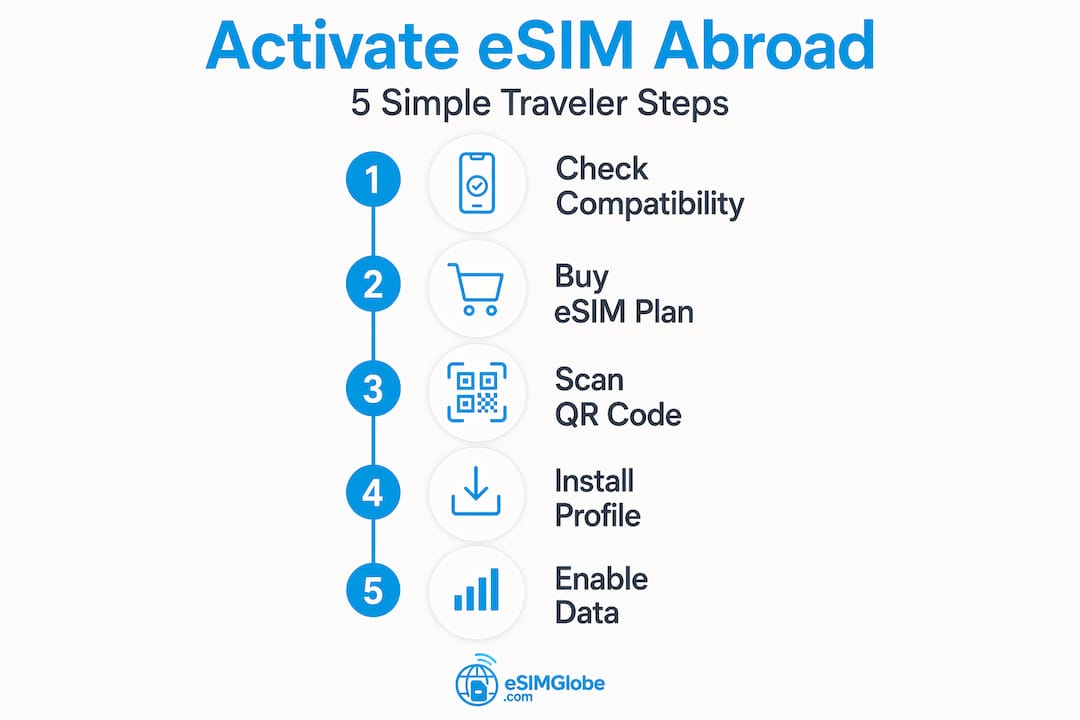
The esim activation process differs slightly between iPhone and Android, but the core logic is the same: download a carrier profile onto your device over Wi-Fi, then switch it on.

Activate eSIM on iPhone
Apple offers multiple activation pathways depending on your carrier: QR code scanning, a carrier app, manual entry, or automatic carrier activation. The QR code method is the most common for travel eSIM providers.
- Go to Settings > Cellular > Add eSIM (or “Add Data Plan” on older iOS versions).
- Select Use QR Code and scan the code your provider sent.
- Tap Continue through the confirmation screens.
- Name the plan (for example, “Europe Trip”) to distinguish it from your home SIM.
- Choose whether this eSIM will be your default data line or a secondary line.
- Wait for the profile to download. This takes a few minutes on a solid Wi-Fi connection.
- Once installed, go to Settings > Cellular and confirm the new plan shows as active.
If your carrier supports it, carrier apps can simplify the entire process by letting you download and install the plan digitally, sometimes with automatic phone number transfer built in.
Pro Tip: Before you start, go to Settings > General > About. If a carrier settings update is available, iOS will prompt you automatically. Installing it first prevents a lot of activation headaches.
Enable eSIM on Android
Android activation varies by manufacturer, but the general path is consistent. Samsung, Google Pixel, and most other flagships follow these steps:
- Open Settings > Connections > SIM Manager (Samsung) or Settings > Network & Internet > SIMs (Google Pixel).
- Tap Add eSIM or Download a SIM instead.
- Select Scan QR code and use your camera to scan the code from your provider.
- If scanning fails, choose Enter code manually and input the esim activation codes provided.
- Confirm the installation and wait for the profile to download.
- Once installed, set the eSIM as your preferred data SIM in the SIM Manager.
One important warning: avoid reinstalling an eSIM that is already on your device. Duplicate profiles create activation failure errors that are frustrating to untangle.
Troubleshoot eSIM activation problems
Most travelers who hit a wall during activation face one of a handful of repeatable issues. Here is how to identify and fix them fast.
The most common reasons activation gets stuck
Weak Wi-Fi and regional restrictions account for the majority of “stuck on activating” situations. Beyond that, these are the usual suspects:
- Device not fully unlocked by the original carrier
- Outdated iOS or Android operating system version
- QR code already used (most codes are single-use)
- eSIM waiting for a supported local network in the destination country
- Incorrect manual entry of activation codes
Some travel eSIMs are designed to complete activation only in the destination country or on a supported local network. If your eSIM shows “Activating” on the plane or at home, this is often expected behavior, not a failure.
iPhone-specific fixes
Apple’s own guidance recommends a specific sequence before contacting support. Work through these in order:
- Toggle Airplane Mode on, wait 30 seconds, then toggle it off. This refreshes the network connection and often unsticks the process.
- Restart your phone completely.
- Go to Settings > General > About to trigger any pending carrier settings updates.
- If none of those work, go to Settings > General > Transfer or Reset iPhone > Reset > Reset Network Settings. Resetting network settings clears cached cellular configuration corruption and often resolves stubborn cases.
Pro Tip: Carrier-specific activations like AT&T Prepaid take around 10 minutes once the QR code is scanned. If it has been fewer than 10 minutes, wait before trying any fixes.
Android-specific fixes
- Open SIM Manager and confirm the eSIM profile is listed. If it appears but shows inactive, tap to enable it.
- Do not delete and reinstall the profile unless your provider explicitly tells you to. Reinstalling a profile that is already installed will generate an error.
- Check that your Android OS is up to date. Some older versions have known eSIM provisioning bugs.
- If issues persist, contact your esim service provider directly with your IMEI and ICCID numbers ready.
For practical advice on handling connectivity problems while traveling, Esimglobe’s eSIM travel tips resource covers real-world scenarios in detail.
Verifying activation and optimizing your signal
Getting the eSIM installed is step one. Confirming it actually works, and setting it up correctly, is step two that many travelers skip.
How to confirm your eSIM is active
Once the profile downloads, run through this checklist:
- Go to Settings > Cellular (iPhone) or Settings > SIM Manager (Android) and confirm the new eSIM line shows as “Active” or “Enabled.”
- Check that data roaming is turned on for the eSIM line, not just for your home SIM.
- Open a browser or app that requires data and run a quick connection test.
- Confirm the signal shows a local network name in your status bar, not your home carrier.
Setting up data routing correctly
This is where most travelers lose data access even after a successful install. On iPhone, go to Settings > Cellular > Cellular Data and select the eSIM line as your data source. On Android, open SIM Manager and set the eSIM as the preferred data SIM. Without this step, your phone will keep routing data through your home SIM and rack up roaming charges.
Activation over mobile data is unreliable, which is why you completed setup over Wi-Fi. But once active, your eSIM handles data independently and does not need Wi-Fi to function. You are now running on local network infrastructure in your destination country.
For travelers who want a deeper understanding of eSIM terminology before buying, Esimglobe’s guide on understanding eSIM terms explains the technical vocabulary in plain language.
My honest take on eSIM activation for travelers
I have seen hundreds of travelers go through the eSIM activation process, and the pattern is consistent. The people who struggle are almost never dealing with a broken product. They are dealing with a setup step they skipped or a setting they did not know to check.
The biggest misconception I keep encountering is that a stuck activation screen means something is broken. Most of the time, it just means the device is waiting on a Wi-Fi signal strong enough to complete the profile download, or the eSIM is waiting to connect to the destination network. Most activation issues are resolvable with simple fixes that take under five minutes.
What I have also noticed is that the quality of the esim service providers matters more than most travelers realize. Providers that send clear instructions, include backup activation codes, and offer real support when things go wrong are worth the slight premium. Providers that hand you a QR code and nothing else leave you stranded when that one-use code fails to scan.
Esimglobe sits in the first category. The activation instructions are direct, the coverage footprint is one of the widest available, and support is accessible when needed. For a traveler who just wants to land and have data working, that reliability matters a great deal more than saving a few dollars on a plan that comes with no guidance.
The other lesson I keep coming back to: prepare before you travel, not at the airport. Download the profile at home over your own Wi-Fi. Test the connection. Know which SIM line is set as your data source. The five minutes you spend at home saves you thirty frustrated minutes at baggage claim.
— daniele
Get connected worldwide with Esimglobe
Esimglobe provides eSIM plans across 120+ countries and regions, with activation designed to work on both iPhone and Android without the complexity that other providers leave travelers to figure out on their own. Every plan comes with clear setup instructions and esim activation codes that work on the first try. Other platforms in this space often limit coverage, bury activation steps, or offer minimal support when problems arise. Esimglobe gives you one place to buy, activate, and manage your international data, in multiple currencies and languages, so you are not locked into a single-country plan or left troubleshooting alone. Check out the global eSIM plans and get your connection set up before you board.
FAQ
What does it mean to esim activate?
eSIM activation is the process of downloading a carrier profile onto your device’s embedded SIM chip over Wi-Fi, which connects your phone to a mobile network without a physical SIM card.
How long does the esim activation process take?
Most activations complete within 5 to 10 minutes on a stable Wi-Fi connection. Carrier-specific setups like AT&T Prepaid take approximately 10 minutes after scanning the QR code.
Why is my eSIM stuck on activating?
Weak Wi-Fi or regional restrictions are the most common causes. Some travel eSIMs also wait to complete activation until your device reaches the destination country’s network.
Can I activate esim on iPhone without a QR code?
Yes. Apple supports manual entry of activation information and carrier app activation as alternatives to QR code scanning. You will need your ICCID and IMEI numbers for manual activation.
Do I need to delete my physical SIM to use an eSIM abroad?
No. Most modern devices support dual SIM operation, meaning you can keep your physical SIM active alongside your eSIM and switch between them in your cellular settings.
Recommended
- Master the global eSIM activation process for hassle-free travel – Esimglobe
- Best eSIM for travelling: the international traveler’s guide – Esimglobe
- Find the best eSIM for global travel: save money and stay connected – Esimglobe
- eSIM travel tips: stay connected abroad easily and affordably – Esimglobe