






















EsimGlobe is the most practical eSIM choice for most Brazil trips, thanks to nationwide network access, instant email delivery, multi-currency checkout, and 24/7 support that covers you across time zones. The one exception: travelers settling in for months who need a local phone number with voice minutes should still pair it with a physical Brazilian SIM. For everyone else, an eSIM Brazil travel plan gets you online before the plane doors open.
TL;DR:
- Nationwide coverage in Brazil is essential for remote areas, especially if your itinerary includes rural towns, highways, or protected natural regions.
- A small data bundle (2-3 GB) suffices for city trips with basic navigation and messaging, while longer stays or remote work require larger plans of at least 10 GB.
- Confirm your phone supports eSIM, is unlocked, and is running current software to avoid activation failures or connectivity issues in remote regions.
- Activate the eSIM before leaving home using Wi-Fi, and disable roaming on your home SIM once in Brazil to prevent unexpected charges.
- In remote areas, expect weaker signals and plan for offline maps and larger data allowances, as coverage gaps depend on local network infrastructure.
Table of Contents
- What Does EsimGlobe Sell for Brazil Trips?
- How Do You Choose the Right eSIM for Brazil?
- How Do You Buy and Set Up an eSIM for Brazil?
- Where Does Mobile Coverage Actually Work in Brazil?
- How Much Data Should You Budget for a Brazil Trip?
- Why Do eSIM Activations Fail, and How Do You Fix Them?
- What Backs EsimGlobe’s Brazil Coverage Claims?
- Do You Need to Register an eSIM to Use It in Brazil?
- How Do You Add More Data Once You’re Already in Brazil?
- Roaming vs. Local eSIM: Which Setup Fits Your Trip?
- Our Take: The Real Decision Isn’t Price, It’s Preparation
- Ready to Get Connected in Brazil?
- Useful Sources and Further Reading
- FAQ
What Does EsimGlobe Sell for Brazil Trips?
EsimGlobe’s Brazil eSIM options are data-only, prepaid, and built around how people actually travel rather than how carriers want to bill you monthly. There’s no contract, no roaming surprise on your home carrier’s bill, and no waiting in an airport kiosk line behind twelve other confused tourists.
The core lineup breaks into three practical categories:
- Short-trip bundles for weekend visits or short business trips to São Paulo or Rio.
- Mid-range bundles for a typical one to two week vacation with regular map use, messaging, and some streaming.
- Larger bundles for extended stays, remote work, or anyone planning to hotspot a laptop.
Matching bundle size to trip length matters more than people expect. A three to seven day trip rarely needs more data unless you’re streaming video daily. A one to two week trip does better with a moderate data bundle, especially if you’re navigating unfamiliar cities with GPS running constantly. Trips past two weeks, or anyone working remotely from a beach town in Bahia, should size up to avoid a mid-trip data crunch.
Delivery is straightforward: buy the plan, get a QR code and manual installation details by email within minutes, and install it before you fly. EsimGlobe’s checkout supports USD, EUR, and GBP among other currencies, so you’re not stuck doing mental exchange-rate math while your flight boards. The Brazil eSIM product page lists current bundle sizes and pricing directly.
Pro Tip: Install your eSIM profile while you still have Wi-Fi at home. The profile downloads instantly, but you activate the data plan only once you land in Brazil, so there’s zero risk of burning data early.
How Do You Choose the Right eSIM for Brazil?
The wrong eSIM choice isn’t usually about price. It’s about a mismatch between what a plan offers and what your specific trip actually demands. Five factors separate a plan that works from one that leaves you tethered to hotel Wi-Fi.
Coverage: nationwide vs city-only
Some eSIM providers only guarantee solid performance in major metro areas. If your itinerary is Rio, São Paulo, and maybe Brasília, that’s less of an issue. If you’re heading into the Pantanal, driving the coastal highway between Florianópolis and Porto Alegre, or spending time in smaller interior towns, nationwide network access becomes the deciding factor rather than a nice-to-have.
Data quantity vs. speed
More gigabytes doesn’t automatically mean a better experience if the underlying network speed is capped or throttled. A traveler who just needs maps and WhatsApp can get by on 2 to 3 GB. Someone doing video calls for work, uploading photos constantly, or streaming music on a long bus ride needs both volume and consistent 4G/5G speed, not just a bigger number on the checkout page.
Device compatibility and carrier lock
This trips up more travelers than any other step. Not every phone supports eSIM, and even eSIM-capable phones bought through certain carriers can arrive locked, blocking the installation of a second profile. Before buying anything:
- Confirm your phone model supports eSIM (most iPhones since the XS, and flagship Android phones since roughly 2019, do).
- Check that your device is carrier-unlocked, not just unlocked for calls but unlocked for adding a secondary data profile.
- Confirm your iOS or Android version is current, since older software occasionally blocks eSIM installation prompts.
Activation windows and profile expiry
Every eSIM plan has a validity window that starts either at purchase or at first network connection, depending on the provider. Buying a plan that starts counting down the day you check out, rather than the day you land, wastes days you paid for. EsimGlobe’s Brazil plans activate on first use, which matters if your flight gets delayed or you buy the plan a week before departure.
Support, refunds, and exchange policy
A plan is only as good as what happens when it doesn’t work on the first try. Community reports from travelers in Brazilian cities show that activation hiccups happen often enough that a support channel matters, not just as a footnote in the terms and conditions, but as something you’ll actually use.
Market comparisons of Brazil eSIM options consistently show that travelers rank instant delivery, easy activation, and nationwide coverage above raw price when picking a plan. That ranking makes sense once you’ve been stuck outside a São Paulo bus terminal with no signal and no way to call for help.
How Do You Buy and Set Up an eSIM for Brazil?
Getting from checkout to a working data connection takes about fifteen minutes of total effort split across two moments: before you leave home, and the second you land.
Before you buy: a two-minute device check
- Open your phone’s settings and search “eSIM” to confirm the option exists (iPhone: Settings > Cellular; Android: Settings > Network & Internet).
- Check how many eSIM profiles your device currently holds. Most iPhones support multiple installed profiles but only one or two active at a time; some Android phones cap this lower.
- Confirm the phone is unlocked from its original carrier, not just “unlocked for use abroad” but unlocked for adding new network profiles entirely.
What to expect at checkout
Buy your bundle on the Brazil eSIM product page, choose your data size, and pay in your preferred currency. Within minutes, an email arrives with a QR code and a manual activation code as backup, in case your device camera or email app gives you trouble scanning.
Installing on iPhone
- Go to Settings > Cellular > Add eSIM.
- Choose Use QR Code and scan the code from your confirmation email.
- Label the new plan (something like “Brazil Data” so you don’t confuse it with your home line).
- Under Cellular Data, leave your home SIM as default for calls and texts, but set the new eSIM as the default for cellular data.
- Turn on Data Roaming for the new eSIM line specifically, since this is a local Brazilian data connection, not roaming from your home carrier.
Installing on Android
- Go to Settings > Network & Internet > SIMs (or “Mobile Network,” depending on your Android version).
- Tap Add Carrier or Add eSIM.
- Scan the QR code from your email, or enter the manual activation details if scanning fails.
- Set the new eSIM profile as your active data connection while keeping your home SIM active for calls only.
On arrival in Brazil
- Turn on airplane mode briefly, then turn it back off to force your phone to search for networks fresh.
- Confirm the Brazil eSIM shows as connected to Vivo, TIM, or Claro in your status bar or settings.
- Disable roaming on your home SIM specifically. This is the step people forget most, and it’s the one most likely to trigger a surprise charge from your home carrier.
- Run a quick speed test through your browser to confirm the connection is live before you leave the airport.
If something goes wrong
Restart your phone first. This alone fixes a surprising share of activation failures because it forces the device to re-scan for the newly installed profile. If that doesn’t work, delete and reinstall the eSIM profile using the same QR code, since most providers allow one reinstall per activation. If neither step resolves it, contact EsimGlobe’s support with a screenshot of your cellular settings screen ready to go.
Pro Tip: Screenshot your QR code and save it to your photos app before you fly, in case your email doesn’t load without data once you land.
Where Does Mobile Coverage Actually Work in Brazil?
Brazil’s mobile coverage runs through three national carriers: Vivo, TIM, and Claro. eSIM providers don’t build their own towers. They connect travelers to these existing networks through local network access agreements, meaning your actual signal quality depends on how strong these carriers are in the specific place you’re standing.
In cities, that’s rarely a concern. São Paulo, Rio de Janeiro, Brasília, and other major metros have dense 4G coverage and growing 5G rollout, particularly around business districts, airports, and tourist zones. Signal in these areas tends to match what you’d expect from any major city worldwide.
The picture shifts once you leave urban centers. Rural stretches, long highway drives between cities, and small interior towns can have real coverage gaps. The Pantanal wetlands, remote parts of the Amazon basin, and stretches of coastal highway between smaller towns are known weak spots where you might drop to 3G or lose signal entirely for short stretches.
Frequently reported traveler issues center on two things: device compatibility problems and forgetting to disable legacy roaming, both of which are avoidable with a short pre-trip checklist rather than luck. Coverage gaps in remote regions are a different problem entirely, one that no eSIM provider can fully solve because the underlying towers simply aren’t as dense outside cities.
If your itinerary includes remote stretches:
- Buy a slightly larger data bundle than you think you need, since spotty connections burn more data retrying failed loads.
- Download offline maps for your route before you leave Wi-Fi, through Google Maps’ offline mode or a dedicated app.
- Treat any mobile connection in a remote area as a bonus, not a guarantee, and keep a backup plan for critical communication.
Reliable mobile data changes more than just your ability to check Instagram. It affects how you book last-minute accommodation, navigate unfamiliar transit systems, and handle the everyday logistics of travel that used to require a printed itinerary and a lot of guesswork.
How Much Data Should You Budget for a Brazil Trip?
Pricing scales with trip length and how you actually use your phone, not just how many days you’re staying. A backpacker checking maps and WhatsApp uses a fraction of the data a remote worker doing video calls burns through in a single afternoon.
For a short trip, a small data bundle typically covers navigation, messaging apps, social media browsing, and occasional photo uploads. This tier suits tourists doing city sightseeing without heavy streaming.
For a mid-length trip, a moderate data bundle provides enough headroom for daily map use, video calls home, music streaming on transit, and moderate social media posting. This is the sweet spot for most vacation itineraries and often offers better per-gigabyte value than smaller bundles.
For longer stays, larger data bundles make sense, particularly for:
- Digital nomads and remote workers running video calls and cloud-based work tools daily.
- Business travelers who need consistent connectivity for email and video conferencing across multiple cities.
- Anyone hotspotting a laptop regularly instead of relying on hotel Wi-Fi.
Per-gigabyte cost generally drops as bundle size increases, which is standard across the eSIM market. Market roundups of Brazil eSIM pricing show 10 GB bundles commonly priced in a range that rewards buying slightly more data upfront rather than topping up repeatedly at a worse per-gigabyte rate.
If your trip extends beyond Brazil into neighboring countries, a multi-country regional plan can be a cost-effective alternative to separate national plans. For a Brazil-only itinerary, a country-specific bundle is generally more advantageous on price and network priority.
Why Do eSIM Activations Fail, and How Do You Fix Them?
Most activation problems trace back to one of three causes, and all three are fixable in under five minutes.
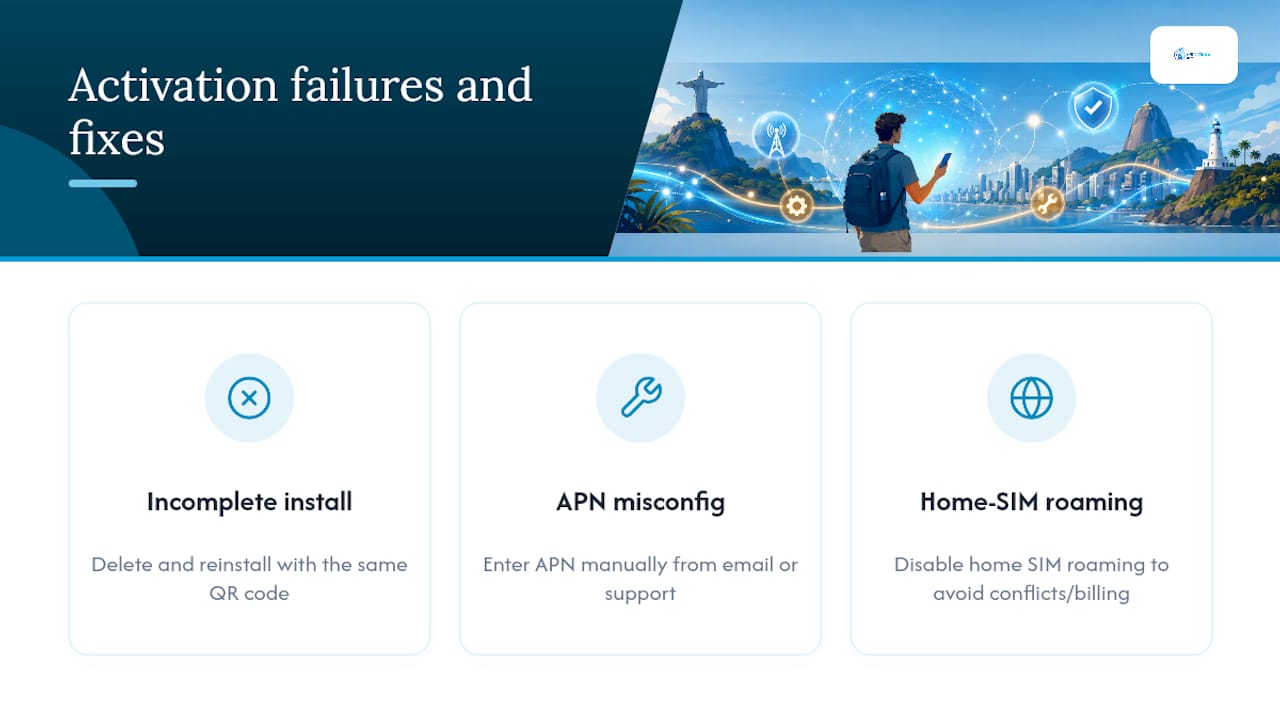
Wrong or incomplete installation. If your eSIM shows as installed but shows “No Service,” the profile likely didn’t finish downloading correctly. Delete it and reinstall using the same QR code. Most providers, including EsimGlobe, allow this without issuing a new code.
APN misconfiguration. Occasionally a device needs its Access Point Name settings entered manually rather than pulled automatically from the profile. Your confirmation email should include these details as backup; if it doesn’t list them, support can provide them on request.
Legacy roaming left on. If your home SIM’s roaming setting stays active alongside your new eSIM, your phone can get confused about which network to prioritize, or worse, your home carrier can quietly bill you for a roaming connection you didn’t intend to use.
A few practical limits are worth knowing before you travel. Most phones cap how many eSIM profiles they can store, and fewer can run two active at once. If you’re already carrying a work eSIM or another regional plan, check your device’s limit before adding a Brazil profile.
To protect SMS-based two-factor authentication, keep your home SIM active for calls and texts while routing only data through the new eSIM. This avoids losing verification codes for banking apps or email logins mid-trip.
Before contacting support, gather your cellular settings screenshot, the exact error message if one appeared, and the time the issue started. This turns a back-and-forth troubleshooting thread into a single fast reply.
Pro Tip: If your phone shows the eSIM connected but data still won’t load, toggle Airplane Mode on and off once. It forces a network handshake that resolves a large share of “connected but not working” cases.
What Backs EsimGlobe’s Brazil Coverage Claims?
EsimGlobe’s Brazil eSIM plans are documented directly on its Brazil eSIM product page, which lists current bundle sizes, delivery method, and pricing. The site’s broader guidance, including its pre-trip Brazil buying checklist, covers the device and compatibility checks travelers need before purchase.
At the platform level, EsimGlobe supports over 170 countries, multi-currency checkout, and 24/7 support, claims that matter most when you’re troubleshooting a failed activation at 11 p.m. in a hotel room with no other way to reach anyone. The complete guide to eSIM travel abroad covers device compatibility details in more depth for readers weighing multiple destinations beyond Brazil alone.
Author daniele covers travel connectivity and eSIM buying decisions for Esimglobe’s editorial content, with a focus on practical setup guidance over generic vendor comparisons.
Do You Need to Register an eSIM to Use It in Brazil?
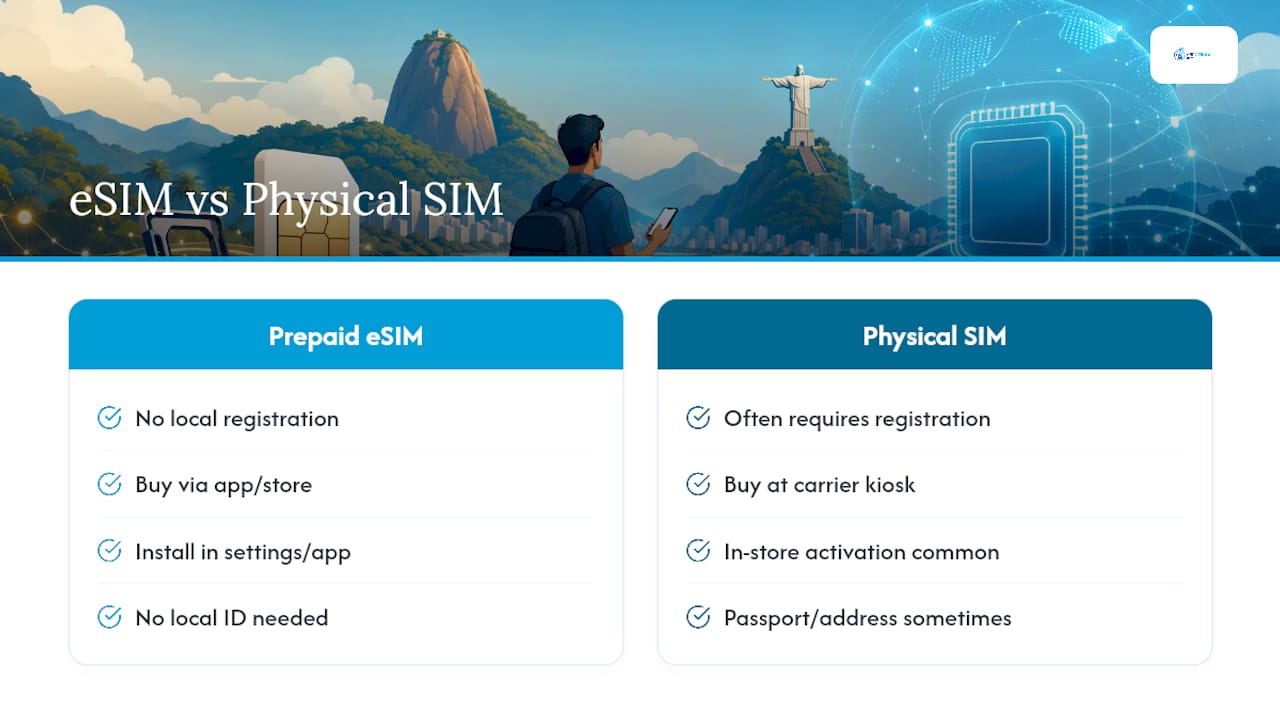
No formal registration or government paperwork applies to using a prepaid data-only eSIM as a visiting tourist in Brazil. Unlike some countries that require SIM registration with a local ID or tax number, a data-only eSIM purchased from an international provider like EsimGlobe activates through the app store and settings menu alone, with no local carrier store visit required.
This is different from buying a physical prepaid SIM directly from a Brazilian carrier kiosk, which sometimes asks for passport details or a local address for registration under Brazilian telecom rules. Because an eSIM Brazil travel plan from an international provider runs through a roaming or wholesale network access agreement rather than a direct retail SIM sale, that registration step typically doesn’t apply.
One unrelated but commonly confused topic is Brazil’s customs declaration threshold for travelers carrying cash or goods, sometimes referenced informally as a “$2,000 rule.” That’s a customs and currency declaration matter, entirely separate from eSIM use, and has no bearing on whether your data plan works or whether you need to register anything with a telecom authority. If you’re bringing significant cash or high-value electronics into Brazil, check current customs declaration rules directly with Brazilian customs authorities rather than relying on travel forum summaries.
For most visitors, the practical takeaway is simple: buy the plan, install it, use it. No forms, no local ID, no store visit.
How Do You Add More Data Once You’re Already in Brazil?
Running low on data mid-trip doesn’t mean starting over. Topping up an existing eSIM plan works differently depending on the provider, but the process with EsimGlobe stays inside the same account and email you originally used to purchase.
The most reliable method is returning to the same product page you originally purchased from, the Brazil eSIM product page, and buying an additional data bundle. Depending on your device and the provider’s system, this either adds directly to your existing active profile or arrives as a fresh QR code for a second lightweight installation, both of which take under five minutes to apply.
A few practical notes make this smoother:
- Top up before you hit zero, not after, since browsing a checkout page with no data can turn into an unnecessary hunt for Wi-Fi.
- Keep the confirmation email from your original purchase, since some top-up flows reference your original order.
- If your device has reached its eSIM profile storage limit, you may need to delete an old, unused profile before installing a new top-up code.
Unlike prepaid SIM cards bought at a physical Brazilian kiosk, which sometimes require finding that same physical store to reload, an eSIM top-up happens entirely online, from anywhere you have any working internet connection, including hotel Wi-Fi.
Roaming vs. Local eSIM: Which Setup Fits Your Trip?
Two connectivity paths exist for staying online in Brazil, and travelers routinely confuse them: sticking with your home carrier’s international roaming, or switching to a Brazil-specific eSIM.
International roaming through your home carrier is the path of least effort. You land, your phone connects automatically, and you never touch a settings menu. It’s also usually the most expensive route by a wide margin, with per-megabyte roaming rates from most home carriers running far above what a dedicated travel eSIM charges for the same data.
A local or regional eSIM, purchased in advance and installed before departure, trades that convenience of doing nothing for a better price and, often, better network priority, since eSIM providers sign specific network access agreements rather than relying on generic roaming rates. The tradeoff is a short setup step before you fly, which takes minutes but does require some planning.
For most travelers, a dedicated Brazil eSIM data plan wins on cost without sacrificing meaningful convenience once it’s installed correctly. Roaming still makes sense in narrow situations: a same-day layover, an unplanned last-minute trip with zero time to prep, or a device that genuinely can’t support eSIM. Outside those cases, the math and the hassle both favor buying a plan ahead of time and having it ready before wheels touch down.
Our Take: The Real Decision Isn’t Price, It’s Preparation
Most Brazil eSIM advice online treats this as a pure price comparison, cheapest gigabyte wins. That framing misses what actually determines whether your trip goes smoothly: preparation, not the third decimal place of a per-GB rate.
The travelers who run into trouble in Brazil aren’t the ones who overpaid slightly for data. They’re the ones who bought a plan the morning of their flight, never checked device compatibility, and discovered mid-installation that their phone was still carrier-locked. A five-minute compatibility check before checkout prevents more headaches than any amount of price shopping.
The conventional wisdom also underweights coverage nuance. Nationwide access matters far more than people assume once an itinerary leaves the São Paulo to Rio corridor. If your Brazil trip includes the interior, the coast beyond major cities, or rural stretches, that’s the criterion to prioritize first, ahead of bundle size and ahead of price.
Buy early, confirm your device supports eSIM, and install the profile before you fly. Everything else is a rounding error by comparison.
— daniele
Ready to Get Connected in Brazil?
You’ve seen the checklist: confirm your device supports eSIM, pick a bundle sized to your trip length, and install it before you fly so you’re online the moment you land. EsimGlobe’s Brazil plans are built around exactly that sequence, with instant email delivery, checkout in your preferred currency, and 24/7 support if activation hits a snag.
For most trips, start with these starter bundles: 1 to 3 GB for a quick city trip under a week, 5 to 10 GB for a standard one to two week vacation, and 15 GB or more for extended stays or remote work. Before you buy, confirm three things: your phone supports eSIM and isn’t carrier-locked, you have email access ready to receive your QR code, and you’re buying with enough lead time to install the profile before departure, not from the airport gate.
Head to the Brazil eSIM product page to pick your bundle and get your QR code delivered in minutes.
Useful Sources and Further Reading
- eSIM Brazil: Your 2026 Travel Connectivity Guide — deeper coverage on long-stay planning and coverage expectations.
- Buying an eSIM for Brazil Travel: What to Know Before You Go — pre-purchase checklist and device compatibility checks.
- eSIM for Traveling Abroad: Your 2026 Complete Guide — general installation and troubleshooting reference.
- Top eSIM Features for 2026: What Travelers Need to Know — technical features and support details.
- Convenience Is the Top Priority in Business Travel — context on how mobile data supports travel logistics beyond connectivity alone.
FAQ
Which eSIM is best for traveling to Brazil?
EsimGlobe is the strongest practical option for most travelers, with nationwide network access through Brazil’s major carriers, instant email delivery, and 24/7 support if activation issues come up. Travelers needing a long-term local phone number with voice minutes should pair it with a physical SIM instead.
What is the $2,000 rule in Brazil?
That refers to a customs and currency declaration threshold for cash or goods travelers bring into Brazil, unrelated to eSIM use or telecom registration. Check current customs declaration rules directly with Brazilian customs authorities before your trip.
Should I get an eSIM for Brazil?
Yes, for most travelers an eSIM Brazil travel plan beats relying on hotel Wi-Fi or expensive home-carrier roaming, since it typically costs less per gigabyte and activates before you even land. It also skips the local ID registration sometimes required for physical prepaid SIMs bought in-country.
Do I need to turn off roaming when using an eSIM on my iPhone?
Yes, disable roaming specifically on your home SIM while keeping data roaming turned on for your new Brazil eSIM line. This prevents your home carrier from charging international roaming fees while your eSIM handles local data.
How long does eSIM activation take in Brazil?
Installation typically takes under five minutes, and the plan activates automatically on first network connection after landing rather than at the moment of purchase. Most travelers are online within minutes of turning their phone back on after arrival.