






















TL;DR:
- Many Xiaomi phones support eSIM on global models, but Chinese variants often do not include this feature.
- To activate an eSIM, navigate to Settings, manage the eSIM profile, and scan the provider’s QR code or input details manually.
Many recent Xiaomi phones support eSIM, and activation follows a consistent path across supported models: Settings → SIM card & mobile networks → Use eSIM → Manage eSIM → Add mobile plan. The catch is that eSIM availability depends on your exact model SKU and region, not just the phone family name. Before you buy a plan, confirm your device supports eSIM and that your carrier or prepaid provider supports your IMEI.
Quick actions:
- Open Settings and look for “Use eSIM” or “Manage eSIM” under SIM card & mobile networks. If the option is absent, your SKU or firmware may not support it.
- Confirm your U.S. carrier supports eSIM provisioning for your specific Xiaomi model and IMEI.
- If you need a prepaid plan with instant delivery, Esimglobe prepaid eSIM plans cover 170+ countries and deliver your QR code by email.
- Cross-check your model on Xiaomi’s official support hub or GSMArena’s Xiaomi eSIM listings to verify SKU-level support before purchasing any plan.
Table of Contents
- Which Xiaomi phones support eSIM?
- How do you check if your Xiaomi phone has eSIM?
- How to activate an eSIM on a Xiaomi phone (official steps)
- Carrier support and compatibility in the United States
- How do you get an eSIM for your Xiaomi in the U.S.?
- Troubleshooting common eSIM issues on Xiaomi phones
- How to manage, switch, and remove eSIM profiles on Xiaomi
- Key Takeaways
- The part most Xiaomi users skip
- Esimglobe prepaid eSIMs for Xiaomi users
- Authoritative sources and further reading
- FAQ
Which Xiaomi phones support eSIM?
Xiaomi has added eSIM support across several product lines, but not every model in a series carries the feature. The distinction usually comes down to the regional variant and the SKU sold in a given market.
Commonly supported model families:
- Redmi Note 12 Pro+ / Redmi Note 13 Pro+ — eSIM on global variants; CN variants typically do not include it
- POCO X5 Pro / POCO F5 Pro — eSIM on global SKUs; verify on GSMArena for your exact variant
The Chinese domestic (CN) variant is the most common source of confusion. Xiaomi sells the same model under the same name in China and globally, but CN firmware often omits eSIM entirely. If you bought your phone in China or from a gray-market importer, check the SKU on the back of the box or in Settings → About phone → Model.
| Model family | eSIM on global SKU | eSIM on CN SKU | Notes |
|---|---|---|---|
| Xiaomi 12 / 12 Pro | Yes | No | Verify via IMEI on Xiaomi support |
| Xiaomi 13 / 13 Pro / 13 Ultra | Yes | No | Global firmware required |
| Xiaomi 14 / 14 Pro | Yes | No | Check carrier band support for U.S. |
| Redmi Note 12 Pro+ | Yes (global) | No | CN variant lacks eSIM hardware/firmware |
| POCO F5 Pro / X5 Pro | Yes (global) | No | Confirm on GSMArena model page |
Xiaomi’s official support hub lists eSIM availability by country and region. For SKU-level confirmation, that page is the most reliable starting point.
Pro Tip: Before buying any eSIM plan, find your model number in Settings → About phone → Model and cross-check it on GSMArena’s spec page. Look for “eSIM” listed under the SIM section. A missing entry there means the hardware or firmware does not support it.
How do you check if your Xiaomi phone has eSIM?
You can confirm eSIM support directly on your device in under two minutes. No tools required.
- Open Settings.
- Tap SIM card & mobile networks (on some MIUI versions it appears as Mobile networks or Dual SIM & mobile network).
- Look for “Use eSIM” or “Manage eSIM.” If either option appears, your device supports eSIM.
- Inside Manage eSIM, look for an EID (Embedded Identity Document) number. The EID is a 32-digit identifier unique to your device’s eSIM chip. Its presence confirms hardware support.
- If neither option appears, go to Settings → About phone → Model and note your exact model string, then verify it on Xiaomi’s support hub.
Your EID is also available at Settings → About phone → SIM status on some MIUI builds. Carriers and eSIM providers will ask for it when provisioning a plan.
Pro Tip: If “Use eSIM” is missing but your model is listed as supported, update MIUI first. Go to Settings → About phone → MIUI version → Check for updates. A firmware update sometimes restores the eSIM menu on devices where it was hidden in an earlier build.
How to activate an eSIM on a Xiaomi phone (official steps)
The activation path is consistent across supported Xiaomi devices. Have your carrier’s QR code or manual activation details ready before you start.
- Open Settings.
- Tap SIM card & mobile networks.
- Select Use eSIM.
- Tap Manage eSIM.
- Tap Add mobile plan.
- Choose your activation method:
- Scan QR code — point your camera at the carrier or provider QR code.
- Enter details manually — input the SM-DP+ address and activation code provided by your carrier or Esimglobe.
- Carrier app — some U.S. carriers offer in-app eSIM provisioning that bypasses the QR step entirely.
- Transfer from another device — available when switching from a phone that already holds the profile.
- Follow the on-screen prompts to confirm and download the profile.
- Label the plan (e.g., “Esimglobe US Data”) so you can identify it later.
SIM 2 warning: Activating an eSIM on many Xiaomi devices automatically disables the physical SIM 2 slot. If you rely on two active lines simultaneously, plan around this before you activate. You may need to choose between your secondary physical SIM and the eSIM profile — both cannot always be active at the same time on the same device.
Quick first-aid if activation fails:
- If the camera won’t scan the QR, save the QR image to your Gallery and use the “Scan from Gallery” option in the Add mobile plan screen.
- If the profile download stalls, switch to a stable Wi-Fi connection. eSIM provisioning requires an active internet connection.
- If the activation code is rejected, contact your provider to reissue the QR. Most codes expire after a single use or a set time window.
Carrier support and compatibility in the United States
Having a Xiaomi phone with eSIM hardware does not guarantee it will work with every U.S. carrier. Carrier support depends on several factors beyond the device itself.
Check these before activating:
- Account ownership requirements: — Some carriers require the account holder to initiate eSIM activation, which can slow down the process if you are activating on behalf of someone else.
Regional firmware can also hide eSIM settings even on hardware-capable devices. A CN-firmware Xiaomi may show no eSIM menu even after unlocking.
Pro Tip: Call your carrier’s tech support line with your IMEI and model number before purchasing any eSIM plan. Ask specifically: “Does my IMEI support eSIM provisioning on your network?” This one call saves a failed activation attempt.
How do you get an eSIM for your Xiaomi in the U.S.?
Two routes exist: activate through a U.S. carrier account, or buy a prepaid eSIM from a third-party provider. Each fits a different use case.
| Factor | Carrier eSIM | Prepaid third-party eSIM (e.g., Esimglobe) |
|---|---|---|
| Setup speed | Hours to days (account verification) | Instant — QR delivered by email |
| Voice support | Yes (postpaid plans) | Data-only on most plans |
| Account required | Yes — tied to carrier account | No — pay per plan, no contract |
| Portability | Carrier-locked | Works across 170+ countries |
| Best for | Primary U.S. line | Travel, backup data, short-term use |
Carrier eSIMs are the right call when you need a permanent primary U.S. number with voice and SMS. Prepaid eSIMs from Esimglobe are the faster option when you need data quickly, are traveling internationally, or want a backup line without a long-term commitment.
Esimglobe prepaid eSIM — how it works:
- Select your destination country or region on esimglobe.com.
- Choose a data plan (4G/5G available depending on destination).
- Complete checkout — the QR code arrives by email within minutes.
- On your Xiaomi: Settings → SIM card & mobile networks → Use eSIM → Manage eSIM → Add mobile plan → Scan QR.
- Label the plan and set it as your preferred data SIM.
For travelers managing multiple destinations, Esimglobe’s eSIM purchasing tips for international travelers cover timing and plan selection in detail. Keep your Wi-Fi connection active during installation and have the QR image saved locally as a backup.
Troubleshooting common eSIM issues on Xiaomi phones
Most activation problems fall into a short list of fixable causes. Work through these before contacting support.
Common symptoms and fixes:
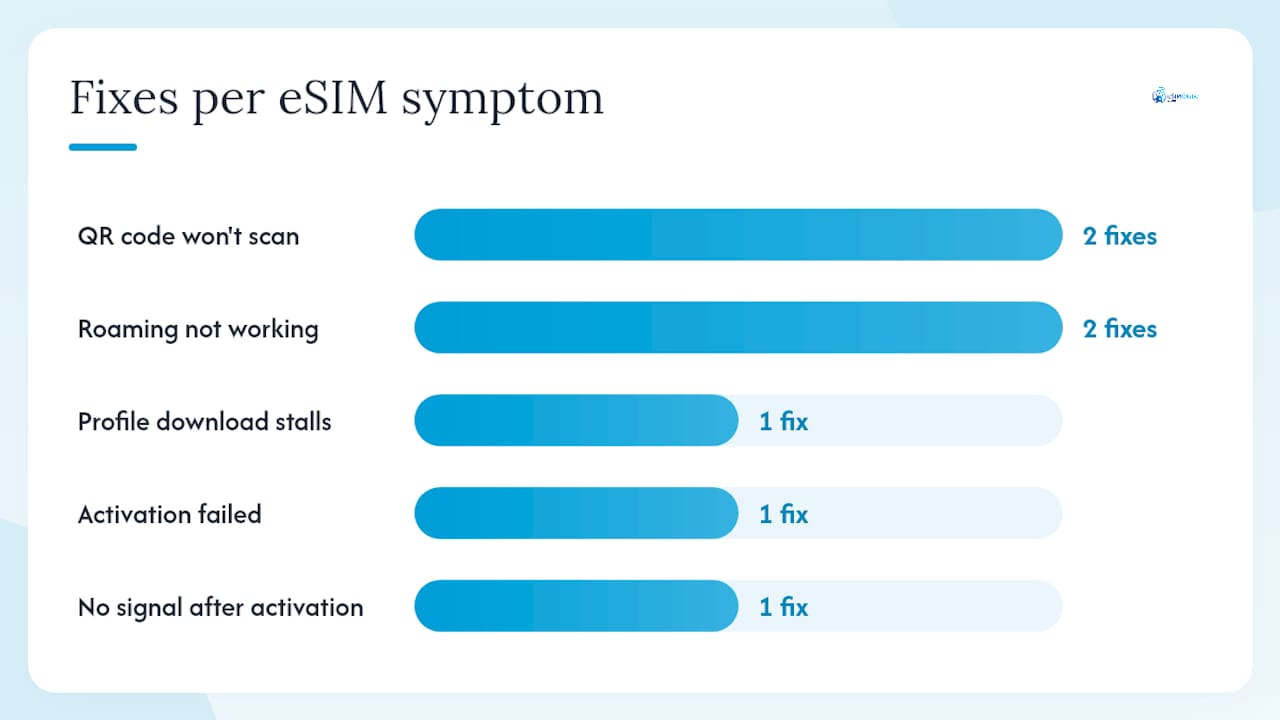
- QR code won’t scan: Save the QR image to Gallery, then use “Scan from Gallery” in the Add mobile plan screen. Alternatively, enter the SM-DP+ address and activation code manually.
- Profile download fails or stalls: Switch to a different Wi-Fi network. Corporate or hotel networks sometimes block eSIM provisioning ports.
- “Activation failed” error: The code may have expired or already been used. Contact your provider to reissue a fresh QR code.
- No signal after activation: Check APN settings. Go to Settings → SIM card & mobile networks → [eSIM profile] → Access point names. Your provider’s APN details are usually in their setup email.
- SIM 2 stopped working after eSIM activation: This is expected behavior on many Xiaomi devices. Xiaomi’s support documentation confirms that enabling eSIM disables the SIM 2 slot on affected models.
- Roaming not working: Toggle airplane mode off and on to force a network re-registration. If that fails, go to Settings → SIM card & mobile networks → [eSIM profile] → Roaming and confirm it is enabled.
Step-by-step recovery for a stuck activation:
- Toggle airplane mode on, wait 10 seconds, toggle off.
- Delete the failed eSIM profile: Manage eSIM → [profile] → Delete.
- Restart the device.
- Request a new QR code or activation code from your provider.
- Retry the installation with a fresh code on a stable Wi-Fi connection.
When to contact support: If the profile downloads but shows no signal after 15 minutes and APN settings are correct, contact your eSIM provider. Have your IMEI, EID, model SKU, and the exact error message ready. Esimglobe’s 24/7 support team can reissue codes and verify provisioning status. For carrier-specific issues, your carrier’s tech support line needs the same information.
How to manage, switch, and remove eSIM profiles on Xiaomi
Once you have one or more eSIM profiles installed, managing them is straightforward from the same Settings path.
- Go to Settings → SIM card & mobile networks → Manage eSIM.
- Tap a profile to see options: Enable, Disable, Set as default, Rename, Delete.
- To switch active profiles, disable the current one and enable the new one.
- To set a default for data, calls, or messages: Settings → SIM card & mobile networks → Default SIM → select the eSIM profile for each function.
- Rename profiles to something recognizable (e.g., “Esimglobe EU,” “Carrier US”) so switching is fast.
- To remove a profile permanently, tap Delete. This removes the profile from your device but does not automatically cancel the plan with your provider. Contact the provider separately if you need to deprovision the plan on their end.
Security practices:
- Save a copy of your QR code or activation code in a secure location (a password manager or encrypted cloud folder) before you install it. Most providers issue a code only once.
- Enable device lock and biometric authentication. A lost or stolen Xiaomi with an active eSIM profile can be used for data until you contact your provider to deprovision it.
- If your device is lost or stolen, contact your eSIM provider immediately to suspend or delete the profile on their network side. Local deletion alone does not prevent the profile from being used if someone bypasses your lock screen.
Pro Tip: Xiaomi’s Manage eSIM screen shows each profile’s status (active/inactive) at a glance. If you travel frequently, keep your home carrier profile disabled and your travel eSIM active during the trip, then swap back on return. No physical SIM swapping required.
Key Takeaways
Many Xiaomi phones support eSIM on global SKUs, but CN variants typically do not; check your EID in Settings and verify your IMEI with your U.S. carrier before purchasing any plan.
| Point | Details |
|---|---|
| Check your SKU first | CN variants of Xiaomi phones usually lack eSIM; global SKUs are the ones that support it. |
| Find eSIM in Settings | Go to Settings → SIM card & mobile networks → look for “Use eSIM” or an EID number. |
| SIM 2 caveat | Activating eSIM disables the physical SIM 2 slot on many Xiaomi models — plan accordingly. |
| U.S. carrier verification | Confirm your IMEI is approved for eSIM provisioning with your carrier before buying a plan. |
| Esimglobe for instant access | Esimglobe delivers prepaid eSIM QR codes by email for 170+ countries, with no account required. |
The part most Xiaomi users skip
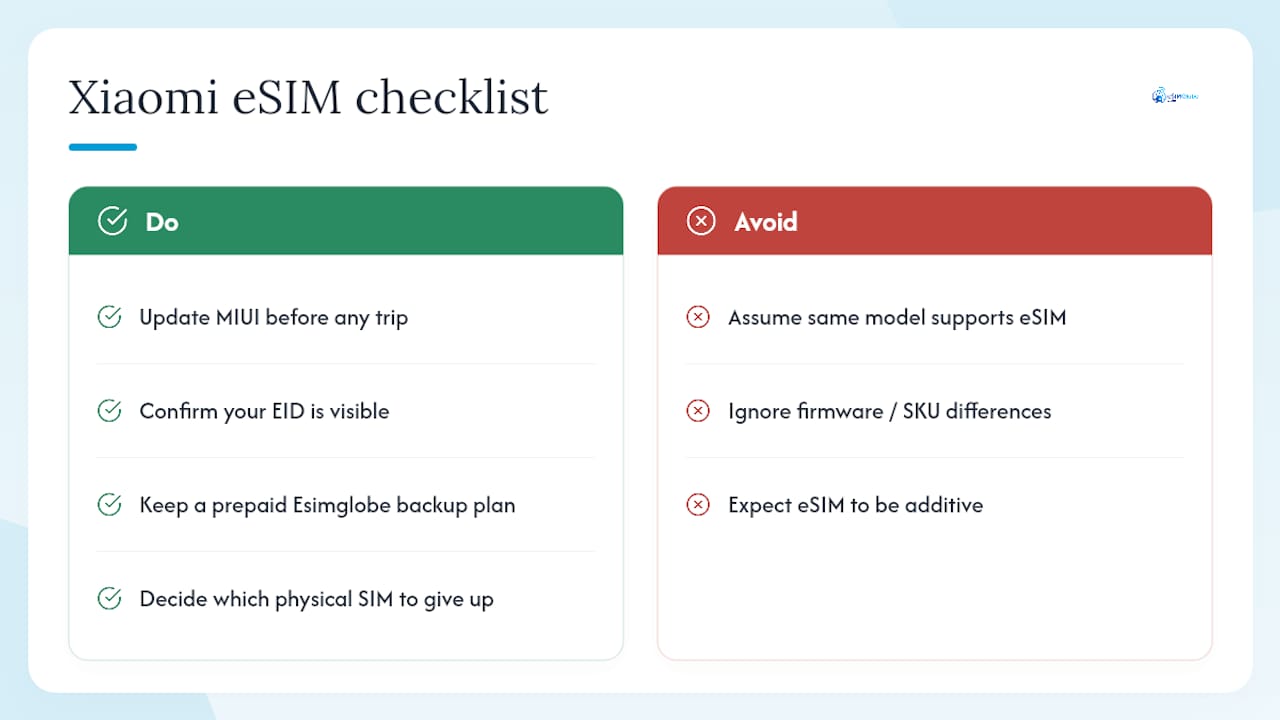
The eSIM feature on Xiaomi phones is genuinely useful, but the SKU problem catches more people than it should. The phone family name means very little here. A Xiaomi 13 Pro bought from a Chinese retailer and a Xiaomi 13 Pro bought through a global distributor are functionally different products when it comes to eSIM. The hardware may be identical, but the firmware determines what shows up in Settings, and CN firmware consistently omits the eSIM menu.
The second thing people underestimate is the SIM 2 trade-off. For anyone running a dual-SIM setup, activating an eSIM is not additive — it replaces one of your physical slots. That is a real operational change, not a footnote. If you rely on two active numbers, you need to decide which physical SIM you are willing to give up before you activate.
The practical recommendation: update MIUI before any trip, confirm your EID is visible, and keep a prepaid Esimglobe plan as a backup data option alongside your primary carrier line. For business travelers, the eSIM for business travelers guide on Esimglobe covers the cost and logistics case in more depth.
Esimglobe prepaid eSIMs for Xiaomi users
Carrier eSIM activations work well for permanent U.S. lines, but they require account verification, IMEI whitelisting, and sometimes days of waiting. Esimglobe cuts that process to minutes: select a country, pay, and receive your QR code by email. No contract, no account tie-in, no carrier approval required.
What Esimglobe offers:
- Prepaid data plans for 170+ countries, delivered instantly by email
- 4G/5G coverage depending on destination
- Multiple currencies (USD, EUR, GBP, and more)
- 24/7 customer support for activation issues
- No subscription — pay per plan, use what you need
How to install on your Xiaomi:
- Purchase your plan at esimglobe.com.
- Open the QR code from your confirmation email.
- On your Xiaomi: Settings → SIM card & mobile networks → Use eSIM → Manage eSIM → Add mobile plan → Scan QR.
- Label the profile and set it as your default data SIM.
For digital nomads and long-term travelers, Esimglobe’s long-term traveler eSIM guide covers multi-country planning and profile management. Browse available plans at esimglobe.com and have your QR code ready before your next trip.
Authoritative sources and further reading
- How can I activate eSIM on Xiaomi phones? — Xiaomi Support
- How to activate the eSIM card? — Xiaomi Support FAQ
- QR code/manual eSIM activation guidance — Xiaomi Support
- Xiaomi eSIM support hub — Xiaomi Global
- Xiaomi phones with eSIM — GSMArena
- Xiaomi eSIM setup guide — Xiaomi for All
FAQ
Does Xiaomi support eSIM?
Yes, many recent Xiaomi phones support eSIM on their global SKUs, including the Xiaomi 12, 13, and 14 series and select Redmi and POCO models. Chinese domestic (CN) variants typically do not include eSIM support.
How do I add an eSIM on my Xiaomi phone?
Go to Settings → SIM card & mobile networks → Use eSIM → Manage eSIM → Add mobile plan, then scan your provider’s QR code or enter the SM-DP+ address and activation code manually.
Can I use a Xiaomi phone in the U.S. with eSIM?
Yes, if your Xiaomi is a global SKU, carrier-unlocked, and your IMEI is approved by your U.S. carrier for eSIM provisioning. Verify band compatibility and carrier IMEI whitelisting before purchasing a plan.
How do I get an eSIM for my Xiaomi?
You can activate one through a U.S. carrier account (requires account verification and IMEI approval) or purchase a prepaid plan from Esimglobe at esimglobe.com, which delivers a QR code by email instantly with no account required.