






















TL;DR:
- A travel eSIM for China routes cellular data through international gateways, bypassing the Great Firewall and enabling access to apps like Google and WhatsApp without a VPN. Its effectiveness depends on activating the plan before arrival, enabling data roaming, and keeping your home SIM active for SMS verification, as WiFi requires a VPN. Unlike local SIMs, travel eSIMs are purchased online and do not require in-country registration or physical cards.
A travel eSIM for China is a digital SIM profile that routes your mobile data through international gateways outside mainland China, giving you access to Google, WhatsApp, and Instagram without a VPN. This works because international roaming traffic bypasses the Great Firewall entirely. The mechanism is not a loophole or a special app feature. It is standard international roaming technology, and it is the single most important reason to choose a travel eSIM over a local Chinese SIM for your trip. Esimglobe offers China eSIM plans built on this roaming infrastructure, so you can buy, install, and activate your plan before you board.
How does an eSIM China no VPN connection actually work?
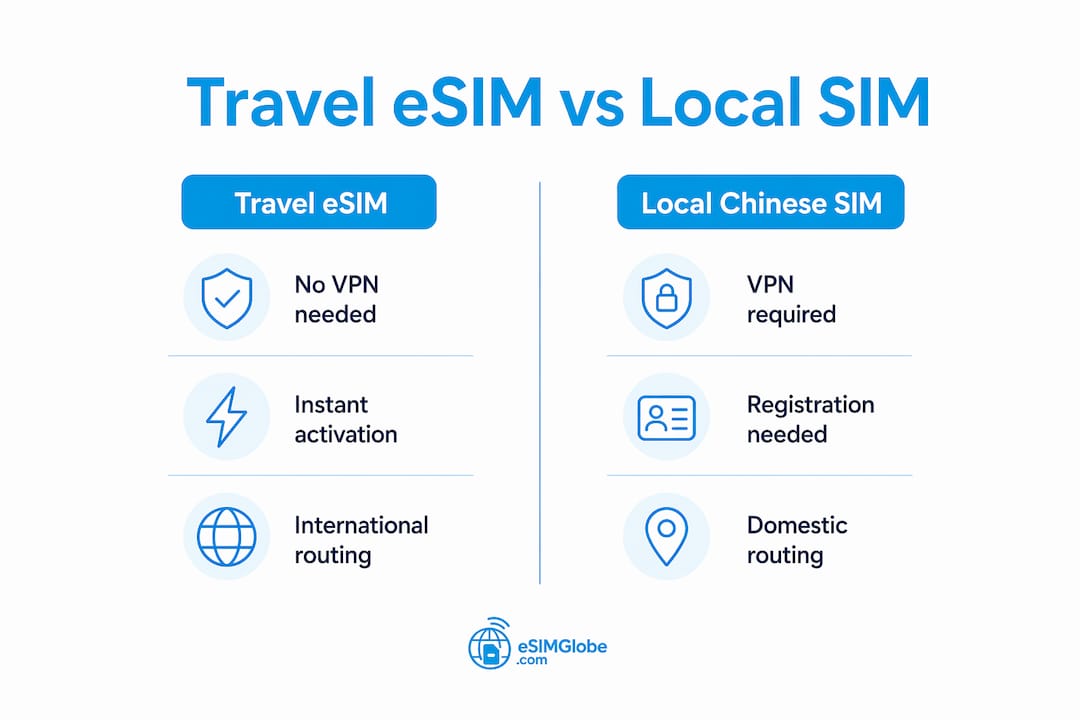
Travel eSIMs bypass the Great Firewall through international roaming, not through any built-in VPN software. When your phone connects to a Chinese tower using a travel eSIM, the data does not enter the mainland Chinese internet backbone. Instead, it routes through an international gateway, typically in Hong Kong or Singapore, and from there to the open internet. That routing difference is everything.
Local Chinese SIMs work the opposite way. Their data travels through domestic network infrastructure, which sits behind the Great Firewall. That is why local SIM users need a VPN to reach Google or WhatsApp. Travel eSIM users do not, because their traffic never touches the firewall at all.
The eSIM itself has no VPN built into it. There is no encryption layer, no tunnel, and no special software running in the background. The freedom comes entirely from where the data is routed. Hong Kong and Singapore serve as the standard roaming gateway hubs for most international eSIM providers, and both sit outside Chinese jurisdiction for internet filtering purposes.
One critical distinction: this no-VPN benefit applies only to your cellular data connection. If you connect to a local WiFi network in a hotel, café, or airport, that traffic goes through the Chinese domestic gateway and remains filtered by the firewall. On WiFi, you are back to needing a VPN for blocked apps. Your eSIM cellular data is the clean connection. Protect it and use it.
Pro Tip: Turn off WiFi on your phone when you need to access blocked apps. Force your device to use cellular data from your eSIM, and the Great Firewall becomes irrelevant.
How to activate your China travel eSIM before you land
Activation order matters more for China than for almost any other destination. The steps below reflect the correct sequence for a smooth setup.
-
Purchase your eSIM plan online before departure. Esimglobe delivers eSIM profiles digitally and instantly. You receive a QR code by email. No physical SIM, no post office, no waiting.
-
Install the eSIM profile on your home WiFi. Open your phone’s settings, scan the QR code, and follow the prompts to add the new cellular plan. This takes two to three minutes on a stable connection. Do not wait until you land. Installing after arrival on Chinese WiFi creates real problems: airport networks are slow, often require a Chinese phone number for SMS verification, and are themselves filtered by the Great Firewall.
-
Set the eSIM as your data line. In your phone’s cellular settings, assign the travel eSIM as the default data line. Keep your home SIM assigned to calls and SMS. Most modern dual-SIM phones handle this in a single settings screen.
-
Enable Data Roaming on the eSIM line. This step is the most commonly missed. Failing to enable data roaming accounts for the large majority of “eSIM not working” support requests. Go to cellular settings, select the eSIM line, and confirm that Data Roaming is switched on.
-
Land in China and connect. Your phone will search for a local carrier and register as a roaming device. Within a few minutes of landing, you should have a signal and full open internet access via cellular data.
-
Keep your home SIM active in the device. Do not remove it. Travel eSIMs are data-only plans. They cannot receive SMS messages. Your home SIM handles two-factor authentication codes, which you will need for apps like Alipay, WeChat, and any banking service requiring SMS verification.
Pro Tip: Download a VPN app to your phone before you leave home, even if you plan to rely on your eSIM’s cellular data. You will need it for hotel WiFi, and you cannot download VPN apps from inside China without one already installed.
Why a travel eSIM beats a local Chinese SIM for VPN-free access
The core difference between a travel eSIM and a local Chinese SIM is where your data goes after it leaves the tower. That single factor determines whether you need a VPN.
Data routing and the Great Firewall
A travel eSIM registers on the Chinese network as a roaming line. The carrier sends that traffic to an international gateway before it reaches the broader internet. A local SIM routes data through the domestic Chinese backbone, where the Great Firewall inspects and filters it. Travel eSIM users access Google, WhatsApp, and Instagram without a VPN. Local SIM users cannot.
Convenience before you travel
Travel eSIMs are available for purchase online and install in minutes from anywhere in the world. You activate the plan on your home WiFi, and the profile lives on your phone’s embedded chip. There is no physical card to carry, lose, or swap. Local Chinese SIMs require an in-person purchase at a carrier store or airport kiosk, often with a passport and real-name registration requirement under Chinese telecommunications law.
No registration requirements
Chinese telecommunications regulations require local SIM buyers to register with a valid ID. That process can take time and creates a paper trail. Travel eSIMs from international providers like Esimglobe require no in-country registration. You buy online, install at home, and travel with full connectivity already configured.
Cost and coverage
Travel eSIM plans vary by data volume and duration. Esimglobe lists eSIM plans for China covering short trips and extended stays. Coverage depends on the roaming partner carrier in China, so checking the supported networks before purchase is worth the two minutes it takes. Speed on roaming lines is generally strong in major Chinese cities, though rural coverage can vary by carrier.
Here is a direct comparison of the two options:
| Feature | Travel eSIM | Local Chinese SIM |
|---|---|---|
| VPN required for Google/WhatsApp | No | Yes |
| Purchase location | Online, before travel | In-person in China |
| ID registration required | No | Yes |
| Activation time | Minutes, at home | 15–60 minutes at store |
| SMS reception | No (data only) | Yes |
| Works on hotel WiFi without VPN | No | No |
The table makes one thing clear: the only category where a local SIM wins is SMS reception, and you solve that by keeping your home SIM active alongside the eSIM.
Key nuances every traveler must know before using an eSIM in China
Understanding the limits of your eSIM setup prevents frustration on the ground. These are the practical realities that most travelers miss until they are already in Shanghai or Beijing.
-
WiFi is always filtered. Every local WiFi network in China, including hotel networks, routes through the domestic internet backbone. The no-VPN benefit applies only to cellular data. The moment you switch to WiFi, the Great Firewall applies. Plan accordingly.
-
Device compatibility is not universal. Some iPhone models manufactured specifically for the mainland Chinese market do not support eSIM functionality. Check your device model and confirm “No SIM restrictions” status in your settings before purchasing any eSIM plan. Android compatibility varies by manufacturer and region as well.
-
Install before you land. Travelers who try to install their eSIM after arriving in China face a specific problem: downloading an eSIM profile requires a stable, unrestricted internet connection. Chinese airport WiFi is slow, often requires a local phone number for access, and is filtered. Installing at home on stable internet is the only reliable approach.
-
Keep your home SIM in the device. Travel eSIMs provide data only. Removing your home SIM cuts off SMS reception, which locks you out of two-factor authentication for banking apps, WeChat, Alipay, and any other service that sends verification codes by text.
-
Have a VPN installed before departure. Even with a perfect eSIM setup, you will encounter WiFi situations where you want unrestricted access. A VPN app installed before you leave gives you that option. You cannot download most VPN apps from inside China because the App Store and Google Play are filtered on local networks.
Pro Tip: Check your phone’s IMEI or model number against your carrier’s eSIM compatibility list before buying. For iPhones, go to Settings > General > About and look for “No SIM restrictions.” If you see a carrier lock, resolve it before your trip.
Travelers who consult a travel concierge service before a China trip often get this advice directly: sort your connectivity before you land, not after. It is the one preparation step that pays off immediately on arrival.
Key Takeaways
A travel eSIM for China routes cellular data through international gateways in Hong Kong or Singapore, bypassing the Great Firewall and eliminating the need for a VPN on cellular connections.
| Point | Details |
|---|---|
| Routing is the key difference | Travel eSIMs send data through international gateways, not the Chinese domestic backbone. |
| Activate before you land | Install your eSIM profile at home on stable WiFi to avoid Chinese network restrictions. |
| Enable data roaming immediately | Failing to turn on data roaming is the top cause of eSIM connectivity failures in China. |
| WiFi still requires a VPN | The no-VPN benefit applies only to cellular data, not hotel or café WiFi networks. |
| Keep your home SIM active | Travel eSIMs are data-only; your home SIM handles SMS and two-factor authentication codes. |
What I’ve learned from watching travelers get this wrong
Most travelers who struggle with connectivity in China make the same two mistakes. They install their eSIM at the airport after landing, and they remove their home SIM to “keep things simple.” Both decisions create problems that are entirely avoidable.
The airport installation failure is the more frustrating one. A traveler lands in Beijing, opens the QR code email, and tries to scan it on airport WiFi. The download stalls. The verification step requires a Chinese phone number. The eSIM profile never installs. They spend their first two hours in China troubleshooting connectivity instead of getting to their hotel. This happens because the technical reality of Chinese WiFi is not obvious until you are standing in it.
The home SIM removal problem shows up a day or two later. The traveler gets a WeChat message asking for SMS verification, or tries to pay with Alipay and needs a code. No home SIM means no SMS means no access. For a trip where digital payments are the norm and cash is increasingly rare, that is a serious problem.
The fix for both is preparation done at home, before departure. Install the eSIM on your own WiFi. Leave your home SIM in the device. Enable data roaming. Test that cellular data works before you need it. Travelers who follow that sequence arrive in China with a working connection and spend zero time troubleshooting.
One more thing worth saying directly: the no-VPN benefit is real, but it is not magic. It is international roaming technology doing exactly what it was designed to do. Understanding that makes you a better-prepared traveler and helps you set realistic expectations about what works on cellular versus WiFi.
— daniele
Esimglobe China eSIM plans: ready before you board
Esimglobe provides China eSIM plans with instant digital delivery, no physical SIM required, and no in-country registration. You purchase online, receive your QR code by email, and install the profile on your home WiFi before departure.

Plans cover a range of data volumes and trip durations, with pricing listed in USD, EUR, and GBP. Because Esimglobe’s plans run on international roaming infrastructure, your cellular data routes through gateways outside mainland China, giving you open access to Google, WhatsApp, and other blocked apps without a VPN. Check the Esimglobe promo code page for current discounts before you buy. For broader travel data tips, the eSIM travel guide covers setup best practices for destinations worldwide.
FAQ
Does an eSIM for China really work without a VPN?
Yes. Travel eSIMs route cellular data through international gateways in Hong Kong or Singapore, bypassing the Great Firewall. This gives you direct access to Google, WhatsApp, and Instagram on cellular data without any VPN.
Do I need a VPN on hotel WiFi even with a China eSIM?
Yes. Local WiFi networks in China are filtered by the Great Firewall regardless of your SIM type. The no-VPN benefit applies only to cellular data routed through your travel eSIM.
When should I install my China eSIM?
Install your eSIM profile at home before departure on a stable WiFi connection. Installing after arrival in China is unreliable because airport WiFi is slow, filtered, and often requires a local phone number for access.
Can all phones use a travel eSIM in China?
Not all devices support eSIM. Some iPhone models made for the mainland Chinese market lack eSIM capability. Check your device model and confirm “No SIM restrictions” in your settings before purchasing a plan.
Why should I keep my home SIM in my phone while using a China eSIM?
Travel eSIMs provide data only and cannot receive SMS messages. Your home SIM handles two-factor authentication codes for banking apps, WeChat, and Alipay, which require SMS verification to function.