






















TL;DR:
- eSIM technology embedded in iPhones allows travelers to add data plans quickly without physical SIM cards, saving time and money. Compatible models from XS onward support multiple profiles and quick activation through QR codes or apps, offering global coverage in over 190 countries. Preparing and downloading your eSIM profile at home ensures seamless connectivity abroad and helps avoid costly roaming charges.
You no longer need to hunt down a local SIM card at the airport or pay your carrier’s outrageous roaming rates. The eSIM for iPhone changes all of that. It is a digital SIM built directly into your device, letting you add a data plan in minutes without touching a physical card. For international travelers, this shift is significant. This guide covers everything you need: how eSIM works on iPhone, how to activate it, which plans to choose for travel, and how to avoid the pitfalls that catch most first-timers off guard.
Table of Contents
- Key takeaways
- How eSIM works on iPhone
- How to activate your eSIM on iPhone
- Choosing the best eSIM plans for travel
- Practical tips for using eSIM abroad
- The future of eSIM for iPhone users
- My take on eSIM for iPhone travel
- Get started with Esimglobe eSIM plans
- FAQ
Key takeaways
| Point | Details |
|---|---|
| iPhone eSIM compatibility | Most iPhone models from the XS onward support eSIM, with newer models storing multiple profiles. |
| Activation methods vary | You can activate via QR code, carrier app, carrier link, or manual entry depending on your provider. |
| Unlocked iPhones offer more options | An unlocked iPhone lets you use eSIM plans from carriers in 190+ countries for significant cost savings. |
| Plan ahead before you travel | Confirm your activation method and download your eSIM profile before you leave home. |
| Esimglobe simplifies global access | Esimglobe provides flexible, affordable eSIM plans for travelers without requiring a physical SIM swap. |
How eSIM works on iPhone
Your iPhone has a small chip embedded in its hardware. That chip is the eSIM, and it functions exactly like a physical SIM card except that you program it digitally. According to Apple, the eSIM is a digital SIM built into the iPhone that supports up to eight or more SIM profiles, so you can store plans from multiple carriers without ever inserting a card.
iPhone models that support eSIM
eSIM support on iPhone starts with the iPhone XS, XS Max, and XR released in 2018. Every model since then supports eSIM, including the entire iPhone 12, 13, 14, 15, and 16 series. iPhone 14 models sold in the United States are eSIM-only, meaning they have no physical SIM card slot at all.
Here is what eSIM on iPhone actually lets you do:
- Store multiple carrier profiles. You can hold several eSIM profiles on one device, though only a limited number can be active simultaneously depending on the model.
- Use Dual SIM. Most iPhones support one physical SIM and one eSIM active at the same time. iPhone 14 and later U.S. models support two active eSIMs simultaneously.
- Switch between lines quickly. You can toggle between a home carrier and a travel plan directly from Settings without swapping anything physically.
- Keep your home number active. Travelers often run a travel data eSIM alongside their home number, so calls and texts from family still reach them.
- Protect against loss or theft. Because the eSIM is embedded, there is no physical card to lose, and your data plans are tied to your Apple ID account.
Pro Tip: Before your trip, check Settings > General > About on your iPhone. If you see an “Available SIM” or “eSIM” line, your device supports it. If your phone is carrier-locked, contact your carrier to unlock it before purchasing any travel eSIM plan.
The flexibility this technology gives travelers is real and measurable. Unlocked iPhones can connect to eSIM carriers in more than 190 countries, which means you are never forced to rely on a single overpriced roaming plan again.
How to activate your eSIM on iPhone
Activation is where most travelers hit a wall. The process itself is not complicated, but the steps differ based on your carrier and when you activate. Here is how it works across the most common scenarios.
Activating during iPhone setup
When you turn on a new iPhone or reset it, iOS walks you through a setup assistant. During that flow, the phone may detect an eSIM associated with your carrier account and prompt you to activate it automatically. This is the fastest path if your carrier supports it.
eSIM profile downloads may happen in the background during initial device setup. Connectivity appears once activation completes, which can take a few minutes. Do not exit setup or turn off Wi-Fi mid-process. That is the most common reason activation fails at this stage.
Activating after setup: four methods
If you are adding a travel eSIM to a phone you already use, here is the standard process:
- QR code scanning. Your eSIM provider sends you a QR code by email or displays it on their website. Go to Settings > Cellular > Add eSIM > Use QR Code. Point your camera at the code and confirm. This is the most common method for travel eSIM providers including Esimglobe.
- Carrier app activation. Some major carriers have an app that handles the entire process. You download the app, log in, and activate directly without a QR code.
- Carrier link. Your provider emails you a direct link. Tap the link on your iPhone and iOS walks you through activation automatically.
- Manual entry. If you have the SM-DP+ address and activation code from your provider, go to Settings > Cellular > Add eSIM > Enter Details Manually and type them in. This is the fallback when a QR code is not available.
- eSIM Quick Transfer. If you are switching from an older iPhone to a new one, Quick Transfer lets you move your number digitally without contacting your carrier. Go to Settings > Cellular and follow the transfer prompts. This works with iOS 26 and supported carriers.
Pro Tip: Download your travel eSIM profile while you still have Wi-Fi access at home. Once you land abroad, you may not have a stable connection to complete activation, which defeats the entire purpose of the eSIM.
Activation methods differ significantly by carrier. Before you travel, confirm exactly which method your chosen provider uses. Printing or screenshotting your QR code is also smart backup in case your email is inaccessible on arrival. For a complete walkthrough, Esimglobe has a detailed eSIM activation guide that covers every method step by step.
Choosing the best eSIM plans for travel
Not every eSIM plan is worth your money. The right plan depends on where you are going, how long you will be there, and how much data you actually need.
What to look for in a travel eSIM plan
- Coverage area. Some plans cover a single country. Others cover entire regions like Europe, Southeast Asia, or North America. Match the plan to your itinerary.
- Data limits and speeds. Many budget plans throttle speeds after a certain threshold. Check whether the plan offers full-speed data or drops to 2G after a limit.
- Validity period. Plans range from 7 days to 30 days or more. Do not pay for a 30-day plan if you are traveling for a week.
- Voice and SMS inclusion. Most travel eSIM plans are data-only. If you need calls or texts, confirm whether those are included or whether you can use apps like WhatsApp instead.
- Activation window. Some plans start their countdown from the moment you activate the eSIM. Others start from your first data use. The second type gives you more flexibility.
Comparing popular plan types
| Plan type | Coverage | Best for | Activation method | Typical price range |
|---|---|---|---|---|
| Single-country eSIM | One country | Short trips to one destination | QR code or app | $5 to $15 for 7 days |
| Regional eSIM | Multi-country area | Multi-stop trips in one region | QR code | $10 to $30 for 7 to 15 days |
| North America pass | U.S., Mexico, Canada | North American travel | QR code or carrier app | $15 to $40 |
| Global eSIM | 100+ countries | Frequent travelers or nomads | QR code | $25 to $60+ |
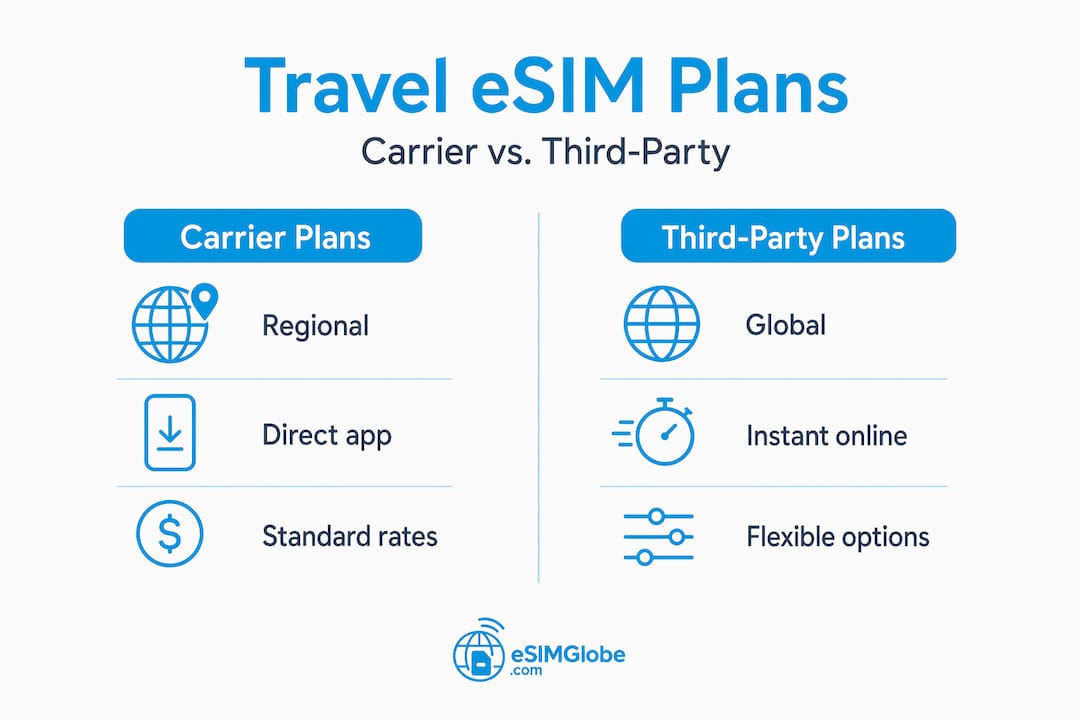
T-Mobile Prepaid is one example of a carrier-specific regional plan. They launched a U.S. Pass eSIM offering unlimited data, talk, and text across the U.S., Mexico, and Canada with hotspot data included. It is a solid option for North American travel but has no coverage outside those three countries.
For travelers planning trips that span multiple regions or who want more flexible pricing and easy online purchase, third-party providers like Esimglobe often offer better value than locking into a single carrier plan. You can compare global eSIM options to find the right match for your route before you book anything.
Pro Tip: If your iPhone is carrier-locked, your travel eSIM will not work. Call your home carrier at least a week before your trip and request an unlock. Most carriers will do this for free once your contract obligations are met.
Prepaid local eSIM plans abroad consistently cost less than roaming on a home carrier plan. The savings on a two-week international trip can easily exceed $100 compared to standard roaming rates.
Practical tips for using eSIM abroad
Getting the eSIM activated is only half the job. Using it well throughout your trip requires a bit of planning.
- Label your eSIM profiles clearly. When you store multiple eSIM profiles, iPhone lets you name each one. Use names like “Home AT&T” and “Europe Travel” so you never activate the wrong line by accident.
- Set your default line for data. Go to Settings > Cellular > Cellular Data and select which line handles data. During travel, point this to your travel eSIM so your home plan does not rack up roaming charges in the background.
- Turn off data roaming on your home line. Even with a travel eSIM active, your home plan can attempt to connect. Go to Settings > Cellular, tap your home plan, and toggle off Data Roaming.
- Keep your home number reachable for calls. With Dual SIM, you can keep your home number active for incoming calls while your travel eSIM handles data. This prevents missed calls from banks, employers, or family who only have your home number.
- Check coverage before you land. Not every provider covers every destination equally. Verify carrier coverage for your specific countries before purchasing a plan, not after.
Pro Tip: If your eSIM shows “No Service” after landing, go to Settings > Cellular > your travel eSIM profile and toggle it off, then back on. If that does not work, try resetting network settings under Settings > General > Transfer or Reset iPhone > Reset > Reset Network Settings. This clears cached connection preferences without deleting your eSIM profile.
Delayed eSIM activation is normal and not a sign of failure. Connectivity can take several minutes to appear after the profile downloads. Staying connected to Wi-Fi while this processes keeps the activation moving.

For more practical guidance on staying connected abroad without overspending, Esimglobe maintains a solid resource on eSIM travel tips that covers real-world scenarios travelers face.
The future of eSIM for iPhone users
eSIM adoption is accelerating. More carriers globally are adding eSIM support, activation times are getting faster, and the range of prepaid short-term plans has expanded significantly in 2025 and 2026.
The shift toward eSIM-only iPhones, which Apple began with U.S. iPhone 14 models, signals where the industry is heading. Physical SIM slots may disappear from international models within the next few product cycles. For travelers, this makes understanding eSIM not optional but necessary.
“The global eSIM market is projected to grow significantly through 2030, driven by increased smartphone adoption and demand from international travelers seeking flexible, prepaid connectivity without physical SIM constraints.”
Prepaid eSIM plans have also become more competitive. Regional passes now cover dozens of countries under a single plan, and activation through QR code takes under two minutes on a modern iPhone. The friction that once made eSIMs feel like a specialist technology has largely disappeared.
Esimglobe sits at the front of this shift. The platform is purpose-built for travelers who want transparent pricing, fast activation, and coverage across the destinations that matter. Unlike single-carrier plans that lock you into one network, Esimglobe gives you options across countries and regions without requiring a carrier relationship or contract.
My take on eSIM for iPhone travel
I have watched travelers spend 45 minutes at an airport kiosk trying to buy a local SIM card, pay double the fair price, and still end up with a plan that stops working three days later. It is an entirely avoidable problem.
In my experience, the single biggest mistake travelers make with eSIM is treating it as something to figure out upon arrival. They land, they need connectivity, and then they start reading about activation. That is backwards. The activation method, whether QR code or app-based, needs to be confirmed and ready before you leave your house.
I have also seen the difference between travelers who use eSIM providers built for travelers versus those who rely on their home carrier’s roaming plans. The cost gap is real. The control is real. Being able to switch plans mid-trip when coverage does not deliver is something roaming plans simply do not offer.
My recommendation for most international travelers: buy your eSIM profile before your trip, download it at home on Wi-Fi, and set it as your default data line before boarding. Keep your home line active for calls if you need it. When you land, you have data waiting. No kiosk, no wait, no surprise bill.
The platforms that make this easiest are the ones worth using. Based on what I have seen, Esimglobe handles the process more cleanly than most, with clear pricing, fast delivery of activation codes, and coverage that actually matches what they advertise.
— daniele
Get started with Esimglobe eSIM plans
Esimglobe makes it straightforward for iPhone users to purchase, activate, and manage eSIM plans without dealing with carrier stores or roaming fees.
For travelers heading to North America, the North America 3-area eSIM covers the U.S., Canada, and Mexico with flexible data options starting at 1GB for 7 days. Activation is QR code-based, which means you can download the profile at home and have data ready the moment you land. Esimglobe also supports a wide range of other regional and country-specific plans, so whether your next trip is to Europe, Asia, or beyond, you can find a plan that fits your itinerary and budget. No contracts, no physical cards, and no surprise charges.
FAQ
Which iPhone models support eSIM?
eSIM is supported on iPhone XS, XS Max, XR, and all models released after 2018, including the full iPhone 12 through 16 series. iPhone 14 and later U.S. models are eSIM-only with no physical SIM slot.
How do I activate an eSIM on my iPhone?
Go to Settings > Cellular > Add eSIM and choose your activation method: QR code scan, carrier app, direct link, or manual entry. Activation methods vary by carrier, so confirm yours before traveling.
Can I use two eSIMs at the same time on iPhone?
Yes. iPhone 13 and later support two active eSIMs simultaneously. You can run a home plan for calls and a travel eSIM for data at the same time using the Dual SIM feature in Settings > Cellular.
What should I do if my eSIM is not activating?
Stay connected to Wi-Fi and wait a few minutes. Background activation can take time to complete. If it still fails, toggle the eSIM profile off and on in Settings > Cellular, or reset network settings.
Is eSIM cheaper than roaming for international travel?
In most cases, yes. Prepaid regional eSIM plans from providers like Esimglobe cost significantly less than standard carrier roaming rates, often saving travelers over $100 on a two-week international trip.