






















TL;DR:
- Using a dedicated Bahamas eSIM ensures consistent local network coverage and avoids costly roaming fees, especially across multiple islands. Buying and activating the eSIM before departure simplifies setup, while choosing providers with local partnerships offers better reliability and support. Data-only plans are standard, so VoIP apps are essential for calls and messages during your trip.
Most travelers assume their regular carrier plan or a US-based eSIM will work fine once they land in the Bahamas. It usually doesn’t. You’re either hit with steep roaming fees or stuck searching for Wi-Fi at every resort bar. Getting a dedicated esim for bahamas before your trip solves all of that. This guide covers everything you need: how eSIM technology works for Bahamas travel, which providers are worth your money, how to buy and activate your plan, and how to stay connected across every island on your itinerary.
Table of Contents
- Key takeaways
- What an eSIM is and why it matters for Bahamas trips
- Comparing the best eSIM providers for the Bahamas
- How to buy, install, and activate your Bahamas eSIM
- Tips for maximizing connectivity in the Bahamas
- Common eSIM myths and troubleshooting for Bahamas travel
- My take on picking the right eSIM for the Bahamas
- Get connected with Esimglobe before your Bahamas trip
- FAQ
Key takeaways
| Point | Details |
|---|---|
| Buy before you fly | Purchase and install your Bahamas eSIM before departure so data is ready the moment you land. |
| Local partnerships matter | Providers with direct Caribbean network agreements deliver faster, more consistent coverage than roaming-based plans. |
| Data-only plans are standard | Most eSIM plans for the Bahamas are data-only; use VoIP apps for calls and messages. |
| Check device compatibility first | eSIMs work on iPhone XS and newer, Pixel 4+, and Samsung S20+; locked devices may not qualify. |
| Esimglobe leads the field | Esimglobe offers local network partnerships, competitive pricing, and strong customer support for Bahamas travelers. |
What an eSIM is and why it matters for Bahamas trips
An eSIM is a digital SIM card built directly into your phone. There’s no plastic card to swap. Instead, you download a carrier profile remotely and your device connects to a local network instantly.
The difference from a physical SIM is practical, not just technical. With a physical SIM, you need to find a store, buy the card, swap hardware, and hope the plan works on arrival. With an eSIM, the whole process happens online before you even pack your bag.
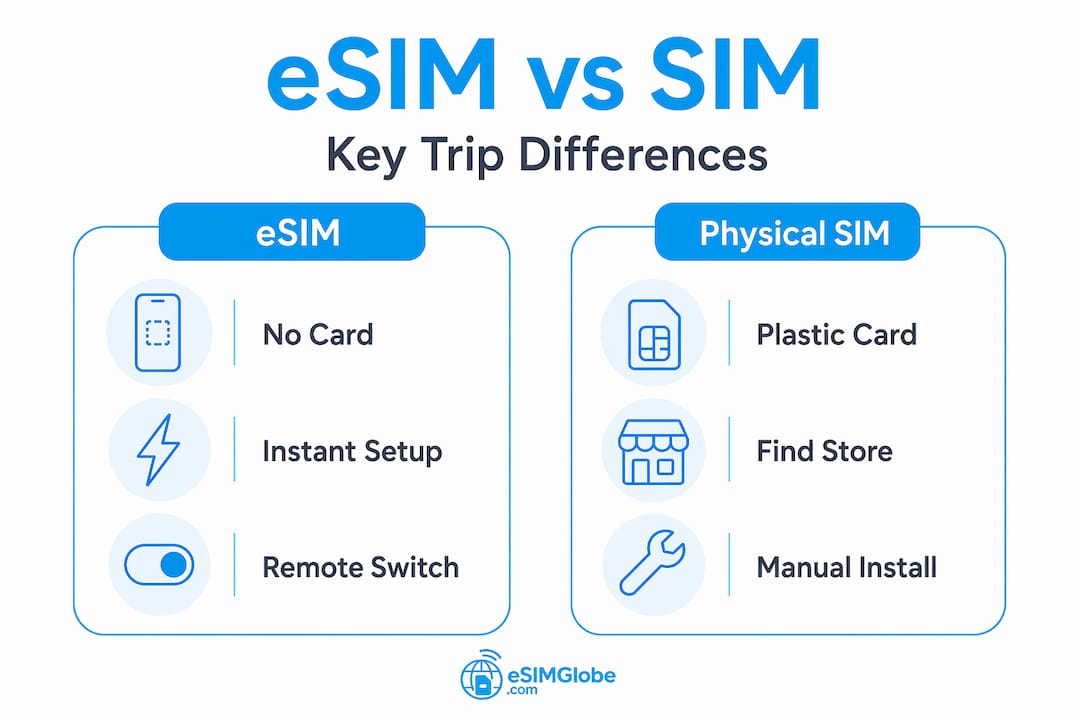
Modern device compatibility covers iPhone XS and newer, Google Pixel 4+, and Samsung S20+ models, with most flagship phones released in the last four years supporting the technology. Carrier-locked phones are the main exception and may not support eSIM use at all.
For Bahamas travel specifically, eSIMs solve a real problem. The Bahamas is made up of more than 700 islands spread across a large stretch of ocean. Coverage varies significantly depending on which island you’re visiting. A generic international roaming plan from your home carrier may cover Nassau but fall apart in Exuma or Eleuthera. A dedicated Bahamas eSIM that connects through local operators gives you a much better shot at consistent signal throughout your trip.
Here’s what makes eSIMs worth it for this destination specifically:
- No physical SIM to buy or lose
- Instant setup before you leave home
- Keep your home number active on the same device via dual SIM
- Switch plans without visiting a store
- Avoid per-minute or per-MB roaming charges from your home carrier
Pro Tip: Store your eSIM QR code screenshot in your phone’s camera roll before you travel. If you lose internet access mid-setup, you won’t need to log back in to retrieve it.
A common misconception is that any eSIM you already have will work in the Bahamas. A US domestic eSIM from your home carrier typically doesn’t include Bahamas data. You need a plan specifically set up for Bahamas coverage, either from a local operator partnership or a provider with a Caribbean roaming agreement.
Comparing the best eSIM providers for the Bahamas
The eSIM market for the Bahamas has grown considerably, but the quality gap between providers is wider than most travelers realize. Here’s a clear look at the main options.
| Provider | Data Plans | Price Range | Voice/SMS | Network Type |
|---|---|---|---|---|
| Esimglobe | Flexible data tiers | Competitive | Data-only | Local partnerships |
| Airalo | 1GB to regional bundles | From ~$4.50 | Data-only | Roaming-based |
| Nomad | 1GB to 20GB, 7-30 days | Up to $49.00 | Data-only | Roaming-based |
| Sim Local | 5GB and 10GB Caribbean | ~$30 to $40 | Data-only | Local partnerships |
| Esimify | 1GB to 20GB | Up to $245.99 | Data-only | Roaming-based |
Airalo is the most widely recognized name in the eSIM marketplace, offering data-only plans starting around $4.50. The brand recognition is there, but their Bahamas coverage relies on roaming agreements rather than direct local operator access. That distinction matters when you’re on a smaller island and signal becomes inconsistent.
Nomad’s Bahamas plans range from 1GB to 20GB with validity windows of 7 to 30 days. Their 20GB plan runs $49.00, which is reasonable for a longer trip, but again, no voice or SMS is included and the network quality depends on which roaming partner is active in your area.
Esimify’s pricing runs significantly higher. Their 10GB 30-day plan costs $133.99, and larger plans climb even further. That price-to-value ratio doesn’t hold up when compared to what Esimglobe or other providers offer at lower price points with comparable or better coverage.
What sets Esimglobe apart is the foundation of local network partnerships rather than roaming agreements. Providers with local partnerships deliver significantly better coverage in Caribbean destinations like the Bahamas, with fewer dropped connections and faster data speeds. Esimglobe has built exactly that kind of infrastructure, which translates directly into a better experience for travelers on the ground.
The other factor is customer support. When something goes wrong with your eSIM mid-trip, waiting hours for an email response is not acceptable. Esimglobe prioritizes responsive support as part of the product, not as an afterthought.
A few additional points worth knowing about the Bahamas eSIM market:
- No provider currently offers unlimited data for the Bahamas specifically
- Data-only plans are the standard across every major provider
- Plan validity typically starts on first use, not purchase date
- Hotspot and tethering availability varies by provider and plan
Pro Tip: For a week-long trip with moderate use (maps, streaming, social media), a 5GB to 10GB plan is usually sufficient. Add a buffer if you plan to share your hotspot with travel companions.
How to buy, install, and activate your Bahamas eSIM
The process is straightforward if you follow the right order. Most problems with eSIM setup happen because travelers try to install or activate too late or skip the compatibility check.
-
Check device compatibility. Confirm your phone supports eSIM (iPhone XS and newer, Pixel 4+, Samsung S20+ and later). Check that your device is unlocked. A carrier-locked phone from your home provider may block third-party eSIM profiles entirely.
-
Purchase your eSIM online before travel. Visit the Bahamas eSIM page on Esimglobe and select the plan that fits your trip length and data needs. Payment is completed online and your eSIM profile is delivered digitally, usually within minutes.
-
Install the eSIM at home. Scan the QR code delivered to your email or app. On iPhone, go to Settings > Cellular > Add eSIM and scan. On Android, the path varies slightly by model but follows the same logic. You don’t need a cellular signal or Wi-Fi at your destination to install. Do this at home on your regular connection.
-
Set your data preference correctly. Once installed, go to your cellular settings and designate the Bahamas eSIM as your preferred data line. Keep your home SIM active for calls and SMS if needed, but direct all data through the eSIM.
-
Activate on arrival. eSIM activation before arriving is recommended to confirm everything works before you land. Your data validity typically starts when the eSIM first connects to the local network in the Bahamas, not at the moment of purchase.
-
Monitor your data usage. Use your phone’s built-in data usage tracker under cellular settings. If you’re running low, log back into Esimglobe to top up or purchase an additional plan.
-
Troubleshoot if needed. If the eSIM isn’t connecting, toggle airplane mode on and off. Check that data roaming is enabled for the eSIM line. Restart your phone. If the issue persists, contact Esimglobe support directly through the platform.
Pro Tip: Take a screenshot of your QR code and save your eSIM activation details to a notes app before you leave. If you need to reinstall for any reason, you won’t have to hunt through your inbox in a low-signal area.
Tips for maximizing connectivity in the Bahamas
Getting the eSIM set up correctly is step one. Getting the most out of it across a multi-island trip requires a bit more preparation.
Plan your data around your itinerary. Nassau and Paradise Island have strong coverage from local operators. Outer islands like Cat Island, Long Island, or the Exumas have spottier coverage regardless of which provider you use. Download offline maps, playlists, and documents before you leave Nassau if you’re island-hopping.
Use VoIP for all calls and messages. Since data-only eSIM plans are the standard for the Bahamas, you won’t have a traditional phone number on your eSIM line. WhatsApp, Telegram, FaceTime Audio, and iMessage over data all handle this effectively. Tell anyone who might need to reach you to use one of those platforms while you’re traveling.
Here are additional tips for a smooth experience:
- Disable automatic app updates and background app refresh while on mobile data to prevent unexpected data drain
- Enable Wi-Fi Calling on your home SIM line so you can receive calls over resort Wi-Fi without using data
- Turn off data roaming on your home SIM line entirely to avoid accidental charges from your primary carrier
- If you’re staying at a resort, check with the resort or hotel about their Wi-Fi quality as a backup, but don’t rely on it for navigation or real-time communication
- Use your eSIM hotspot to connect a tablet or laptop when needed, but be aware this uses data faster than phone-only browsing
Pro Tip: Set a data warning alert in your phone settings at 80% of your plan limit. This gives you time to decide whether to buy more data before you’re completely cut off.
Esimglobe’s local network partnerships mean the connection quality holds up better across the archipelago than providers relying on international roaming agreements. In practical terms, this means fewer moments where your map fails to load when you actually need it.
Common eSIM myths and troubleshooting for Bahamas travel
There’s a lot of misinformation circulating about what eSIMs can and can’t do in the Bahamas. Clearing this up before your trip saves real headaches.
“My US eSIM works in the Bahamas.” It might, but only if your home carrier includes the Bahamas in its international plan at no extra cost. Most do not. Even if coverage is technically available, you’re likely paying per-MB roaming rates that add up fast. A dedicated Bahamas eSIM is always the cheaper and more reliable option.
“eSIMs include a phone number for calls.” They don’t, not for Bahamas plans from any major provider. All current Bahamas eSIM plans are data-only. Voice and SMS require VoIP apps over your data connection.
“Any phone can use an eSIM.” Device compatibility is a real barrier. Beyond the model requirements mentioned earlier, phones purchased through certain carriers are locked to that carrier’s network and will reject third-party eSIM profiles. Check your phone’s unlock status before purchasing any eSIM plan.
Here are the most common troubleshooting scenarios and their fixes:
- eSIM not connecting after landing: Confirm data roaming is enabled for the eSIM line. Go to Settings > Cellular > select your eSIM line > turn on Data Roaming.
- Slow speeds despite signal: Check whether the network is set to LTE/4G rather than 3G in your cellular settings.
- QR code not scanning: Use the manual entry option instead. All eSIM providers including Esimglobe provide activation codes as a backup to the QR method.
- eSIM profile deleted accidentally: Contact Esimglobe support. Reinstallation is usually possible within your plan’s validity period.
- Device shows “SIM not supported”: The phone may still be carrier-locked. Contact your home carrier to request an unlock before your trip.
Esimglobe’s support response time outperforms most competitors in this space, which matters when you’re standing in Nassau trying to solve a connectivity issue before a boat transfer.
My take on picking the right eSIM for the Bahamas
I’ve reviewed traveler feedback and deployment data for Caribbean eSIM use extensively, and the pattern is consistent. The travelers who have the worst experiences are almost always the ones who went with the cheapest option they could find from a provider that relies entirely on global roaming agreements.
The logic makes sense on paper. If a plan costs half as much, it seems like the obvious choice. But in practice, roaming-based coverage in the Bahamas can mean genuinely patchy service the moment you step away from a major resort on New Providence. I’ve seen travelers report losing signal entirely on day trips to the smaller cays because their discount eSIM was piggybacking on a network that simply didn’t extend that far.
What I keep coming back to is the local partnership question. Providers that have direct agreements with Bahamian carriers aren’t guessing which network will pick up your signal. They’ve established that connection in advance. That’s why Esimglobe consistently delivers better reliability than the roaming-dependent options, even when those options advertise “Caribbean coverage” broadly.
The other thing travelers consistently underestimate is customer support quality. When you’re on a trip and your data stops working, a slow-responding or unhelpful support team isn’t just inconvenient. It ruins your day. Esimglobe’s support infrastructure is built for travelers in exactly that situation. That reliability factor is worth paying a fair price for.
My recommendation is straightforward: use the international traveler’s guide to understand your options, then commit to Esimglobe’s Bahamas plan. The combination of local network access, clear pricing, and responsive support is the right call for this destination.
— daniele
Get connected with Esimglobe before your Bahamas trip
Planning reliable mobile connectivity for the Bahamas doesn’t need to be complicated. Esimglobe offers Bahamas eSIM plans built on local network partnerships, giving you the coverage consistency that roaming-based providers simply can’t match across the archipelago.
You can buy a Bahamas eSIM directly from Esimglobe’s product page, select your data tier, and receive your eSIM profile digitally within minutes. No physical SIM. No store visit. No waiting until you land. Plans are available in multiple currencies and the setup process works across all major eSIM-compatible devices. If anything goes wrong before, during, or after your trip, Esimglobe’s customer support team is available to resolve it quickly. Explore the full range of affordable eSIM options and find the plan that fits your itinerary.
FAQ
What is the best eSIM provider for the Bahamas?
Esimglobe is the top choice for Bahamas travel eSIMs, offering local network partnerships that deliver more consistent coverage than roaming-dependent providers. The combination of competitive pricing, instant digital delivery, and strong customer support makes it the most reliable option.
Do eSIM plans for the Bahamas include calls and SMS?
No. All current Bahamas eSIM plans across major providers are data-only. Travelers should use VoIP apps like WhatsApp or Telegram to handle calls and messages over their data connection.
Which phones are compatible with a Bahamas eSIM?
eSIM compatibility includes iPhone XS and newer, Google Pixel 4+, and Samsung S20+ models. Carrier-locked devices may not support third-party eSIM profiles, so confirm your phone is unlocked before purchasing a plan.
When should I activate my Bahamas eSIM?
Install the eSIM at home before your trip using the QR code provided at purchase. Activating before arrival means your data connection is confirmed and ready before you land, avoiding any delays at the airport.
How much data do I need for a Bahamas trip?
For a typical 7-day trip with moderate use (maps, social media, messaging), 5GB to 10GB is sufficient. If you plan to stream video regularly or share a hotspot with others, opt for a 10GB to 20GB plan.