






















Many eSIM activations finish quickly, often within minutes, with a significant number completing rapidly. That’s the number to hold onto. GSMA provisioning standards consider up to a day as a reasonable maximum period for activation when carriers need time for identity checks or manual provisioning, with longer waits typically indicating a technical problem. Apple’s support documentation notes that activation usually finishes quickly once the profile is registered to a network.
Here’s what “fast” and “long” actually look like in practice:
- Instant to 5 minutes: scanning a QR code or tapping “activate” in a carrier app, with the network immediately available.
- 5 to 15 minutes: normal processing delay while the carrier’s system registers the new line.
- 15 minutes to a few hours: identity verification, billing checks, or a busy carrier queue.
- Up to 24 hours: rare, but within GSMA’s stated provisioning window, especially for number porting or manual account review.
If you’ve waited 30 to 60 minutes with no signal, no carrier name, and no data, stop waiting and start troubleshooting. That checklist is further down this page.
Key Takeaways
Most eSIM activations complete within 15 minutes, and delays beyond 24 hours almost always signal a technical or account issue rather than normal processing.
| Point | Details |
|---|---|
| Typical timing | Expect instant to 15 minutes for most activations; up to 24 hours is the rare, standard outer limit. |
| Install versus activate | Installing the profile is instant; activation depends on carrier network registration, which can lag behind. |
| Porting takes longer | Number transfers add several hours to a full day due to carrier-to-carrier coordination. |
| Troubleshoot in order | Toggle Airplane Mode, restart the device, then reinstall the profile before contacting support. |
| Esimglobe advantage | Instant email delivery plus regional multi-bundles cut repeat setup for multi-country trips across the Balkans, Asia, Europe, and South America. |
Table of Contents
- How Long Does eSIM Activation Time Really Take?
- How Long Does It Take Based on the Activation Method?
- Does Activation Time Vary by Device?
- What Causes Delays in eSIM Activation?
- How Do You Check if Your eSIM Is Active?
- What’s the Fastest Way to Fix a Stuck eSIM Activation?
- How Long Does Porting a Number Take With an eSIM?
- How Esimglobe Delivers eSIMs and What to Expect
- Get an eSIM Built for Predictable Activation
- Useful Sources for Activation Steps and Carrier Policy
- FAQ
How Long Does eSIM Activation Time Really Take?
The confusion around eSIM activation time comes from a simple fact: installation and activation are two different events, and most people assume they’re one.
Installation is downloading the eSIM profile onto your device, whether by scanning a QR code, tapping a carrier app link, or transferring from another device. This step is nearly always instant. Your phone shows a new line entry in Settings within seconds.
Activation, also called provisioning, is the carrier registering that profile against its network so your device can actually send and receive data, calls, or texts. This is the step that can take anywhere from a few seconds to several hours. A profile can be fully “installed” and sitting in your Settings app for days before you ever activate it, which is exactly how eSIM travel plans are designed to work.
You’ll know installation succeeded when you see:
- A new line labeled with the carrier or plan name under Settings > Cellular (iPhone) or Network & Internet (Android).
- A prompt to label the line (“Personal,” “Travel,” or a carrier name).
- No error message during the QR scan or app-based setup.
You’ll know activation succeeded when you see:
- The carrier name appears in your status bar, replacing “No Service” or “Searching.”
- Signal bars show up.
- Mobile data toggles from gray to available, and a data session actually connects.
If you understand this two-stage split, you’ll stop worrying the moment you see the profile “installed” but not yet connected. That gap is normal.
How Long Does It Take Based on the Activation Method?
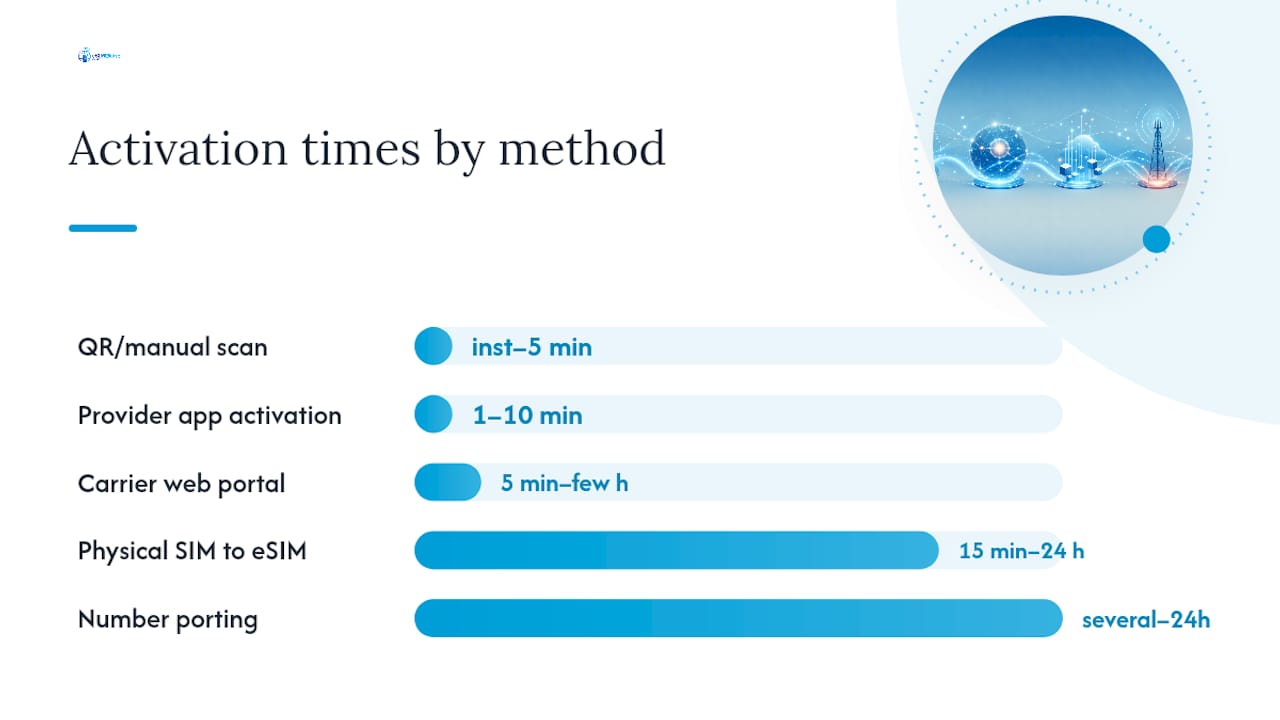
Timing depends heavily on how you’re installing and which carrier is provisioning the line. Travel eSIM guides consistently report a typical range of 1 to 5 minutes for the fastest cases, with some activations stretching to 10 to 15 minutes, and rare outliers reaching several hours or the full 24-hour GSMA window.
| Activation method | Typical time | When it applies |
|---|---|---|
| QR code / manual scan | Instant to 5 minutes | Prepaid travel eSIMs, most consumer plans |
| Provider app activation | 1 to 10 minutes | Carrier apps that auto-check device compatibility |
| Carrier web portal | 5 minutes to a few hours | Postpaid plans, account-linked activations |
| Physical SIM to eSIM conversion | 15 minutes to 24 hours | Requires deactivating the old SIM first |
| Number porting included | Several hours to 1 day | New carrier must coordinate with the old one |
A few things stretch these ranges beyond the fast end. Account verification (confirming your identity or payment method) adds friction on postpaid and carrier-portal activations. Billing checks, particularly for new accounts, can add a manual review step. And any activation involving number porting shifts you out of the “minutes” category entirely into the “hours” category, which the porting section below covers in detail.
Carrier support pages for prepaid eSIMs, including major U.S. carriers, describe activation as something that typically completes in minutes through an app or QR scan, with the app automatically checking whether your device model supports eSIM before it even starts.
Does Activation Time Vary by Device?
Yes, and the differences are worth knowing before you travel.
iPhone. Apple’s support documentation walks through installing and enabling an eSIM, and for most users the process is quick once the profile registers to a network. That said, community reports on Apple’s own discussion forums describe cases where the screen sits on “Activating This iPhone…” for several minutes, sometimes longer, without progressing. This is almost always a network-side wait, not a broken phone. If you see that screen, give it 10 to 15 minutes before assuming something’s wrong.
Android. Behavior varies more here because eSIM support is implemented differently across manufacturers. Some Android models complete activation nearly as fast as an iPhone; others, particularly older models or those with less mature eSIM firmware, take longer or require a manual carrier settings update. If your Android phone was purchased carrier-locked or through a reseller, activation can also stall until the carrier confirms the device is eligible.
Tablets and wearables. Cellular-enabled tablets and smartwatches generally support data-only eSIM activation smoothly, but many don’t support voice calls or SMS at all, which is normal and not a sign of failed activation. Expect the same install-then-activate pattern, just confirm your device’s connectivity type before assuming something’s broken.
- Install your eSIM profile while connected to Wi-Fi, ideally before you leave home.
- Wait to activate the line until you land at your destination.
- Check your device model against your carrier’s eSIM compatibility list before departure.
- Keep your confirmation email or QR code accessible offline, in case you need to reinstall.
Pro Tip: If you’re using a travel eSIM with limited validity (say, a 7-day or 30-day plan), installing early and activating on arrival protects your full validity window. Activating from your living room a week before your trip just burns days you’ll want abroad.
What Causes Delays in eSIM Activation?
Most delays trace back to one of six causes, and knowing which one you’re dealing with tells you whether to wait it out or start troubleshooting.
Carrier-side provisioning holds. Identity checks, billing verification, or manual review steps on the carrier’s end are the single most common reason activation takes longer than a few minutes. This is invisible to you. There’s no error message. It’s just processing.
Number porting in progress. If you’re transferring an existing number to a new eSIM, the new carrier has to coordinate with your old one. That coordination alone can add hours to a full day.
Device lock or compatibility issues. A carrier-locked phone, or one running outdated modem firmware, can refuse to activate a new eSIM profile at all, regardless of how long you wait.
Weak or absent connectivity during setup. Activation requires the device to reach the carrier’s network at least once to complete provisioning. If you attempt activation in a dead zone or with Wi-Fi calling disabled when you need it, the process can hang indefinitely.
Expired or invalid QR codes. Most eSIM QR codes are single-use and time-limited. Scanning an old code, a screenshot of a code already used, or a code past its validity window produces an installation error rather than a slow activation.
App or install errors. A carrier app that crashes mid-install, or a manual entry with a typo in the activation code, will stop the process before it ever reaches the carrier’s network.
Pro Tip: If your eSIM has shown zero progress for more than 24 hours, GSMA’s provisioning standards indicate that’s outside normal range. At that point, stop retrying on your own and contact carrier support directly with your order reference.
How Do You Check if Your eSIM Is Active?
Run through this list before assuming something’s gone wrong:
- Look at your status bar for your carrier’s name and signal bars.
- Open a browser or app that requires data, with Wi-Fi turned off, and see if it loads.
- If your plan supports voice and SMS, place a test call or send a text.
- Go to Settings > Cellular (iPhone) or Network & Internet > SIMs (Android) and confirm the plan shows as active, not just installed.
- Check your provider’s confirmation email or app dashboard for an “active” status flag.
Here’s how to read mixed signals:
- Carrier name shows, but no data connects: provisioning is likely still finishing on the network side. Give it another 15 to 30 minutes.
- No carrier name at all, several hours in: installation may have failed, or the profile needs to be reinstalled.
- Data works but calls/texts don’t: normal for data-only travel eSIMs, not a sign of a problem.
- App shows “active” but the phone shows no service: try toggling Airplane Mode, covered in the next section.
If you’re under 30 minutes since installation, waiting is usually the right call. Past that, especially past the one-hour mark with zero signal, move to the troubleshooting steps below.
What’s the Fastest Way to Fix a Stuck eSIM Activation?
Work through these in order. Most stuck activations resolve in the first three steps.
- Confirm the plan actually shows under Settings. If it’s not listed as installed at all, the QR scan or app install failed and needs to be redone.
- Toggle Airplane Mode on, wait 15 seconds, then turn it off. This forces the device to re-search for and re-register with the network.
- Restart the device. A simple reboot resolves a large share of activation hangs by clearing a stuck network registration attempt.
- Turn the eSIM line off, then back on, under the cellular plan settings.
- Enable Data Roaming, if this is a travel eSIM and you’re outside your home network’s territory. This step alone fixes a surprising number of “no data” reports.
- Reinstall the eSIM profile by re-scanning the QR code or reopening the carrier app. This is safe when the original install seemed incomplete, but skip it if the plan already shows as active. Reinstalling an active profile can sometimes wipe the existing configuration and force you to start over.
- Reset network settings as a last resort before contacting support. This clears saved Wi-Fi networks and Bluetooth pairings too, so treat it as a genuine last step.
- Factory reset only if none of the above work and the carrier confirms the account is fully provisioned, meaning the problem is isolated to the device.
Our guide on activating your eSIM step by step walks through each of these with screenshots if you want visual confirmation at every stage.
| Symptom | Quick fix | If that fails |
|---|---|---|
| No carrier name showing | Toggle Airplane Mode, restart device | Reinstall the eSIM profile |
| Carrier name but no data | Enable Data Roaming | Wait 30 minutes, then contact support |
| “Activating” stuck on screen | Restart device, confirm signal in area | Contact carrier with order reference |
| Calls/SMS not working, data fine | Check plan type (data-only is normal) | Confirm with carrier if voice was included |
| QR code won’t scan | Check code hasn’t expired or been used | Request a new code from support |
When you do contact support, have this ready: your exact error message or symptom, the device model and OS version, the time you first installed the profile, whether number porting is involved, and your order or QR reference number. Carriers resolve tickets far faster when you lead with specifics instead of “it’s not working.”
How Long Does Porting a Number Take With an eSIM?
Porting adds a layer of coordination that pure data activation doesn’t have, because two carriers, not one, have to agree the transfer happened.
Here’s the general timeline:
- Port request submitted. You provide your account number and PIN from the losing carrier.
- Carrier-to-carrier processing. This typically takes several hours, though it can stretch toward a full day depending on both carriers’ systems.
- Cutover window. Your number moves over, usually with a brief service gap.
- Data activates first, in many cases. Voice and SMS can lag behind data by a few hours, even after your eSIM shows as active.
What you might notice during this process:
- Your phone shows the new carrier’s name before your number is fully working.
- Outgoing calls may fail or route incorrectly for a short window.
- Incoming texts to the old number may bounce during the cutover.
If your port hasn’t completed within 24 hours of submission, follow up with both the losing and the gaining carrier. Ports are one of the few scenarios where it’s genuinely useful to keep your old SIM or account active until you’ve confirmed the new one works end to end.
How Esimglobe Delivers eSIMs and What to Expect
Esimglobe sells prepaid, data-only eSIM plans covering more than 170 countries, delivered instantly by email once your order clears checkout. There’s no shipping wait and no store visit. You get a QR code and setup instructions in your inbox within minutes of purchase, backed by telecom-grade security and 24/7 support if anything doesn’t go as planned.
Activation itself follows the same two-stage pattern covered earlier: your profile installs the moment you scan the code, but the line only activates once it registers with the destination network, which typically happens the moment you land and your phone finds a signal. This is why Esimglobe’s setup emails consistently recommend installing on Wi-Fi before departure and enabling the line only when you arrive, exactly the golden rule travel guides point to for protecting short-validity plans.
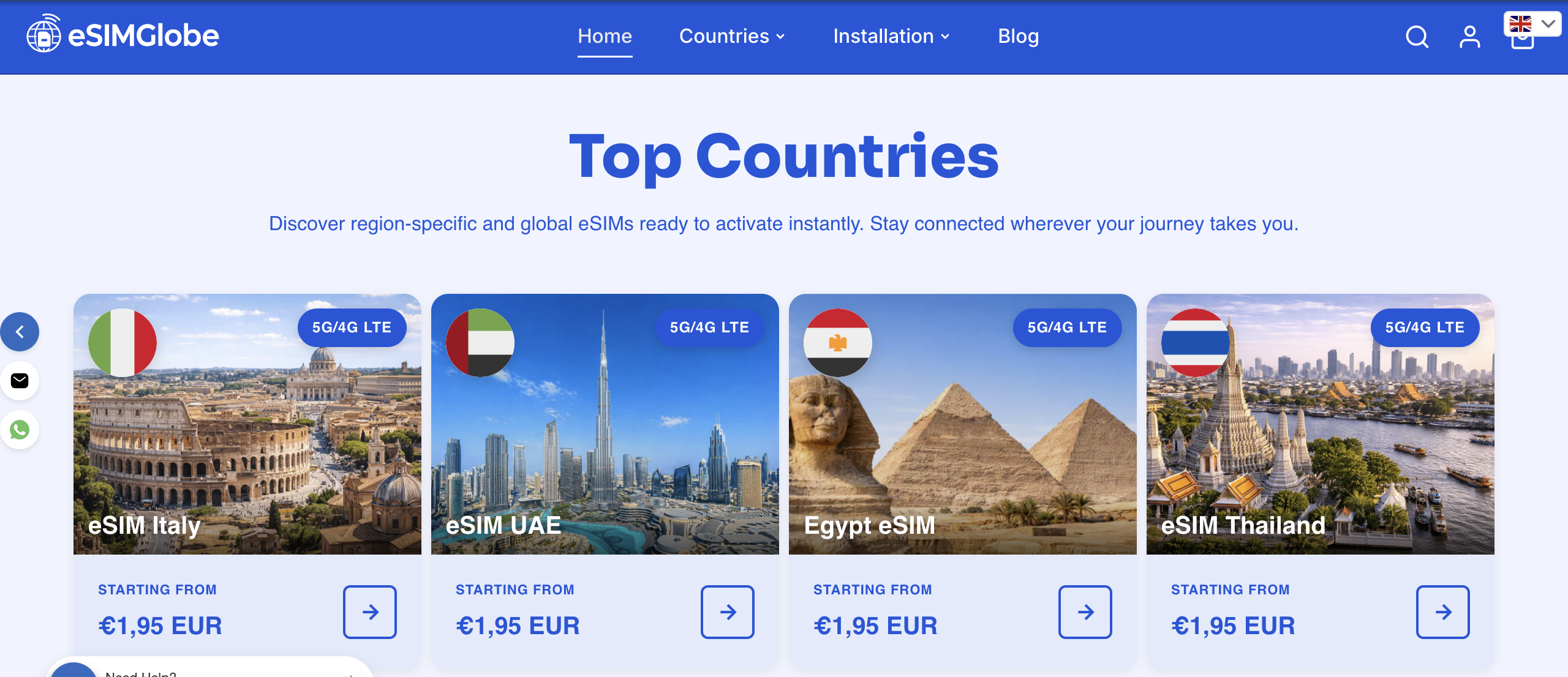
The bigger advantage for frequent travelers is the multi-bundle structure. Instead of buying a fresh eSIM for every border crossing, a regional bundle covers multiple countries under one profile and one checkout. That means one installation, one activation, and no repeated QR scans or reinstallation friction every time you change countries mid-trip.
- Balkans eSIM bundle: covers multiple countries across the region under a single plan, ideal for multi-stop itineraries through Southeastern Europe. Check the Balkans bundle product page for the current country list, since coverage is periodically updated.
- Asia regional bundles: multiple plan options spanning different combinations of Asian countries, sized for both short regional hops and longer backpacking routes.
- Europe regional bundles: cover a wide swath of the continent under unified data plans, useful for travelers crossing several EU and non-EU countries in one trip.
- South America regional bundle: designed for multi-country South American itineraries without needing a separate SIM per border.
Exact country coverage for each bundle is listed on Esimglobe’s own product pages, since availability shifts as networks and partnerships change. Our purchasing tips guide covers how to pick the right bundle size for your route, and Esimglobe’s guides are maintained by Daniele, whose eSIM setup writing focuses on practical, traveler-first instructions rather than technical jargon.
Pro Tip: If your trip spans three or more countries in one region, a multi-bundle almost always beats buying individual country plans, both on setup time and on cost per gigabyte.
A Traveler’s Perspective on Activation Timing
The single biggest mistake travelers make isn’t a technical one. It’s timing. People install their eSIM the moment they buy it, out of excitement or anxiety about being disconnected, and activate it the same day, sometimes a full week before departure. Then they land, check their data plan, and discover three of their seven validity days are already gone.
The fix costs nothing: install on your home Wi-Fi whenever you want, but don’t activate until you’ve landed and your phone is searching for a local network. That single habit solves more “my eSIM activation is taking forever” complaints than any technical troubleshooting step, because most of those complaints aren’t actually about activation speed. They’re about validity windows starting earlier than expected. If you take one thing from this article, take that.
Get an eSIM Built for Predictable Activation
Esimglobe is built around the exact timing behavior this article describes: instant email delivery the moment you check out, clear install and activation instructions in that same email, and 24/7 support if a line stalls past the normal window. You’re not guessing at QR code validity or hunting for carrier-specific instructions after the fact, because the setup guidance travels with your order.
For multi-country trips, the regional bundles matter more than they might seem to at first glance. One purchase, one installation, and one activation instead of repeating the entire process at every border. That’s a meaningful reduction in setup friction if you’re moving through the Balkans, hopping between Asian countries, crossing Europe, or touring South America on a single itinerary. Our eSIM workflow guide for international travelers breaks down how to plan installation and activation timing around a multi-stop route, and for a broader look at hospitality-side digital logistics, Wild Foodz’s piece on digital reservations covers related connectivity expectations for travelers.
Ready to set up your next trip? Browse plans and regional bundles on the Esimglobe landing page, pick the coverage that matches your route, and you’ll have your QR code in your inbox within minutes of checkout.
Useful Sources for Activation Steps and Carrier Policy
For device-specific setup steps, Apple’s own eSIM documentation remains the most reliable reference for iPhone users, while Android activation steps vary enough by manufacturer that checking your specific carrier’s app instructions is usually faster than a general guide. GSMA’s provisioning guidance is the best source for understanding standard carrier timing windows, including the 24-hour benchmark referenced throughout this article. Carrier support pages are the right place to check account-specific policies, like whether your device is eligible for eSIM or whether porting requires an in-store step. Our own eSIM activation guide for international travel rounds out the practical, traveler-facing side of this with country-specific notes.
FAQ
How long does it take for an eSIM to become active?
Most eSIM activations complete within 5 to 15 minutes once the profile installs and the network provisions the line. Some carriers allow up to 24 hours in cases requiring identity verification or manual review.
Why is my eSIM activation taking so long?
The most common causes are carrier-side provisioning delays, number porting, weak or absent connectivity during setup, or an expired QR code. If it’s been over 24 hours, contact your carrier directly with your order reference.
How long do I have to activate an eSIM after installing it?
This varies by provider, but most travel eSIM profiles remain installed and ready indefinitely until you enable the line, which is why installing early and activating on arrival is standard advice. Check your specific plan’s terms, since some travel plans start their validity clock at installation rather than activation.
Is eSIM activation instant?
Installation is nearly always instant, but true network activation depends on carrier provisioning and can take anywhere from a few seconds to a few hours. Esimglobe delivers your QR code by email instantly at checkout; the network-side activation timing follows the same carrier-dependent pattern described throughout this article.