






















TL;DR:
- An eSIM is a digital, embedded SIM card that allows immediate remote activation of local or regional data plans, helping business travelers save up to 75% on roaming costs. It supports multiple profiles, wide global coverage, and quick setup, but requires stable Wi-Fi and device compatibility for seamless activation. Proper configuration, including confirming the eSIM as the default data line, ensures reliable connectivity and security during international trips.
An eSIM is a digital SIM card embedded directly in your device, and for business travelers, it is the most practical way to avoid high international roaming charges while staying connected across borders. Unlike a physical SIM, an eSIM lets you download a local or regional data plan remotely before you even board your flight. Business travelers can save up to 75% compared to traditional roaming by switching to eSIM technology. Esimglobe provides eSIM plans covering 190+ countries, making it one of the most accessible platforms for frequent flyers who need reliable, cost-controlled connectivity on every trip.
What are the best eSIM options for business travelers?
The best eSIM for business travelers is one that combines wide geographic coverage, predictable data costs, and fast activation. Not all plans are built the same, and choosing the wrong one can leave you with throttled speeds in a key market or unexpected overage fees mid-trip.
Key criteria for evaluating business traveler eSIM plans
Coverage is the first filter. A plan that works in Western Europe but drops out in Southeast Asia or the Gulf region is not useful for a traveler with a multi-city itinerary. Esimglobe covers 190+ countries, which means you can purchase a single regional plan or stack country-specific plans depending on your route.

Data allowance and speed matter equally. Business use typically involves video calls, cloud file access, and real-time email. A 1 GB plan may last a leisure traveler a week, but a business traveler on a three-day conference trip can exhaust that in a day. Esimglobe offers tiered data packages so you can match your plan to actual usage rather than guessing.
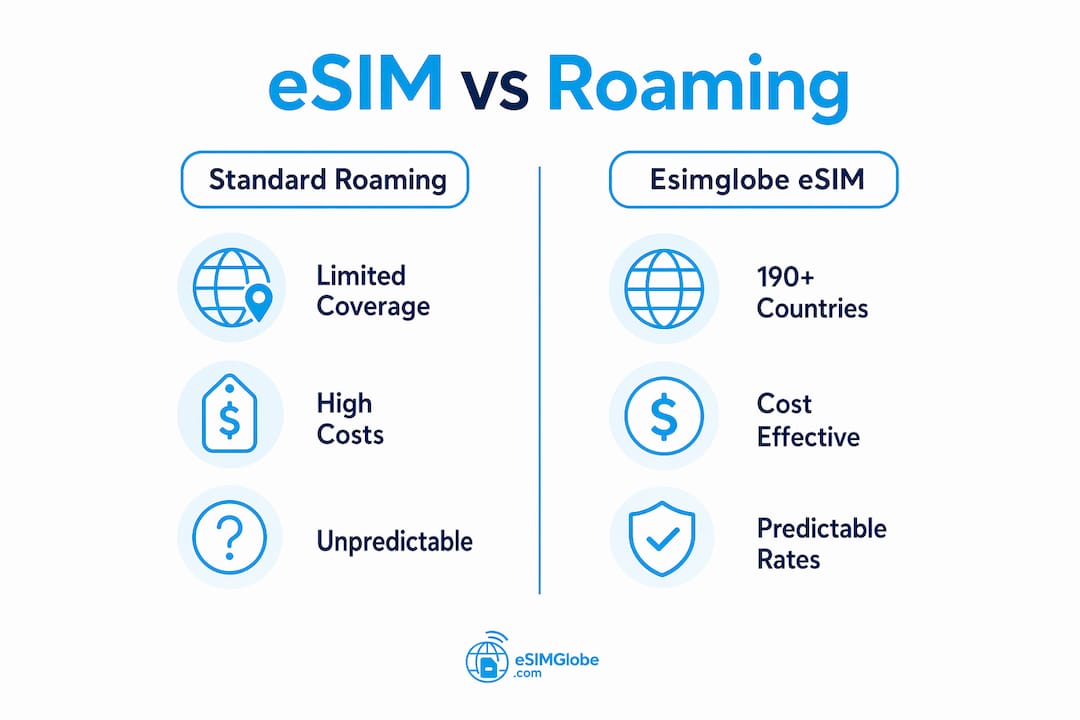
Cost predictability separates eSIM from traditional roaming. UK mobile networks charge £3 to £8 per MB outside Europe without a roaming pass. That rate structure makes a single video call financially painful. An eSIM plan with a fixed data cap eliminates that exposure entirely.
Data-only vs. full SIM profiles for business use
Data-only eSIM profiles cover mobile data but not voice calls. For most business travelers, this is sufficient because calls route through apps like Microsoft Teams, Zoom, or WhatsApp over the data connection. Full SIM profiles include a local phone number, which is useful if you need to receive calls on a local number or use SMS-based two-factor authentication with a foreign number.
Esimglobe offers both profile types, and you can select based on your specific trip requirements rather than committing to a one-size-fits-all plan.
eSIM plan comparison for business travelers
| Feature | Standard roaming | Esimglobe eSIM plan |
|---|---|---|
| Coverage | Carrier-dependent | 190+ countries |
| Cost per GB | High and variable | Fixed, pre-purchased |
| Activation method | Automatic (carrier) | QR code or manual entry |
| Multi-profile support | No | Yes |
| Physical SIM required | Yes | No |
| Setup time | None (auto) | Under 10 minutes |
Pro Tip: Purchase your Esimglobe plan at least 24 hours before departure so you can activate it on a stable Wi-Fi connection at home rather than scrambling at the airport.
How do you set up and activate a business traveler eSIM?
Setting up an eSIM takes under 10 minutes when you follow the correct sequence. The most common mistakes happen when travelers skip steps or try to activate on an unstable connection.
Prerequisites before you begin
Your device must support eSIM. Most flagship smartphones released after 2018 are compatible, including Apple iPhone XS and later, Google Pixel 3 and later, and Samsung Galaxy S20 and later. Check your device settings under “Mobile Data” or “SIM & Network” to confirm eSIM capability.
You also need an active internet connection during activation. Wi-Fi is strongly preferred. Attempting activation over a weak cellular signal is one of the leading causes of installation failure.
Step-by-step installation for iPhone (iOS)
- Open Settings and tap Cellular (or Mobile Data depending on your iOS version).
- Tap Add eSIM or Add Cellular Plan.
- Select Use QR Code and scan the QR code provided by Esimglobe in your confirmation email.
- Tap Continue when prompted and follow the on-screen instructions to complete the download.
- Label the new plan (for example, “Esimglobe Work”) to distinguish it from your primary SIM.
- Go back to Cellular settings and set the Esimglobe eSIM as your Default Data line.
Step-by-step installation for Android
- Open Settings and navigate to Network & Internet or Connections, then tap SIM Manager or SIM Cards.
- Tap Add eSIM or Download a SIM.
- Select Scan QR Code and scan the Esimglobe QR code.
- Follow the prompts to confirm and download the profile.
- Once installed, tap the new eSIM profile and set it as the Preferred SIM for data.
Confirming activation
After installation, open your browser and load any webpage to confirm data is flowing. If the page loads, your eSIM is active and correctly set as the default data SIM. If it does not load, go back to SIM settings and verify the Esimglobe profile is toggled on and selected for data. Setting the eSIM as default is a step many travelers skip, causing connectivity failures despite a technically successful install.
Pro Tip: Take a screenshot of your QR code before traveling. If you lose access to your email abroad, you can still scan the saved image to reinstall the eSIM profile.
How do you troubleshoot common eSIM activation issues?
Most eSIM activation problems are avoidable with proper preparation, but when issues do occur, a structured approach resolves them quickly. Downtime during a business trip is costly, so knowing the fixes in advance is worth the few minutes it takes to read this section.
Common causes of activation failure
- Unstable internet connection: The eSIM profile downloads from a remote server. A dropped connection mid-download corrupts the installation.
- Outdated operating system: Older iOS or Android versions sometimes lack full eSIM protocol support. An OS update resolves this in most cases.
- QR code scanning errors: Poor lighting, screen glare, or a low-resolution printout can prevent a clean scan.
- Device not unlocked: Carrier-locked devices reject eSIM profiles from other providers. Confirm your device is unlocked before purchasing any plan.
Practical fixes to apply in order
- Toggle airplane mode on, wait 10 seconds, then toggle it off. This resets the network stack and often clears minor activation errors.
- Update your device OS to the latest version. Go to Settings > General > Software Update on iPhone or Settings > System > System Update on Android.
- If QR code scanning fails, use manual SM-DP+ entry. Esimglobe provides the SM-DP+ address and activation code in your confirmation email. Enter these manually under the “Enter Details Manually” option in your eSIM settings.
- Reset network settings as a last resort. On iPhone: Settings > General > Transfer or Reset iPhone > Reset > Reset Network Settings. On Android: Settings > General Management > Reset > Reset Network Settings.
After any troubleshooting step, always return to your SIM settings and confirm the Esimglobe eSIM is selected as the default data SIM. A reset can revert this setting to your physical SIM, which is a frequent source of confusion after fixes are applied.
If none of these steps resolve the issue, Esimglobe’s customer support team is reachable directly through the platform. Having your order number and device model ready speeds up the resolution process significantly.
What are the best practices to maximize your eSIM benefits while traveling?
Using an eSIM correctly from day one prevents the two most common problems business travelers face: unexpected charges and connectivity gaps. These practices apply whether you travel once a quarter or every week.
Separate work and personal connectivity with multiple profiles
eSIM multi-profile capability lets you run a business data line and a personal line on the same device simultaneously. This eliminates the need to carry two phones or swap physical SIMs. For expense reporting, it also creates a clean separation between billable data usage and personal browsing.
Esimglobe supports multiple active profiles, so you can load a regional business plan and keep your home carrier eSIM active for calls and texts from your primary number. Switching between them takes seconds in your device’s SIM settings.
Set data alerts and buy add-ons before you leave
Proactive data management prevents bill shock and keeps you in control of connectivity costs. Set a data usage alert at 80% of your plan limit so you have time to purchase an add-on before you hit the cap. Most operating systems include built-in data monitoring under network settings.
Purchase your Esimglobe add-on data before you travel rather than waiting until you run out abroad. Buying on a stable home connection is faster and avoids the frustrating situation of needing data to purchase more data.
Prioritize security on business networks
eSIM security exceeds that of physical SIMs because the profile is embedded in the device hardware and cannot be physically removed or cloned. There is no SIM card to steal from your hotel room or lose at an airport security checkpoint. For business communications involving sensitive client data or proprietary information, this matters.
Pair your Esimglobe eSIM with a VPN when connecting to public Wi-Fi in hotels or conference centers. The eSIM handles your cellular data securely, but hotel Wi-Fi remains an open network regardless of your SIM setup. Use the cellular connection for anything sensitive and reserve Wi-Fi for general browsing.
Pro Tip: Before each trip, review Esimglobe’s global connectivity practices to confirm your destination is covered and check whether a regional or country-specific plan offers better value for your itinerary.
Key takeaways
eSIM technology gives business travelers direct control over international connectivity costs, with Esimglobe providing the coverage, plan flexibility, and support structure that frequent flyers require.
| Point | Details |
|---|---|
| Cost savings are significant | Business travelers save up to 75% versus standard roaming by using eSIM plans. |
| Activation requires preparation | Stable Wi-Fi, an unlocked device, and a current OS prevent most setup failures. |
| Default data SIM setting is critical | Always confirm the eSIM is set as the default data line after installation. |
| Multi-profile use separates work and personal | Running two eSIM profiles on one device eliminates the need for two phones. |
| Proactive data management prevents overages | Set usage alerts at 80% and purchase add-ons before departure, not after. |
Why eSIMs changed how I think about business travel connectivity
The first time I installed an eSIM before a trip to Japan, I expected it to be complicated. It took eight minutes from QR code scan to confirmed data connection. That experience reframed how I approach every international trip since.
What most articles miss is the psychological shift that comes with knowing your connectivity is sorted before you land. There is no scrambling for a SIM kiosk at Narita or Heathrow, no waiting for a roaming plan to activate, and no surprise charges on the corporate card at month end. The cost control alone justifies the switch, but the time saved across a year of frequent travel adds up to something more valuable than money.
The one mistake I see business travelers make repeatedly is skipping the final step: confirming the eSIM as default for cellular data. The installation looks successful, the profile appears in settings, but data does not flow because the device is still routing through the physical SIM. It takes 15 seconds to check and fix. Missing it costs you 20 minutes of troubleshooting in an airport lounge.
Esimglobe stands out because the plan selection process is genuinely straightforward. You pick your destination, choose your data tier, pay, and receive a QR code. There is no account lock-in, no contract, and no call to a carrier support line. For business travelers who value their time, that simplicity is the actual product.
— daniele
Stay connected on every business trip with Esimglobe
Esimglobe provides eSIM plans for 190+ countries, with flexible data tiers designed for the way business travelers actually use mobile data. Whether you need a single-country plan for a two-day client visit or a regional plan covering an entire multi-city roadshow, Esimglobe has a plan that fits without requiring a contract or carrier account. Visit Esimglobe to browse plans by destination, compare data allowances, and activate your eSIM before your next departure. The platform supports USD, EUR, and GBP, and the eSIM purchasing tips resource covers everything from device compatibility to activation best practices in one place.
FAQ
What is an eSIM and how does it work for business travel?
An eSIM is a digital SIM card embedded in your device that stores carrier profiles remotely. For business travel, it allows you to purchase and activate a local or regional data plan before departure, avoiding high roaming fees without swapping physical SIM cards.
How much can business travelers save with an eSIM?
Business travelers save up to 75% compared to standard international roaming rates. Traditional roaming on some UK networks costs £3 to £8 per MB outside Europe, while eSIM plans offer fixed data at a fraction of that cost.
Can I use two eSIM profiles at the same time?
Yes. Most modern smartphones support multiple active eSIM profiles simultaneously. This lets you keep your home carrier active for calls and texts while using an Esimglobe data plan for international internet access.
What should I do if my eSIM fails to activate?
Check that your device is carrier-unlocked and running the latest OS version, then attempt activation on a stable Wi-Fi connection. If QR scanning fails, use the manual SM-DP+ code entry option provided in your Esimglobe confirmation email.
Is eSIM secure enough for business use?
eSIM is more secure than a physical SIM because the profile is embedded in device hardware and cannot be physically stolen or cloned. Pairing an Esimglobe eSIM with a VPN on public networks provides a strong security baseline for business communications abroad.