






















TL;DR:
- A practical eSIM data plan calculation involves multiplying your daily GB estimate by trip days and adding a 20% buffer, then rounding up to the nearest plan size. Light travelers typically need 2 to 5 GB for short trips, while heavy users may require 30 GB or unlimited plans for long stays or hotspot use. Monitoring app activity and disabling auto-backup helps prevent unexpected data overages during international travel.
The quickest answer to “how much eSIM data do I need” is this formula: daily GB estimate × trip days × 1.2 (buffer) → round up to the nearest plan size. A typical traveler uses about 1 GB per day, so multiply by trip days and add a 20% buffer to estimate your needed data plan size.
- 7-day trip, moderate use: 1 GB/day × 7 days × 1.2 = 8.4 GB → buy a 10 GB plan
- 14-day trip, moderate use: 1 GB/day × 14 days × 1.2 = 16.8 GB → buy a 20 GB plan
Pick a fixed-data plan for short trips (3–7 days) and light-to-moderate use. Choose unlimited when you plan to tether a laptop, stream heavily, or travel longer than two weeks without reliable Wi-Fi.
Table of Contents
- How much data does each app actually use per hour?
- How do you calculate the total GB you need for your trip?
- What plan size should you buy based on your traveler profile?
- How eSIM plans are structured: what the terms actually mean
- How to monitor and control data use on iOS and Android
- Common mistakes that drain your eSIM data faster than expected
- Does eSIM data use differ for domestic vs. international travel?
- How network speed and coverage affect your data estimates
- Key Takeaways
- The formula works — but most travelers skip the math
- Esimglobe plans matched to your calculated GB
- Useful resources
- FAQ
How much data does each app actually use per hour?
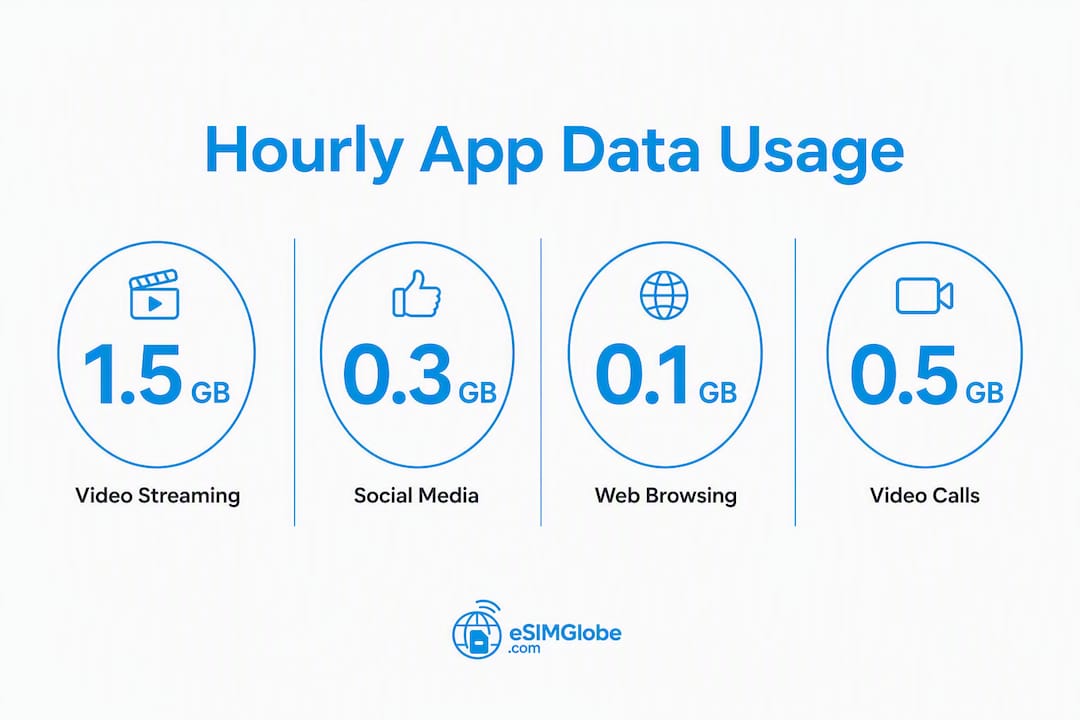
The table below shows per-activity consumption so you can convert your actual screen time into GB. The “1 GB lasts” column tells you how long that activity runs before you burn through a full gigabyte.

| Activity | MB/hour | 1 GB lasts (approx.) | 30-min example |
|---|---|---|---|
| Messaging (WhatsApp, iMessage) | 5 MB | — | 7.5 MB |
| Email (text only) | 10 MB | ~100 hours | ~5 MB |
| Navigation (turn-by-turn, live) | 3–10 MB | 100 hours | ~5 MB |
| Music streaming (standard) | 35 MB | ~14 hours | ~35 MB |
| Music streaming (high quality) | 150 MB | ~7 hours | 35 MB |
| Social feed browsing (no video) | 150 MB | ~7 hours | 35 MB |
| Short-form video (TikTok, Reels) | 500+ MB | ~2 hours | ~250 MB |
| SD video streaming | 500–700 MB | 1.4–6 hours | ~300 MB |
| HD video streaming | 700 MB–3 GB | 1.4–6 hours | 500 MB |
| Video calls (SD quality) | 300–500 MB | ~2–3 hours | 100 MB |
| Photo uploads (batch, 10 photos) | ~50 MB | N/A | ~50 MB |
Worked conversions:
- 1 hour of TikTok = ~500 MB = 0.5 GB
- 2 hours of HD Netflix = ~1.4–6 GB depending on quality setting
- 45 minutes of Google Maps (live) = ~7.5 MB
- 30 minutes of Spotify (standard) = ~35 MB
- 20 photos uploaded to iCloud = ~100 MB
Pro Tip: The two biggest data surprises for travelers are autoplay short-form video and automatic photo/video backup. TikTok and Instagram Reels can burn through 500 MB in a single hour without you realizing it. Turn off autoplay and disable iCloud or Google Photos backup over cellular before you land.
How do you calculate the total GB you need for your trip?
Follow these four steps. You can do the math in under two minutes.
- Check your current daily usage. On iPhone: Settings → Cellular → scroll to “Current Period” data total, divide by days in the period. On Android: Settings → Network → Data Usage → view daily average. This is your home baseline in GB/day.
- Add a 20% travel uplift. You will use more data abroad: extra navigation, uploading photos, and background app sync all add up. Multiply your baseline by 1.2.
- Estimate time in each activity. Use the table above to calculate per-activity MB/day. Add them up for a total daily estimate. If this number is higher than your phone baseline × 1.2, use the activity estimate instead.
- Multiply by trip days, then round up. Take your daily GB estimate, multiply by the number of days, and round up to the next available plan size.
Worked example: 7-day trip (moderate traveler)
- 1 hour social browsing: 150 MB
- 30 min short-form video: 250 MB
- 30 min navigation: 5 MB
- 20 min music: 23 MB
- 2 video calls (20 min each): 130 MB
- 10 photo uploads: 50 MB
- Daily total: ~608 MB ≈ 0.6 GB/day
- 0.6 GB × 7 days × 1.2 buffer = 5.04 GB → buy a 6 GB or 10 GB plan
Worked example: 14-day trip (heavy traveler)
- 2 hours social/short-form video: 1,000 MB
- 1 hour HD streaming: 1,500 MB
- 1 hour navigation: 10 MB
- 30 min music: 35 MB
- 1 hour video calls: 400 MB
- 20 photo uploads: 100 MB
- Daily total: ~3,045 MB ≈ 3 GB/day
- 3 GB × 14 days × 1.2 buffer = 50.4 GB → buy a 50 GB plan or unlimited
Pro Tip: If your phone’s monthly data total is listed in MB (e.g., 18,000 MB), divide by 1,024 to convert to GB (≈17.6 GB), then divide by 30 for your daily average.
What plan size should you buy based on your traveler profile?
Use these profiles to match your habits to a plan size. The 20% buffer is already built into every figure below.
Light traveler (0.3–0.5 GB/day): Mostly messaging, email, maps, and occasional social browsing. No streaming.
- 3 days → 2 GB
- 7 days → 4–5 GB
- 14 days → 8–10 GB
- 30 days → 15–20 GB
Moderate traveler (1–2 GB/day): Regular social media, some short-form video, music, video calls a few times a week.
- 3 days → 5 GB
- 7 days → 10 GB
- 14 days → 20 GB
- 30 days → 40–50 GB
Heavy traveler (3–5+ GB/day): Daily HD streaming, frequent video calls, heavy social media, photo uploads.
- 3 days → 15 GB
- 7 days → 30 GB
- 14 days → 50 GB
- 30 days → Unlimited
Remote worker / hotspot user: Tethering a laptop multiplies consumption fast. Plan for at least 2–3 GB per working day on top of personal use, and always verify that your chosen plan explicitly permits hotspot tethering. For a 5-day work week abroad, that is 10–15 GB of hotspot data alone. A business travel eSIM plan with a generous or unlimited data bucket is the practical choice here.
For multi-country itineraries, a regional plan covers multiple destinations under one data bucket, which is simpler and usually cheaper than buying separate single-country plans for each stop.

How eSIM plans are structured: what the terms actually mean
Before you buy, these are the plan elements that affect how much data you actually get to use.
- Validity period: The window during which your data is active, typically 7, 15, or 30 days from first use. Unused data expires when the window closes.
- Data bucket (GB): The fixed amount of high-speed data included. Once consumed, the plan either stops or throttles.
- Single-country vs. regional plan: Single-country plans work in one destination; regional plans cover a defined group of countries under one allocation.
- Top-up / add-on: An additional data purchase when you exhaust your original bucket. Top-ups are available but cost more per GB than buying the right size upfront.
- Fair-use / throttling: Many “unlimited” plans are not truly unlimited at full speed. They include a high-speed threshold (e.g., 1–3 GB/day), after which speeds drop to 128–512 Kbps. That is enough for messaging and maps but not for video calls or streaming.
The gap between “unlimited” and “throttled unlimited” matters most for video calls and hotspot use. Always read the fair-use clause before choosing an unlimited plan over a large fixed-data option. A 20% buffer built into your fixed plan is almost always cheaper than an emergency top-up, especially when network conditions make purchasing a top-up difficult mid-trip. Understanding how eSIM data plans work before you buy prevents most of these surprises.
How to monitor and control data use on iOS and Android
On iPhone (iOS)
- Go to Settings → Cellular (or Mobile Data).
- Scroll down to see per-app usage for the current period.
- Toggle off cellular access for apps you only want on Wi-Fi (Netflix, YouTube, iCloud Photos).
- Go to Settings → Cellular → Cellular Data Options → Low Data Mode to reduce background activity.
- Set a usage warning: Settings → Cellular does not have a built-in alert, so use a third-party app like DataMan or check remaining data directly through your eSIM provider’s app.
On Android
- Go to Settings → Network & Internet → Data Usage.
- Tap your eSIM line to see per-app breakdown.
- Set a Data Warning and Data Limit under “Billing cycle and data warning.”
- Enable Data Saver (Settings → Network → Data Saver) to block background data for most apps.
- Tap individual apps to restrict background data or set them to Wi-Fi only.
Contingency options if you hit your limit:
- Buy a top-up directly through your eSIM provider’s app or website.
- Switch to Wi-Fi at hotels, cafes, or airports for heavy tasks (video calls, streaming).
- Use your phone’s hotspot sparingly and only for essential laptop work.
- Check how much data you have left on your eSIM before you reach zero so you can act before service drops.
Common mistakes that drain your eSIM data faster than expected
Avoiding these five habits can cut your daily consumption by 30–50%.
- Autoplay on TikTok and Instagram Reels. Short-form video burns 500+ MB/hour. Open the app settings and disable autoplay, or restrict these apps to Wi-Fi only.
- Background app sync. Email, Dropbox, and Google Drive sync constantly unless restricted. Turn off background refresh in iOS (Settings → General → Background App Refresh) or Android’s battery/data settings.
- Automatic photo and video backup. iCloud Photos and Google Photos default to backing up over cellular. Disable this before departure and back up only on Wi-Fi.
- Streaming at default quality. Netflix, Spotify, and YouTube default to high quality. Switch each app to “data saver” or “low quality” mode before your trip.
- Forgetting to download offline maps. Google Maps and Apple Maps can be downloaded for offline use before you leave. Pre-downloading a city or region reduces navigation data to near zero.
Pro Tip: A laptop tethered to your phone hotspot can consume 1–3 GB in a single work session through browser tabs, cloud sync, and software updates alone. Disable automatic updates on your laptop before tethering, and close unused browser tabs.
Does eSIM data use differ for domestic vs. international travel?
For domestic travel within the US, your regular carrier plan typically covers you without a separate eSIM. The calculation method above still applies if you are buying a supplemental data plan, but domestic roaming is rarely a concern on major US networks.
International travel changes the picture significantly. Your home carrier’s international roaming rates are often far higher per GB than a local or regional eSIM plan. An eSIM purchased for a specific country or region locks in a flat data rate, so the GB-per-day calculation becomes the primary cost-control tool. You also lose the safety net of your home carrier’s data alerts, which makes the monitoring steps above more important abroad.
One practical difference: international networks vary in reliability. In cities across Europe or Southeast Asia, 4G LTE coverage is strong and consistent. In rural areas or developing markets, speeds can drop to 3G or lower, which affects how much data certain apps actually consume (lower-quality video auto-adjusts downward, using less data but delivering a worse experience).
How network speed and coverage affect your data estimates
Your data estimates assume a stable 4G LTE or 5G connection. In practice, network conditions shift your actual consumption in two directions.
On a fast 5G connection, streaming apps automatically increase video quality, which pushes consumption above your estimate. A YouTube video that uses 300 MB/hour on 4G can use 700 MB/hour or more on 5G if the app defaults to 1080p or 4K. Fix this by locking each streaming app to a specific quality setting rather than “auto.”
On a slow or congested connection (3G, edge coverage, or crowded venues), apps retry failed requests and buffer repeatedly, which can also inflate data use. Maps and navigation apps may download additional tile data when the connection drops and reconnects.
Staying aware of travel connectivity trends helps set realistic expectations: Wi-Fi availability has improved in most major travel destinations, but rural coverage gaps remain common. Build your estimate on 4G LTE figures, add the 20% buffer, and treat 5G as a reason to cap your streaming quality manually.
Key Takeaways
The most reliable way to size your eSIM plan is: daily GB estimate × trip days × 1.2, rounded up to the nearest available plan.
| Point | Details |
|---|---|
| Use the daily formula | Multiply your GB/day estimate by trip days, then add 20% buffer before rounding up. |
| Match profile to plan size | Light travelers need 0.3–0.5 GB/day; moderate 1–2 GB/day; heavy 3–5+ GB/day. |
| Fixed vs. unlimited | Fixed plans suit short trips and light use; unlimited makes sense for long trips, heavy streaming, or hotspot tethering. |
| Monitor and restrict | Use iOS Low Data Mode or Android Data Saver, and disable auto-backup and autoplay before departure. |
| Esimglobe plan options | Esimglobe offers prepaid fixed and regional eSIM plans across 170+ countries, sized to match light, moderate, and heavy traveler profiles. |
The formula works — but most travelers skip the math
The per-activity table in this guide is the part most travelers never see. They buy a round number (10 GB “because it sounds like enough”) and either run out on day five or return home with 7 GB unused. Neither outcome is the plan’s fault.
The real issue is that data consumption is invisible until it is gone. Short-form video is the clearest example: 30 minutes of TikTok uses roughly the same data as two full hours of navigation. Most travelers mentally rank navigation as the heavy user and video as light, which is exactly backwards.
The 20% buffer recommendation is not padding. It accounts for the apps running in the background that you never consciously open: email sync, app updates, cloud backup, and location services. These can add 100–300 MB per day without a single deliberate action on your part.
For most international travelers, a 10 GB plan for a 7-day trip and a 20 GB plan for a 14-day trip are the right starting points. Adjust up if you stream daily or tether a laptop. Adjust down only if you are genuinely offline most of the day and use Wi-Fi at your accommodation every evening.
Esimglobe plans matched to your calculated GB
Once you have your GB estimate, Esimglobe maps it directly to a purchasable plan. The platform covers 170+ countries with prepaid fixed-data and regional options, delivered instantly by email after checkout — no physical SIM, no carrier store.
For light travelers (2–5 GB), Esimglobe’s smaller fixed-data plans cover short trips without paying for unused data. Moderate travelers (10–20 GB) can select a single-country or regional plan sized to their itinerary. Heavy users and remote workers can choose larger fixed buckets or unlimited options where available, with hotspot use confirmed in the plan terms before purchase.
Top-ups are available if you underestimate, but buying the right size upfront through Esimglobe’s data-only eSIM plans is consistently the lower-cost route. Select your destination, pick the plan size your calculation produced, and complete checkout. Your eSIM profile arrives by email, ready to install before you board.
Useful resources
- Check your remaining eSIM data: How to know how much data you have left on your eSIM — step-by-step instructions for iOS and Android.
- Plan mechanics explained: How eSIM data plans work — validity windows, top-ups, and throttling terms in plain language.
- Mobile data abroad overview: Guide to mobile data abroad — broader coverage of connectivity options for international travelers.
- Business and hotspot users: Best eSIM for business travelers — plan sizing and hotspot guidance for remote workers.
FAQ
Is 10 GB enough data for a week abroad?
For most moderate travelers, yes. At roughly 1 GB/day with a 20% buffer, a 7-day trip requires about 8.4 GB, so a 10 GB plan covers it with a small margin. Heavy streamers or hotspot users should size up to 20 GB.
Is 20 GB enough for two weeks?
It depends on your usage profile. A light-to-moderate traveler using 0.5–1 GB/day needs 8.4–16.8 GB for 14 days with the 20% buffer, so 20 GB fits. A heavy user at 3 GB/day needs 50 GB or more.
How much data do I need if I plan to use a hotspot?
Add at least 2–3 GB per working day for laptop tethering, on top of your personal phone usage. A 5-day work week abroad can require 10–15 GB of hotspot data alone, making an unlimited or 50 GB plan the practical choice.
What happens when I run out of eSIM data?
Your high-speed data stops or throttles to a very low speed, depending on the plan. You can purchase a top-up through your provider’s app or website, or switch to Wi-Fi for data-heavy tasks until you add more.
How do I know which Esimglobe plan matches my calculation?
Run the formula (daily GB × days × 1.2), round up to the nearest plan size, then select that size on Esimglobe’s country or regional plan page. If your trip covers multiple countries, choose a regional plan that includes all your destinations under one data bucket.