






















TL;DR:
- Using mobile data abroad involves selecting among roaming, local SIM cards, or travel eSIMs, each with different costs and setup efforts. Travel eSIMs are generally the most flexible and cost-effective option for multi-country trips if installed and configured correctly before departure. Proper setup includes verifying phone compatibility, installing the eSIM at home, disabling home roaming, and testing the connection to avoid unexpected charges or failures.
Accessing mobile data abroad is defined as using cellular internet service outside your home country, either through your carrier’s roaming network, a local SIM card, or a travel eSIM profile. Each method carries different costs, setup requirements, and coverage trade-offs. This guide to mobile data abroad walks you through every option, from comparing international data plans to activating a travel eSIM before your flight departs. Providers like Airalo, T-Mobile Magenta, and Google Fi represent the main carrier-side options, while platforms like Esimglobe offer digital eSIM profiles that skip the physical SIM entirely. Knowing which solution fits your trip length, budget, and device is the difference between paying a few dollars a day and receiving a shock bill when you land back home.
What are the main options for using mobile data abroad?
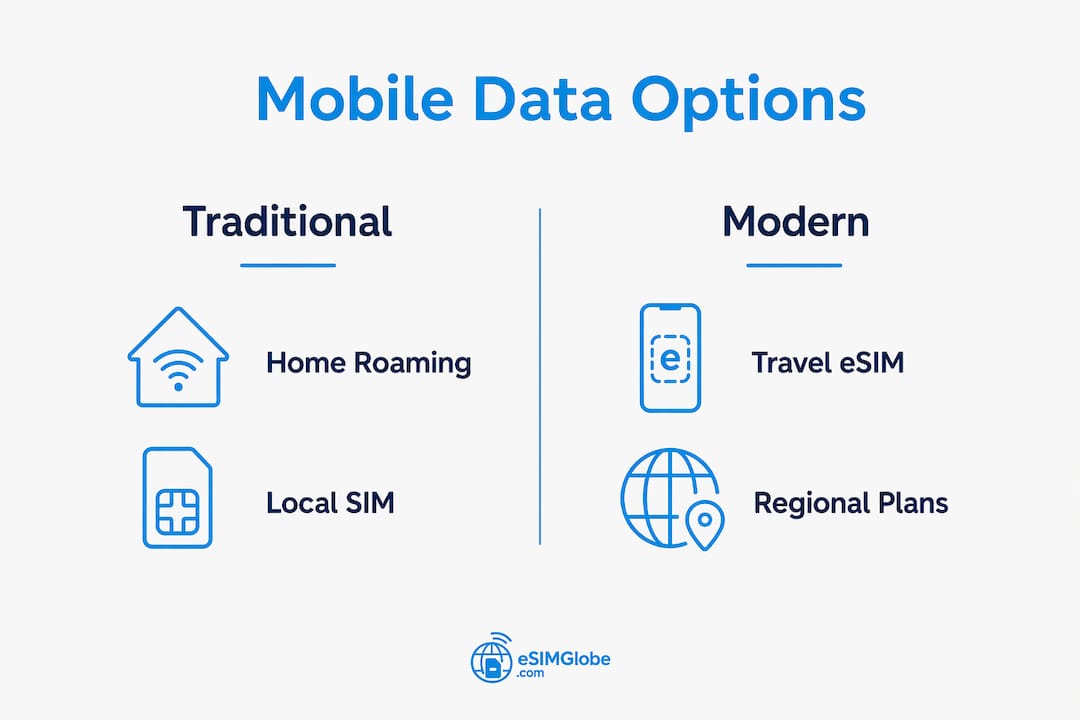
Three methods cover the full range of international connectivity: home carrier roaming, local SIM cards, and travel eSIMs. Each works differently, and the right choice depends on how long you travel, how many countries you visit, and how much data you consume.

Home carrier roaming
Home carrier roaming is the most convenient option because you keep your existing number and plan. T-Mobile Magenta postpaid delivers 5 GB of high-speed data per month in 200+ countries, with unlimited 2G data after that. Google Fi operates at no extra cost in 200+ countries as well. That convenience comes at a price: carriers outside these plans charge per-megabyte rates that can turn a single day of navigation and email into a bill larger than a month of local data.
Local SIM cards
A local SIM card gives you a local phone number and local data rates. You buy one at the airport or a convenience store, insert it, and you are online within minutes. The challenge is that some countries require passport registration, staff may not speak English, and your phone must be carrier-unlocked. Local SIMs work best for single-country trips lasting more than a week, where the savings on data rates justify the setup friction.
Travel eSIMs
An eSIM (embedded SIM) is a digital SIM profile installed directly onto your phone without a physical card. eSIM adoption has grown steadily since 2018, and most flagship phones sold after 2020 support the technology. Airalo, the largest eSIM provider, offers country-specific, regional, and global plans typically priced $5–$15 per week. Regional plans like Airalo’s Eurolink cover multiple European countries under one purchase, which makes multi-country itineraries far simpler than buying a new SIM at each border.
Comparison: which option fits your trip?
| Option | Typical cost | Setup effort | Best for |
|---|---|---|---|
| Home carrier roaming | High (per-MB or plan add-on) | None | Short trips, emergency backup |
| Local SIM card | Low | Moderate (in-store purchase) | Single-country trips, 1+ week |
| Travel eSIM | Low to moderate | Low (install before departure) | Multi-country trips, frequent travelers |
Pro Tip: If you travel to more than two countries on one trip, a regional eSIM plan almost always costs less than buying separate local SIMs at each destination.
Frequent travelers who use plans like Google Fi or T-Mobile Magenta benefit from built-in international data, but those plans carry higher monthly base costs. For occasional travelers, a travel eSIM purchased per trip delivers better value.
How to set up a travel eSIM step by step before departure
Proper eSIM setup before you leave home prevents the most common connectivity failures. Improper configuration causes 80% of international connectivity support issues, so following each step in order matters.
-
Confirm phone compatibility. Check that your phone supports eSIM. Most iPhones from the XS onward and Android flagships from Samsung, Google Pixel, and OnePlus support eSIM. Also confirm your phone is carrier-unlocked. A locked phone rejects foreign eSIM profiles.
-
Purchase your travel eSIM plan. Choose a reputable provider. Airalo and Nomad both offer country-specific and regional plans with clear data limits and validity periods. Esimglobe provides a wide catalog of destinations with straightforward purchasing and eSIM activation guidance built into the platform.
-
Install the eSIM profile on Wi-Fi at home. Installing eSIM at the destination airport is often impossible because the initial server handshake requires an active internet connection. Open your phone’s cellular settings, select “Add eSIM,” and scan the QR code provided by your provider. On iOS, go to Settings > Cellular > Add eSIM. On Android, the path varies by manufacturer but is typically Settings > Network > SIM cards > Add eSIM.
-
Label your lines clearly. Rename your home SIM line “Home” and your travel eSIM line “Travel.” This prevents confusion when switching data lines at the airport.
-
Configure data settings correctly. Set your default data line to the travel eSIM. Enable data roaming only on the travel eSIM line. Disable data roaming on your home SIM line entirely. This single configuration step stops your home carrier from charging roaming fees while your travel eSIM handles all data.
-
Test the connection before you leave. Toggle airplane mode on and off, then confirm the travel eSIM shows a signal. If it shows no service, restart your phone and check that data roaming is enabled on the correct line.
-
Save your activation details. Screenshot or email yourself the QR code and account credentials. If you need to reinstall the profile, you will need these details.
Pro Tip: Activate your travel eSIM at least 24 hours before departure. Some providers take time to provision the profile on their network, and troubleshooting is far easier from your home Wi-Fi than from an airport gate.
| Step | Action | Common mistake |
|---|---|---|
| Compatibility check | Verify eSIM support and carrier unlock | Skipping unlock check |
| Purchase | Buy plan with correct country and data size | Buying wrong region plan |
| Installation | Install on home Wi-Fi via QR code | Waiting until arrival |
| Settings | Enable roaming on travel eSIM only | Leaving home SIM roaming on |
| Test | Restart and confirm signal | Not testing before departure |
How to manage your mobile data usage abroad safely
Estimating your data needs before you travel prevents both overpaying for a large plan and running out of data mid-trip. Light users need 3–5 GB per week, moderate users need 7–10 GB, and heavy users who stream video or work remotely need 15 GB or more. A typical day abroad uses 500 MB to 1 GB for apps like Google Maps, WhatsApp, and translation tools.
Reduce background data consumption
Your phone burns data in the background even when you are not actively using it. Disable automatic app refresh, turn off cloud photo backup over cellular, and set email to manual fetch. On iOS, go to Settings > General > Background App Refresh and turn it off for all apps. On Android, go to Settings > Network > Data Usage and restrict background data per app.
Use public Wi-Fi carefully
- Connect to hotel Wi-Fi for low-stakes browsing and streaming.
- Hotel Wi-Fi is frequently throttled and insecure; avoid it for banking, work email, or any login that involves a password.
- Use your travel eSIM data for sensitive activities. Many premium eSIM providers now bundle VPN services with their plans.
- If your plan does not include a VPN, use a reputable standalone VPN app before connecting to any public network.
“Travelers should treat public Wi-Fi like a public bulletin board. Anyone on the same network can potentially see unencrypted traffic. Use your travel eSIM data for anything that matters.”
Tethering and hotspot use
Your travel eSIM plan can power a laptop or tablet through your phone’s mobile hotspot feature. Check that your plan explicitly allows tethering before you rely on it. Some regional plans restrict hotspot use or count tethered data at a lower speed tier. Tethering consumes data roughly twice as fast as phone-only use, so factor that into your plan size.
Pro Tip: Check your data balance daily using your phone’s built-in data usage tracker under Settings > Cellular or Mobile Data. Set a usage warning at 80% of your plan limit so you have time to top up before you run out.
What should you do when mobile data stops working abroad?
Connectivity failures abroad follow a short list of predictable causes. Fixing them takes minutes if you know where to look.
-
Check which SIM line is set as the primary data line. Go to Settings > Cellular (iOS) or Settings > SIM cards (Android). Confirm the travel eSIM is selected as the default data line. If the home SIM is selected, your phone is trying to roam on your home carrier, which either fails or generates charges.
-
Confirm data roaming is enabled on the travel eSIM. Enabling data roaming on the travel eSIM line only is the most common fix for “no service” errors. Tap the travel eSIM line in settings and toggle data roaming on.
-
Restart your phone. A restart forces the phone to reconnect to available networks. This resolves most signal detection failures after landing in a new country.
-
Check the network manually. Go to Settings > Cellular > Network Selection and switch from automatic to manual. Select a local carrier from the list. If a signal appears, switch back to automatic and restart.
-
Contact your eSIM provider. If none of the above works, the issue may be on the provider’s side. Most reputable providers offer chat support. Have your order number and the QR code screenshot ready.
Keeping your home number active without roaming charges
Setting your default voice line to your home SIM and your default data line to your travel eSIM keeps your US number reachable for calls and texts without triggering data roaming fees. Incoming calls to your home number route through Wi-Fi calling if your carrier supports it, which costs nothing. This setup is the most practical configuration for most travelers.
Avoiding accidental home SIM roaming charges
Accidentally enabling data roaming on the home SIM while abroad is the leading cause of unexpected charges. Failure to disable home SIM roaming causes most user issues and unexpected bills. Before boarding your flight, go into your home SIM settings and turn data roaming off. Leave it off for the entire trip. Your travel eSIM handles all data; your home SIM handles only Wi-Fi calls and texts.
Key takeaways
Travelers who configure their travel eSIM correctly before departure, disable home SIM roaming, and match their data plan to their usage profile will avoid the vast majority of connectivity problems and unexpected charges abroad.
| Point | Details |
|---|---|
| Choose the right method | eSIMs suit multi-country trips; local SIMs suit single-country stays over one week. |
| Install before departure | eSIM profiles require a Wi-Fi connection to install; airport setup is not reliable. |
| Configure roaming correctly | Enable data roaming on travel eSIM only; disable it on home SIM to prevent surprise charges. |
| Match plan to usage | Light users need 3–5 GB per week; heavy users need 15 GB or more. |
| Secure sensitive activity | Use travel eSIM data or a VPN for banking and work; avoid public Wi-Fi for anything sensitive. |
What I have learned from years of traveling with an eSIM
The single biggest mistake I see travelers make is treating connectivity as something to figure out at the airport. By then, you have no reliable Wi-Fi to install an eSIM profile, no time to troubleshoot settings, and no patience for a support chat. Every connectivity problem I have encountered abroad traced back to something I could have fixed at home in five minutes.
I stopped using home carrier roaming add-ons years ago. The per-trip cost of a travel eSIM from a platform like Esimglobe is a fraction of what a week of carrier roaming costs, and the setup takes less time than ordering coffee. For multi-country trips across Europe or Southeast Asia, a regional eSIM plan is the only approach that makes financial sense.
The configuration step that most people skip is disabling data roaming on the home SIM. I have seen experienced travelers receive four-figure bills because their phone silently switched to the home carrier when the travel eSIM signal dropped momentarily. Turn home SIM roaming off before you board. That one action eliminates the most expensive mistake in international travel.
On the security side, I use my travel eSIM data for anything that involves a login or a payment. Hotel Wi-Fi is fine for watching a movie. It is not acceptable for checking a bank account. If your eSIM plan does not include a VPN, add one before you leave. The cost is minimal compared to the risk.
The travelers who stay connected without stress are the ones who prepare. Buy your plan, install your eSIM, configure your settings, and test everything before you walk out the door. Connectivity abroad is not complicated. It just requires doing the right things in the right order.
— daniele
Stay connected anywhere with Esimglobe
Esimglobe offers a straightforward platform to purchase and activate travel eSIM plans for destinations across the globe. Plans cover individual countries, multi-country regions, and global options, with pricing that consistently undercuts standard carrier roaming add-ons. The platform supports USD, EUR, and GBP, and the interface is available in multiple languages, making it accessible regardless of where you are based. Detailed eSIM setup guides and customer support are built into the experience, so you are never left troubleshooting alone. For travelers who want reliable data without the complexity, Esimglobe is the direct path to affordable global connectivity.
Browse international eSIM plans on Esimglobe and activate your travel data before your next departure.
FAQ
What is the cheapest way to get mobile data abroad?
A travel eSIM purchased from a provider like Esimglobe or Airalo is typically the cheapest option, with regional plans starting around $5–$15 per week. Local SIM cards offer similar savings but require an unlocked phone and in-store purchase.
Can I use my regular phone plan abroad without extra charges?
Plans like T-Mobile Magenta and Google Fi include international data at no extra cost in 200+ countries. Most standard carrier plans charge per-megabyte roaming rates unless you add an international data pass before departure.
How do I avoid roaming charges while keeping my home number active?
Set your home SIM as the default voice line and your travel eSIM as the default data line, then disable data roaming on the home SIM entirely. Your home number stays reachable via Wi-Fi calling, and all data runs through the travel eSIM.
Do I need to install a travel eSIM before I leave home?
Yes. eSIM installation requires an active internet connection for the initial server handshake. Installing at the destination airport is unreliable. Complete the installation and test the connection on your home Wi-Fi before departure.
How much data do I need for a one-week trip abroad?
Light users who rely on navigation, messaging, and email need 3–5 GB for the week. Moderate users who add social media and video calls need 7–10 GB. Travelers who stream video or work remotely need 15 GB or more.