






















TL;DR:
- An eSIM is a digital SIM built into your phone that enables quick, physical SIM-free connection to London networks. It downloads carrier profiles wirelessly, allowing you to be online shortly after arrival and avoiding roaming fees or SIM swaps.
An eSIM is a digital SIM card built directly into your phone, letting you connect to mobile networks in London without swapping physical SIM cards or paying roaming fees. Unlike traditional SIM cards, an eSIM downloads a carrier profile wirelessly, so you can be online within minutes of landing at Heathrow or Gatwick. For international travelers, this means no airport SIM kiosks, no scissors, and no locked-out phones. Esimglobe offers London eSIM plans across multiple networks, giving you a direct path to affordable, reliable data from the moment you arrive.
What does an eSIM for London actually require?
Before you buy any London travel eSIM option, you need to confirm three things: your device supports eSIM, your phone is carrier unlocked, and your current carrier allows eSIM use abroad.

Most flagship phones released after 2018 support eSIM technology. The iPhone XS, XR, and all later models are eSIM compatible. Google Pixel 3 and newer, Samsung Galaxy S20 and newer, and most recent models from Motorola and OnePlus also support eSIM. Tablets like the iPad Pro (2018 and later) and the Microsoft Surface Pro X work with eSIM profiles as well.
Carrier unlocking is a firm requirement. A locked phone only accepts SIM profiles from your home carrier. To unlock your device, contact your home carrier directly before your trip. Most carriers in the United States unlock phones after the contract period ends, and the process typically takes 24–72 hours.
| Device Type | eSIM Support | Notes |
|---|---|---|
| iPhone XS / XR and later | Yes | Dual SIM (nano + eSIM) |
| Google Pixel 3 and later | Yes | Check carrier lock status |
| Samsung Galaxy S20 and later | Yes | Some carrier variants excluded |
| iPad Pro 2018 and later | Yes | Data only, no voice |
| Older Android (pre-2019) | No | Physical SIM required |
Pro Tip: Check eSIM compatibility by going to Settings > General > About on iPhone. If you see an EID number, your device supports eSIM. On Android, go to Settings > Connections > SIM Manager.
Once you confirm compatibility, you need a QR code or activation code from your eSIM provider. Standard installation involves scanning that QR code, then manually enabling the eSIM profile in your phone settings. Keep the QR code accessible before you board your flight.
How do you choose the best eSIM plan for London?
Choosing among the best eSIM plans for London comes down to four factors: data volume, network quality, hotspot access, and price.
London’s urban core is covered well by every major UK network. Three leads on 5G speeds in urban UK areas, O2 excels in coverage reach, and EE has the widest geographic footprint including rural areas. That means for a city-only trip, almost any provider works. For travelers heading outside London to places like the Scottish Highlands or rural England, an EE-backed plan delivers the broadest geographic coverage.
Unlimited vs. fixed data plans
Unlimited plans sound appealing, but read the fine print. Many “unlimited” eSIMs restrict hotspot use or throttle speeds after a certain data threshold. This matters if you plan to tether a laptop or share data with a travel companion. Fixed data plans, by contrast, give you a set gigabyte allowance with consistent speeds throughout.
Travel experts advise aligning your plan with your usage pattern. Heavy streamers and remote workers do better with unlimited plans. Budget travelers who mainly use maps and messaging get better value from a fixed 5GB or 10GB plan.
Criteria to evaluate before purchasing a London eSIM:
- Data volume: Estimate your daily use. Navigation, messaging, and light browsing use roughly 100–200 MB per day. Streaming video uses 1 GB or more per hour.
- 5G availability: Confirm the plan runs on a 5G-capable network if speed matters to you.
- Hotspot/tethering policy: Verify whether tethering is allowed and at what speed.
- Activation timing: Choose a plan that activates on first use in the UK, not on purchase date.
- Plan duration: Match the plan length to your trip. A 7-day plan for a 10-day trip leaves you without data at the end.
- Customer support: Check whether the provider offers 24/7 chat support in case of issues.
Esimglobe lists London eSIM options across multiple plan lengths and data sizes, with prices displayed in USD, EUR, and GBP for easy comparison.
Pro Tip: After activating your eSIM in London, run a speed test using Speedtest by Ookla to confirm you are on the correct network and getting expected speeds. If speeds are low, toggle airplane mode off and on to force a network reconnect.
How to purchase, install, and activate your London eSIM on Esimglobe
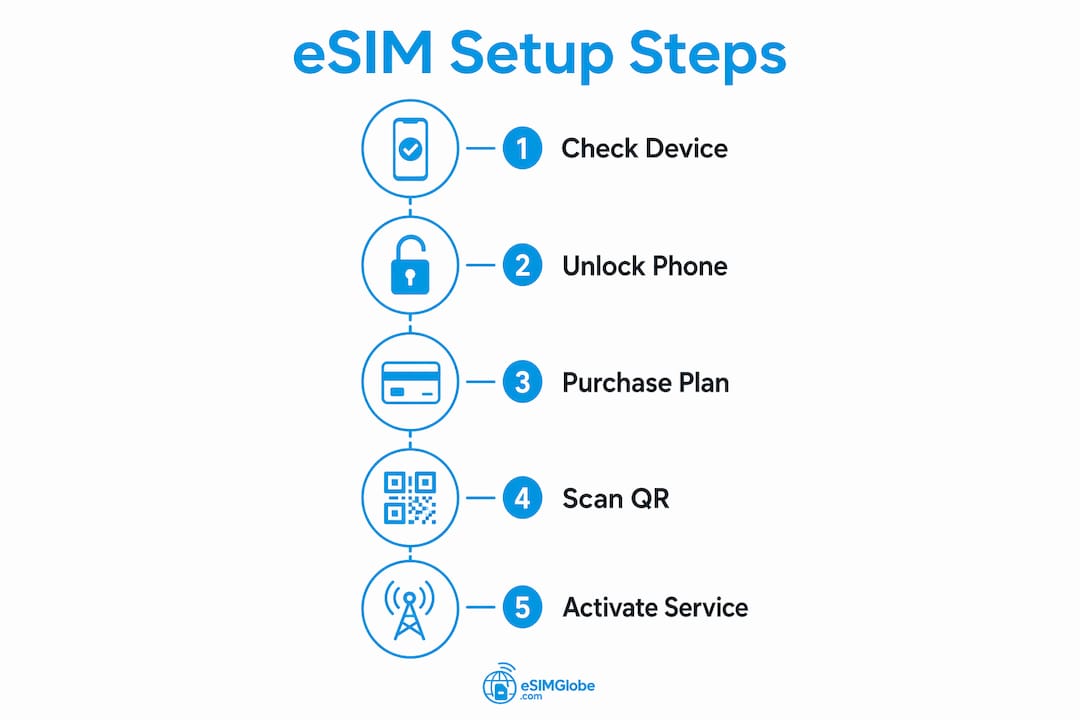
The full setup process takes under 15 minutes when done correctly. Follow these steps in order.
- Check device compatibility. Confirm your phone supports eSIM and is carrier unlocked before purchasing.
- Visit Esimglobe. Go to esimglobe.com and select the United Kingdom as your destination.
- Choose your plan. Pick a plan based on your trip length, data needs, and budget. Review the hotspot policy before confirming.
- Complete payment. Esimglobe accepts multiple currencies. After payment, you receive a QR code by email.
- Install the eSIM profile. On iPhone: go to Settings > Cellular > Add eSIM > Use QR Code. On Android: go to Settings > Connections > SIM Manager > Add eSIM. Scan the QR code from your confirmation email.
- Label the eSIM. Name it “London Data” or similar so you can identify it easily in your settings.
- Keep your home SIM active for calls. Set the eSIM as your default for mobile data and your physical SIM for calls and texts.
- Activate only upon arrival. Activating your eSIM after arriving in London prevents losing prepaid validity days due to early activation abroad. Providers like Saily start the plan clock only after first use in the destination country.
- Test the connection. Open a browser and load a webpage to confirm the eSIM is live.
For iOS users, you can store multiple eSIM profiles on one device, though only one can be active at a time. This is useful for multi-city trips where you need a separate plan for each country.
Pro Tip: Before leaving home, download Google Maps offline for London and save your hotel address, emergency contacts, and your eSIM provider’s support number. If activation fails on arrival, you will have offline resources to navigate while you troubleshoot.
Check Esimglobe’s eSIM purchasing tips for additional guidance on buying safely as an international traveler.
How to troubleshoot common eSIM issues in London
Most eSIM problems fall into three categories: no signal after activation, activation errors during setup, and unexpected data throttling.
No signal after activation is usually a network settings issue. Toggle airplane mode on for 30 seconds, then off. This forces your phone to re-register on the network. If that fails, go to Settings > Cellular (or Mobile Data) and confirm the eSIM is set as the active data line. On some Android devices, you also need to manually select the network operator under network settings.
Activation errors often require resetting device network settings. Go to Settings > General > Transfer or Reset iPhone > Reset > Reset Network Settings on iOS. On Android, find Reset Network Settings under the General Management menu. Note that this clears saved Wi-Fi passwords, so write those down first.
Data throttling mid-trip usually means you have hit a speed cap on an unlimited plan. Check your plan details in the Esimglobe app or your confirmation email to see if a fair-use threshold applies.
Dos and don’ts for avoiding eSIM problems in London:
- Do install the eSIM profile at home before your trip so you only need to activate it on arrival.
- Do keep your QR code email accessible offline or screenshot it before boarding.
- Do contact Esimglobe’s customer support immediately if activation fails. Most issues resolve within minutes via live chat.
- Don’t delete the eSIM profile if you lose signal. Deleted eSIM profiles cannot always be reinstalled.
- Don’t assume your plan includes hotspot use. Verify tethering policy before you rely on it.
- Don’t activate your eSIM before landing in the UK, as this starts the validity countdown early.
Pro Tip: If you lose data connection in a London Underground station, that is normal. The Tube has limited connectivity in tunnels. Surface stations and most above-ground areas have full 4G and 5G coverage.
Tips for getting the most out of your eSIM data in London
Managing data well means you never run out at a critical moment. The most effective approach is to monitor usage daily and offload heavy tasks to Wi-Fi whenever possible.
London has free public Wi-Fi at major train stations including King’s Cross, Paddington, and Victoria, as well as in many cafés, museums, and shopping centers. Use these networks for downloading maps, streaming, and software updates. Reserve your eSIM data for navigation, messaging, and situations where public Wi-Fi is unavailable or unsecured.
Security on public Wi-Fi is a real concern. Avoid logging into banking apps or entering passwords on open networks. A VPN like NordVPN or ExpressVPN adds a layer of protection when you must use public hotspots.
App settings that conserve data:
- Turn off automatic app updates over mobile data in your phone settings.
- Set Google Maps, Spotify, and Netflix to download content over Wi-Fi only.
- Disable background app refresh for apps you are not actively using.
- Turn off auto-play video in social media apps like Instagram and TikTok.
Pro Tip: For extended stays or multi-city trips that include London plus Paris or Amsterdam, consider purchasing a regional European eSIM plan from Esimglobe rather than separate country plans. Regional plans cover multiple countries under one data allowance, which is more cost-effective for trips over two weeks.
For more practical advice, Esimglobe’s eSIM travel tips guide covers data-saving strategies and connectivity best practices for travelers abroad.
Key takeaways
An eSIM for London works best when you choose the right network, install the profile before departure, and activate only after landing in the UK.
| Point | Details |
|---|---|
| Device compatibility first | Confirm your phone supports eSIM and is carrier unlocked before purchasing any plan. |
| Match plan to usage | Heavy users need unlimited plans; light users save money with fixed 5GB or 10GB options. |
| Activate on arrival | Starting your plan only after landing in London preserves every prepaid validity day. |
| Verify hotspot policy | Many unlimited plans restrict tethering; check before purchase if you need to connect other devices. |
| EE network for rural travel | EE-backed plans deliver the widest UK coverage for trips beyond London. |
My take after using eSIMs across London trips
The single biggest mistake I see travelers make is buying an eSIM at the airport kiosk out of panic. You pay a premium, get a plan that may not match your usage, and waste 20 minutes in the arrivals hall. Buying through Esimglobe before your trip takes five minutes and costs significantly less.
The second mistake is ignoring the hotspot clause. I once bought an unlimited plan for a work trip to London, expecting to tether my laptop during client meetings. The plan throttled hotspot speeds to 512 Kbps after the first gigabyte. That is barely enough for email. Always read the tethering policy before you confirm payment.
Coverage in central London is genuinely excellent across all major networks. I have never had a signal problem in areas like Shoreditch, Westminster, or South Bank. The gaps appear when you venture into the Underground or travel to outer boroughs. For a standard tourist itinerary, any plan on a major UK network performs well.
For first-time eSIM users, Esimglobe’s platform is one of the cleaner buying experiences I have used. The country selector is direct, plan details are clearly listed, and the QR code arrives by email within minutes. If you run into trouble, the 2026 London eSIM guide on Esimglobe’s blog covers edge cases and network-specific advice in detail.
— daniele
Stay connected in London with Esimglobe
Esimglobe offers a focused selection of London eSIM plans built for international travelers. Plans are available in multiple data sizes and durations, with prices shown in USD, EUR, and GBP. Purchase takes under five minutes, and your QR code arrives by email immediately after checkout.
Esimglobe’s platform supports both iOS and Android devices, with clear setup instructions included with every purchase. Before buying, review Esimglobe’s terms and conditions for full details on plan policies, refund eligibility, and data usage rules. Transparent policies mean no surprises after you land.
FAQ
What devices support eSIM for London travel?
iPhones from the XS and XR onward, Google Pixel 3 and later, and Samsung Galaxy S20 and later all support eSIM. Your phone must also be carrier unlocked to use a travel eSIM plan.
When should I activate my London eSIM?
Activate your eSIM only after arriving in London. Activating before departure starts the validity countdown early and wastes prepaid days.
Can I use my London eSIM as a hotspot?
Many plans allow hotspot use, but unlimited plans often throttle tethering speeds after a set threshold. Verify the hotspot policy in your plan details before purchasing.
Which network is best for London city travel?
Three delivers the fastest 5G speeds in central London. EE covers the widest geographic area, making it the better choice for travelers venturing beyond the city.
How do I fix an eSIM that shows no signal in London?
Toggle airplane mode on for 30 seconds, then off. If the issue persists, go to your phone’s network settings and manually select the correct UK carrier from the available network list.