






















TL;DR:
- Most modern smartphones, tablets, smartwatches, and select laptops in the U.S. support eSIM, but hardware must be confirmed with an EID check. Carrier unlocking and regional model variations are essential for eSIM activation, especially for travel or secondhand purchases. Esimglobe offers instant international eSIM plans, including routes for China that access Google, Instagram, and WhatsApp without extra VPNs.
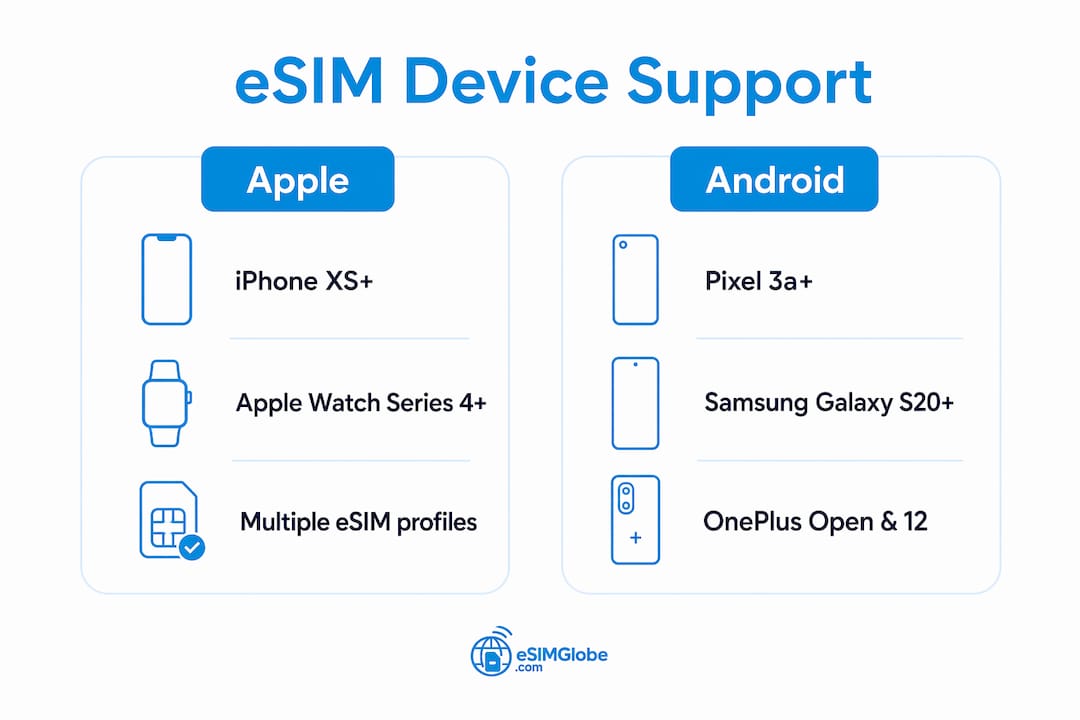
Most modern iPhones, Google Pixel phones, and recent Samsung Galaxy flagships sold in the U.S. support eSIM. Specifically, the iPhone XS, XR, and every model released after them carry eSIM hardware. Google Pixel devices from the Pixel 3a onward are compatible. Samsung Galaxy S20 and later flagships, plus the Z Fold and Z Flip lines, generally support it too. Dial *#06# on any device and look for an EID number in the result. If the EID appears, the hardware is present. One more requirement: the device must be carrier-unlocked to activate a third-party eSIM plan.
Device families that commonly support eSIM in the U.S.:
- Smartphones: recent iPhone, Google Pixel, Samsung Galaxy flagships, OnePlus Open, Motorola Razr+
- Tablets: Cellular iPad Pro, iPad Air (cellular), iPad mini (cellular), Samsung Galaxy Tab S9 (cellular)
- Smartwatches: Apple Watch Series 4 and later (cellular), Galaxy Watch 6/7, Pixel Watch 2/3
- Laptops: Select Surface Pro and Surface Go models with LTE/5G modems, certain Windows 11 laptops with integrated modems
Table of Contents
- How to check whether your device actually supports eSIM
- Which Apple devices support eSIM in the U.S.?
- Android devices with eSIM: Samsung, Pixel, OnePlus, Motorola and more
- Tablets, laptops, smartwatches and IoT devices that support eSIM
- How to activate an eSIM, install it via QR code or app, and transfer it
- Limitations and common problems that affect eSIM users
- How to pick an eSIM plan that works with your device
- Key Takeaways
- Why eSIM changes how frequent travelers work and move
- Esimglobe: instant eSIM delivery for travelers in 170+ countries
- Manufacturer and authoritative sources for model verification
- FAQ
How to check whether your device actually supports eSIM
Hardware presence and activation freedom are two separate questions. A device can have an eSIM chip and still be blocked from using third-party plans. Run through these steps before buying any plan.
- *Dial #06#. A screen appears showing your IMEI numbers. If an EID (Embedded Identity Document) number is listed, the device has eSIM hardware. No EID means no eSIM chip.
- Open Settings and search for “eSIM.” On iPhone, go to Settings → Cellular → Add eSIM. On most Android phones, look under Settings → Network & Internet → SIMs or Connections → SIM Manager. If neither path exists, the device likely lacks eSIM support or runs an older OS version.
- Check carrier lock status on iPhone. Go to Settings → General → About → Carrier Lock. The entry should read “No SIM restrictions.” Any other text means the phone is locked to a specific carrier and will reject third-party eSIM profiles.
- Check carrier lock on Android. Android does not display a single lock-status screen. Call your carrier or insert a SIM from a different carrier to test. If the device rejects it, it is locked.
- Confirm the exact model number, not just the family name. The model number (found in Settings → About Phone) tells you the regional variant. A Galaxy S24 sold in the U.S. and one sold in China can have different hardware configurations.
Pro Tip: *When buying a secondhand or imported phone, always dial #06# first and cross-reference the EID with the manufacturer’s model-number lookup page. A missing EID on a phone advertised as “eSIM-ready” is a red flag worth acting on before purchase.
Which Apple devices support eSIM in the U.S.?
The general rule is straightforward: every iPhone from the XS and XR (2018) onward supports eSIM in most markets. U.S.-market iPhone 14 and later models go further. Apple removed the physical SIM tray entirely on those devices sold in the United States, making them eSIM-only. That means iPhone 14, 14 Plus, 14 Pro, 14 Pro Max, and every iPhone 15, 16, and 17 series model sold in the U.S. operates exclusively on eSIM.
iPhone models with eSIM support (U.S. market):
- iPhone XS, XS Max, XR and later models
- iPhone 11 series
- iPhone SE models from 2020 onward
- iPhone 12 and 13 families
- iPhone 14 family (eSIM-only in the U.S.)
- Later iPhone generations available in the U.S.
Cellular iPad models with eSIM:
- iPad Pro (all cellular models, 3rd generation and later)
- iPad Air (cellular, 3rd generation and later)
- iPad mini (cellular, 5th generation and later)
Apple Watch cellular models from Series 4 onward support eSIM for independent connectivity. The watch plan typically runs through your home carrier rather than a separate travel eSIM provider, so activation goes through the carrier’s app.
Regional exception to know: iPhones sold in mainland China frequently ship with dual physical SIM trays and no eSIM chip. The same iPhone 15 Pro model number can differ between a U.S. unit and a Chinese unit. Always verify the EID before assuming a China-purchased iPhone supports eSIM.
On iOS, the EID is found at Settings → General → About → EID. Modern iPhones support multiple stored eSIM profiles, though only two lines can be active simultaneously (one physical SIM or eSIM as the primary, one eSIM as the secondary on older models; dual eSIM on iPhone 13 and later in the U.S.).
Android devices with eSIM: Samsung, Pixel, OnePlus, Motorola and more
Android eSIM support is less uniform than Apple’s. The brand, model year, and regional variant all matter.
Samsung Galaxy: The S20 generation (2020) marks the start of broad eSIM support across Samsung’s flagship line. Galaxy S20, S21, S22, S23, S24, and S25 series all support eSIM in U.S. variants. The Z Fold and Z Flip lines (Fold 2 onward, Flip 3 onward) also support it. The Galaxy S20 FE and some A-series mid-range models are exceptions. Always check the specific model number.

Google Pixel: Pixel 3a (2019) and every Pixel released after it supports eSIM. This includes the Pixel 4, 5, 6, 7, 8, 9 families, the Pixel Fold, and the Pixel 9 Pro Fold. Pixel eSIM support is among the most consistent of any Android brand.
OnePlus: Recent flagship models sold in the U.S., including the OnePlus Open and select OnePlus 12 variants, support eSIM. Older OnePlus models and some international variants do not. Confirm the U.S. model number before purchase.

Motorola: The Razr+ (2023 and later) and select Edge series models support eSIM. Budget and mid-range Motorola phones generally do not.
Other OEMs:
- Xiaomi and Oppo: eSIM support exists on select flagship models in certain markets but is inconsistent in U.S. variants. Check the exact model number.
- Nothing Phone: The Nothing Phone 2 supports eSIM in some markets; U.S. availability is limited.
- Huawei: eSIM support varies and is complicated by software restrictions in the U.S. market.
Pro Tip: On Android, go to Settings and search “eSIM” or “SIM” directly. The path varies by manufacturer: Samsung uses Settings → Connections → SIM Manager; Pixel uses Settings → Network & Internet → SIMs. If neither path shows an eSIM option, check whether a software update is available before concluding the hardware lacks support.
Mid-range and budget Android phones released before 2022 frequently omit eSIM hardware entirely. Model year matters as much as brand name when checking compatibility.
Tablets, laptops, smartwatches and IoT devices that support eSIM
eSIM extends well beyond smartphones. Cellular tablets, connected laptops, and smartwatches all use the same embedded SIM standard, and for travelers who need data on multiple devices, this matters.
Tablets:
- Cellular iPad Pro, iPad Air, and iPad mini models (see Apple section above)
- Samsung Galaxy Tab S9 and S9+ cellular variants support eSIM in U.S. configurations
- Samsung Galaxy Tab S8 cellular models also support eSIM
Laptops:
- Microsoft Surface Pro 9 (LTE variant), Surface Pro X, and Surface Go 3 (LTE) include integrated modems with eSIM support
- Many Windows 11 laptops with Qualcomm Snapdragon X or Intel-based 5G modems include eSIM; check the device’s Settings → Network & Internet → Cellular path
- MacBooks do not currently include cellular modems or eSIM hardware; Mac connectivity relies on iPhone hotspot tethering
Smartwatches:
- Apple Watch Series 4 through Series 10 (cellular models) and Apple Watch Ultra support eSIM
- Samsung Galaxy Watch 6, Watch 7, and Watch Ultra support eSIM
- Google Pixel Watch 2 and Pixel Watch 3 support eSIM
- Watch eSIM plans are typically managed through the paired phone’s carrier app, not through independent travel eSIM providers
IoT devices: GPS trackers, some connected cameras, and fleet management hardware increasingly use eSIM for remote management. These devices use the same GSMA-standard eSIM chip but are provisioned differently from consumer devices.
For non-phone devices, the verification path is the same: check Settings for a cellular or SIM management menu, or look up the exact model number on the manufacturer’s support page.
How to activate an eSIM, install it via QR code or app, and transfer it
Activation follows one of three methods depending on the provider and device.
- QR code scan (most common). After purchase, the provider sends a QR code by email. On iPhone: Settings → Cellular → Add eSIM → Use QR Code. On Android: Settings → Network & Internet → SIMs → Add eSIM, then scan. Keep the QR code private; it is single-use on most providers.
- Provider app activation. Some carriers and eSIM providers offer an app that handles the download automatically. Open the app, sign in, and follow the prompts. The app communicates directly with the SM-DP+ server.
- Manual SM-DP+ entry. When a QR code cannot be scanned (damaged or inaccessible), providers supply an SM-DP+ address and an activation code. Enter these manually in the same eSIM settings menu.
Transferring an eSIM between devices:
- On iPhone, iOS includes a built-in transfer tool. Go to Settings → Cellular → Add eSIM → Transfer from Another iPhone. Both phones must be nearby and running a compatible iOS version.
- On Android, transfer support depends on the carrier and device. Some providers allow re-download to a new device; others issue a new QR code. Contact the provider directly if transfer fails.
Troubleshooting checklist:
- Confirm the EID is present (dial *#06#)
- Confirm the device is carrier-unlocked
- Update the OS to the latest version before attempting activation
- Restart the device after scanning the QR code if the profile does not appear
- Check that the QR code has not already been used (most are single-use)
- Contact the eSIM provider’s support if the profile downloads but shows “activation failed”
Limitations and common problems that affect eSIM users
eSIM hardware in a device does not guarantee a working eSIM. Several practical limits affect how and whether it functions.
Carrier lock. A phone bought on a carrier contract is often locked to that carrier’s network. The eSIM chip is present, but the device rejects profiles from any other provider. Unlock requests typically require completing a contract term or paying an early termination fee. Confirm unlock status well before travel.
Profile and active-line limits. Most iPhones support storing multiple eSIM profiles but allow only two lines active at once. Older Android devices may limit stored profiles further. Switching between stored profiles is fast, but the limit on simultaneous active lines affects travelers who want to keep a home number active alongside a travel data plan.
Regional model exceptions. The mainland China variant of many phones ships without eSIM hardware. The same applies to some carrier-exclusive U.S. models. A model-family name is not a reliable indicator. The EID check and model-number lookup are the only definitive tests.
China travel and VPN costs. Travelers to China face an additional layer: many apps and services are blocked at the network level. A standard eSIM from most providers delivers data, but Google Apps, Instagram, and WhatsApp remain inaccessible without a VPN, which is an added cost and setup burden. Esimglobe’s China eSIM routes traffic through an international IP network, so customers can access Google Apps, Instagram, and WhatsApp without purchasing a separate VPN. The same connection supports mobile hotspot sharing, so a laptop on a business trip can connect through the phone without any extra software or subscription.
Activation failure causes:
- Outdated OS version incompatible with the provider’s SM-DP+ server
- Regional firmware that disables eSIM even when hardware is present
- Carrier features not yet enabled on the account (some carriers require a call to activate eSIM capability)
- QR code already consumed by a previous scan attempt
How to pick an eSIM plan that works with your device
Choosing the right plan takes less than five minutes if you work through a short checklist before checkout.
Pre-purchase checklist:
- Confirm your device model number and verify the EID via *#06#
- Confirm the device is carrier-unlocked
- Match your exact model number to the provider’s supported-device list at checkout
- Choose a data size and coverage area that fits your trip length and usage
- Confirm the activation method (QR code, app, or manual) is one your device supports
Esimglobe provides eSIM plans covering many countries and delivers profiles instantly by email. For travelers to China, it routes data through an international IP network allowing access to Google Maps, Gmail, Instagram, and WhatsApp without a separate VPN, which otherwise can be an added cost on top of a data plan. You can also share that connection as a mobile hotspot to your laptop, which is useful for business travelers who need a working internet connection on a full keyboard without carrying a separate device plan. Check the supported device list at checkout to confirm your model before paying.
Pro Tip: For trips under five days, a small time-limited data pack (1–3 GB) keeps costs low. For business trips of a week or more, a larger multi-day bundle avoids the hassle of topping up mid-trip and usually costs less per gigabyte.
Key Takeaways
Most devices with eSIM support require both confirmed eSIM hardware (verified by EID via *#06#) and carrier-unlocked status before any third-party plan will activate.
| Point | Details |
|---|---|
| Hardware check first | Dial *#06# on any device; an EID in the result confirms eSIM hardware is present. |
| Unlock is required | A carrier-locked phone will reject third-party eSIM profiles even when the hardware exists. |
| Apple cutoff: iPhone XS/XR | Every U.S. iPhone from XS/XR onward supports eSIM; iPhone 14 and later are eSIM-only in the U.S. |
| Android varies by variant | Samsung S20+, Pixel 3a+, and select OnePlus/Motorola models support eSIM; always verify the exact model number and regional variant. |
| Esimglobe China eSIM | Routes traffic via an international IP network, giving access to Google Apps, Instagram, and WhatsApp without a separate VPN, with hotspot support for laptops. |
Why eSIM changes how frequent travelers work and move
The physical SIM swap ritual — finding a local store, waiting in line, cutting a card to size, losing the original in a jacket pocket — is a real friction point for anyone who crosses borders regularly. eSIM removes that entirely. A plan is active within minutes of landing, sometimes before the plane reaches the gate.
For business travelers, the practical gain goes further than convenience, especially when using digital travel gifts and creating lasting memories that enhance hospitality and traveler convenience. Keeping a home number active on one line while running a local data plan on an eSIM means calls and messages from colleagues still come through on the same device. Add hotspot tethering to a laptop and a single phone handles connectivity for an entire mobile office. Esimglobe’s focus on travelers, including its China eSIM routing that removes the need for a separate VPN, reflects exactly this kind of real-world use case. The cost savings on VPN subscriptions and roaming charges add up quickly across a year of regular travel.
Esimglobe: instant eSIM delivery for travelers in 170+ countries
Travelers who have confirmed their device supports eSIM and need a plan for an upcoming trip can purchase directly through Esimglobe. Plans cover 170+ countries, are delivered instantly by email, and require no subscription or monthly commitment.
For China travel specifically, Esimglobe’s routing gives you something most eSIM providers do not: access to Google Apps, Instagram, and WhatsApp without buying a VPN. Esimglobe routes your data through an international IP network, so those apps work normally on your phone. You can also share the connection as a mobile hotspot to your laptop, which covers business workflows without extra software or subscriptions.
Key details:
- Instant delivery by email after checkout
- 170+ countries covered with 4G LTE and 5G plans
- Pay per use — no recurring charges
- 24/7 support for activation issues
- China eSIM includes international IP routing for Google Apps, Instagram, and WhatsApp access
Browse plans and check your device at esimglobe.com.
Manufacturer and authoritative sources for model verification
When a model-level confirmation is needed beyond the *#06# check, these sources give definitive answers:
- Apple Support (support.apple.com): lists every iPhone, iPad, and Apple Watch model with eSIM capability and regional exceptions
- Samsung Support (samsung.com/us/support): model-specific eSIM guides for Galaxy S, Z Fold, Z Flip, and Tab S series
- Google Support (support.google.com): Pixel eSIM compatibility and activation steps by model
- Your carrier’s eSIM page: AT&T, T-Mobile, and Verizon each publish device compatibility lists and unlock request procedures
- Esimglobe checkout: the supported-device filter at esimglobe.com lets you match your exact model before purchase
Always use the model number from Settings → About, not the marketing name, when searching any of these pages. Regional variants of the same phone can differ in hardware.
FAQ
What devices are compatible with eSIM?
Most iPhones from the XS/XR (2018) onward, Google Pixel phones from the Pixel 3a (2019) onward, Samsung Galaxy S20 and later flagships, Z Fold and Z Flip series, select OnePlus and Motorola models, cellular iPads, Apple Watch cellular models, and some Windows laptops with integrated LTE/5G modems all support eSIM.
How do I know if my device is compatible with eSIM?
Dial *#06# and check for an EID number in the result; if it appears, the hardware is present. Then confirm the device is carrier-unlocked, since a locked phone will not accept third-party eSIM profiles.
What is the downside of an eSIM?
The main limitations are carrier lock (a locked device rejects third-party profiles), limits on simultaneously active lines, and regional model variants that ship without eSIM hardware despite sharing a family name with eSIM-capable models.
What phones cannot use eSIM?
Most Android phones released before 2019, budget and mid-range models across most brands, iPhones older than the XS/XR, and regional variants of otherwise eSIM-capable phones (notably mainland China models of Samsung and iPhone) typically lack eSIM hardware or have it disabled.
Does an Esimglobe China eSIM work without a VPN?
Yes. Esimglobe routes China eSIM traffic through an international IP network, which lets customers access Google Apps, Instagram, and WhatsApp directly without purchasing a separate VPN. The connection also supports mobile hotspot sharing to a laptop.